
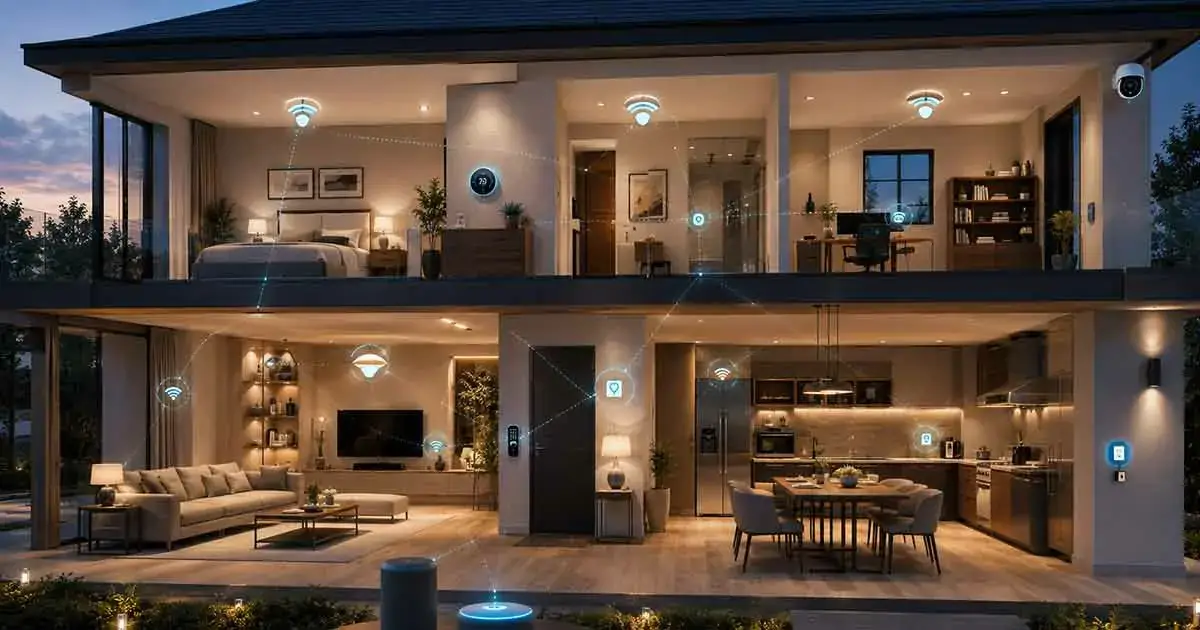
Wireless home automation makes it possible to control and automate different parts of a home without relying on extensive physical wiring between devices. Using wireless communication technologies, homeowners can connect lights, thermostats, sensors, locks, cameras, appliances, and other smart devices to create convenient automated routines.
Unlike traditional home automation installations that may require significant wiring and professional installation, wireless systems can often be installed gradually. This makes them particularly attractive for existing homes where adding new electrical or communication cables would be difficult or expensive.
However, wireless home automation is not simply a matter of connecting everything to Wi-Fi. Different devices use different wireless technologies, and each technology has its own advantages, limitations, range, power requirements, and compatibility considerations.
This guide explains how wireless home automation works, the main technologies involved, its benefits and limitations, and how to build a reliable wireless automated home.
Table of Contents
What Is Wireless Home Automation?
Wireless home automation is the use of wireless communication technologies to connect and control smart home devices.
Instead of depending primarily on dedicated physical control wiring, devices communicate wirelessly with a hub, controller, router, smartphone, or another compatible device.
A wireless automation system can include:
- Smart lights
- Smart plugs
- Motion sensors
- Door and window sensors
- Smart thermostats
- Smart locks
- Security devices
- Motorized blinds
- Smart appliances
- Smart speakers
- Smart displays
These devices can then participate in automated routines.
For example, a motion sensor could detect movement in a hallway and trigger a compatible light automatically. A door sensor could activate a notification when the door opens. A thermostat could adjust the temperature according to a schedule or occupancy condition.
The main advantage is that the devices can communicate without requiring dedicated automation cables throughout the home.
How Wireless Home Automation Works
A typical wireless automation system contains several components that work together.
Wireless Devices
These are the physical products installed throughout the home.
Some devices are powered continuously, while others use batteries.
Battery-powered devices are particularly useful for sensors because they can often be installed without running electrical wiring.
Wireless Network
The network provides the communication path between devices.
Depending on the technology, communication may occur directly between devices, through a hub, or through a wireless router.
Hub or Controller
Some systems use a dedicated hub or controller to coordinate devices.
The controller may receive information from sensors and then execute automation rules.
For example, a motion sensor may send an event to the controller, which then instructs a light to turn on.
Automation Software
Software defines how the system should behave.
A homeowner might create a rule such as:
If motion is detected after sunset, turn on the hallway light.
More advanced systems can combine several conditions.
For example:
If nobody is home, the system is in away mode, and a door opens, send a security notification.
Wireless Technologies Used in Home Automation
Wireless home automation does not depend on a single technology.
Different devices can use different communication standards.
Wi-Fi
Wi-Fi is one of the most familiar wireless technologies in the home.
Many smart cameras, appliances, speakers, displays, and other connected products use Wi-Fi.
Advantages include:
- High data capacity
- Wide availability
- Direct connection to home networks
- No dedicated smart-home hub required for some products
- Easy smartphone integration
However, Wi-Fi devices can consume more power than some low-power wireless technologies, making them less suitable for small battery-powered sensors.
A large number of Wi-Fi devices can also increase the workload on a home network.
Zigbee
Zigbee is a low-power wireless technology commonly used for smart home devices.
It is particularly useful for sensors, lighting products, switches, and other devices that do not require high bandwidth.
Zigbee networks can use mesh networking, allowing compatible devices to help extend communication throughout the home.
Z-Wave
Z-Wave is another wireless technology designed specifically for home automation.
It is commonly used for devices such as:
- Smart locks
- Sensors
- Switches
- Thermostats
- Lighting controls
Z-Wave also supports mesh networking, allowing compatible powered devices to relay communication.
One consideration is that Z-Wave products may have regional frequency differences, so homeowners should verify compatibility with their location before purchasing equipment.
Thread
Thread is a low-power mesh networking technology designed for connected devices.
It can be particularly useful for smart home products that need efficient, reliable local communication.
Thread is also important within modern smart home ecosystems because some newer devices use Thread as their network technology while relying on another platform for control and interoperability.
Bluetooth
Bluetooth is widely used for short-range communication and device setup.
Bluetooth Low Energy is especially useful for low-power devices.
It can be used in smart home products, although its role differs from technologies designed primarily for larger home automation networks.
Wireless Home Automation and Mesh Networking
Mesh networking is an important concept in wireless home automation.
In a traditional network structure, devices may communicate directly with a central access point.
A mesh network can allow compatible devices to communicate through multiple nodes.
This can improve coverage across larger homes.
For example, a device at one end of a house may communicate through another compatible device before reaching the hub or network infrastructure.
However, mesh performance depends on the devices involved, their placement, the building structure, interference, and the specific wireless technology.
Benefits of Wireless Home Automation
Wireless automation provides several important advantages.
Easier Installation
One of the biggest advantages is reduced wiring.
A homeowner can often install wireless sensors and other devices without opening walls or running dedicated communication cables.
This is particularly useful in finished homes.
Easier Expansion
Wireless systems can usually be expanded gradually.
A homeowner might begin with a few lights and sensors and add thermostats, locks, shades, and other devices later.
Lower Installation Complexity
Some wireless products can be installed without professional electrical work.
This can reduce installation complexity for suitable DIY projects.
However, devices that require electrical wiring should still be installed safely and according to local requirements.
Flexible Device Placement
Wireless sensors can often be placed where they provide the greatest value without requiring a new communication cable.
This is useful for doors, windows, hallways, rooms, and other areas where sensors may need to be repositioned.
Suitable for Existing Homes
Wireless technology is especially useful when upgrading an existing property.
Installing extensive automation wiring during a renovation can be practical, but wireless technology provides another option when major construction is not desirable.
Limitations of Wireless Home Automation
Wireless systems also have limitations.
Wireless Interference
Wireless signals can be affected by interference from other devices and networks.
Crowded wireless environments can reduce reliability.
Range Limitations
Every wireless technology has practical range limitations.
Walls, floors, furniture, appliances, and building materials can affect signal strength.
Battery Maintenance
Battery-powered sensors require periodic battery replacement or charging.
A system containing many battery-powered devices can therefore create an ongoing maintenance requirement.
Network Dependence
Some Wi-Fi-based devices depend heavily on the home’s network and internet connection.
If the network fails, certain functions may stop working or become unavailable.
The exact behavior depends on whether the device supports local control.
Compatibility Issues
Not every wireless device works with every smart home platform.
Before purchasing equipment, homeowners should verify compatibility between the device, wireless technology, hub, and automation platform.
Wireless vs Wired Home Automation
Wireless and wired automation each have advantages.
Wireless systems generally provide easier installation and greater flexibility.
Wired systems can offer highly predictable communication and can be attractive for new construction or major renovations.
A wired installation may also reduce dependence on battery-powered devices and certain types of wireless interference.
For an existing home, wireless technology can often provide a practical path to automation without major construction.
For a new luxury build, a hybrid approach may be worth considering.
Hybrid Home Automation Systems
A hybrid system combines wired and wireless technologies.
For example, a home could use Ethernet for important network infrastructure while using wireless technologies for sensors, switches, locks, and other devices.
This approach can provide flexibility while maintaining reliable infrastructure where wired connections make sense.
A hybrid system may be especially useful in larger homes where network performance and reliability are important.
Wireless Home Automation Without Wi-Fi
Wireless home automation does not necessarily mean Wi-Fi.
Technologies such as Zigbee, Z-Wave, Thread, and Bluetooth can operate in different ways and may serve different purposes.
This distinction is important because a home can contain many wireless smart devices without every device communicating directly through the Wi-Fi network.
For example, a low-power sensor may communicate through a dedicated smart home protocol while a hub or border router connects the system to the broader home network.
Wireless Home Automation Security
Security should be considered from the beginning of any wireless automation project.
Connected devices may control important parts of the home, including locks, security systems, lighting, and climate equipment.
Homeowners should:
- Use strong account passwords
- Enable multi-factor authentication when available
- Keep device firmware updated
- Secure the home router
- Replace default credentials
- Review connected devices regularly
- Remove devices that are no longer used
- Understand which devices require cloud services
It is also useful to understand what happens when the internet connection is unavailable.
A device that supports local automation may continue performing certain functions even when cloud services cannot be reached.
Wireless Home Automation and Privacy
Wireless smart devices can collect different types of information.
Depending on the product, this may include:
- Device status
- Usage patterns
- Motion events
- Voice commands
- Location information
- Home occupancy information
Before purchasing a product, review its privacy practices and understand what information is collected and where it is processed.
Products that provide local processing and local control may reduce reliance on external cloud services, although the exact privacy benefits vary by device.
Wireless Home Automation for Security
Wireless technology can be particularly useful for home security.
Battery-powered sensors can monitor:
- Doors
- Windows
- Garages
- Motion
- Water leaks
- Smoke-related events
- Other conditions
Wireless security devices can also be installed without extensive wiring.
However, security-critical systems should be selected carefully.
Consider battery life, communication reliability, backup options, local operation, and notification behavior before relying on wireless equipment for important security functions.
Wireless Lighting Automation
Wireless lighting is one of the easiest ways to introduce automation.
Depending on the system, homeowners can control lights through:
- Smartphone apps
- Wireless switches
- Motion sensors
- Schedules
- Voice commands
- Automation routines
For example, hallway lights could automatically turn on when motion is detected during selected nighttime hours.
Wireless lighting can also be expanded room by room without installing a dedicated automation cable.
Wireless Climate Automation
Wireless thermostats and temperature sensors can help automate heating and cooling.
A system could use temperature information from different parts of the home to improve comfort.
For example, a remote temperature sensor can help the system understand conditions in another room rather than relying entirely on the temperature near the main thermostat.
Wireless climate automation can also work with occupancy and scheduling rules.
Wireless Smart Locks
Wireless communication makes it possible to install connected locks without running a new automation cable to every door.
Depending on the lock, users may be able to:
- Lock and unlock remotely
- Create temporary access codes
- Receive notifications
- Check lock status
- Integrate the lock with automation routines
Because locks control physical access to the property, reliability and backup access methods are especially important.
Wireless Home Automation for Apartments and Rentals
Wireless systems can be useful in apartments and rental properties because they generally require fewer permanent modifications.
Portable devices such as smart plugs, sensors, bulbs, and some smart locks can often be removed when moving.
However, renters should check property rules before installing equipment that modifies electrical systems, doors, or other permanent components.
How to Build a Wireless Home Automation System
A reliable system should be built progressively.
Step 1: Identify Your Goals
Determine what you want to automate.
For example:
- Lighting
- Climate
- Security
- Access
- Energy management
- Entertainment
Step 2: Evaluate Your Network
Check Wi-Fi coverage and router performance before adding large numbers of devices.
Poor network coverage can cause problems that appear to be device failures.
Step 3: Choose Your Primary Platform
Select a platform that supports the devices and automation features you need.
Consider compatibility and long-term expansion rather than choosing based on one product.
Step 4: Select the Appropriate Wireless Technology
Not every device needs to use Wi-Fi.
Choose technology based on the device’s purpose, power requirements, range, data needs, and ecosystem compatibility.
Step 5: Start With a Small Group
Install several devices first and test them.
Check reliability, response times, automation behavior, and coverage before expanding.
Step 6: Create Useful Automations
Start with practical routines.
Examples include:
- Automatic hallway lighting
- Away mode
- Bedtime routine
- Scheduled climate changes
- Door and window alerts
Step 7: Expand Gradually
Once the system operates reliably, add additional devices and rooms.
This makes troubleshooting easier and reduces the risk of creating a complicated system that is difficult to maintain.
Common Wireless Home Automation Mistakes
Using Wi-Fi for Everything
Wi-Fi is useful, but not every smart device needs high-bandwidth connectivity.
Battery-powered sensors may be better suited to low-power technologies.
Ignoring Network Coverage
A device located too far from the router or mesh access point may have unreliable communication.
Mixing Incompatible Products
Always check platform and protocol compatibility before purchasing devices.
Creating Too Many Automations
Automation should simplify the home rather than make it unpredictable.
Start with routines that provide obvious value.
Forgetting Batteries
Battery-powered devices need maintenance.
Track battery status where possible and keep replacement batteries available for important sensors.
Ignoring Offline Behavior
Understand which features continue to work if the internet or cloud service becomes unavailable.
How Much Does Wireless Home Automation Cost?
Wireless home automation can range from a relatively inexpensive DIY setup to a sophisticated multi-room installation.
A basic system may include a few smart bulbs, plugs, and sensors.
A more advanced system may include:
- Multiple smart lighting zones
- Smart thermostats
- Security devices
- Smart locks
- Motorized shades
- Dedicated controllers
- Network upgrades
- Professional installation
The total cost depends primarily on the number and type of devices and the complexity of the automation.
Starting small can help homeowners determine which features provide the greatest value before investing in a larger system.
Is Wireless Home Automation Reliable?
Wireless home automation can be highly reliable when it is properly designed.
Reliability depends on:
- Wireless technology
- Device quality
- Signal coverage
- Network configuration
- Device placement
- Interference
- Battery condition
- Controller reliability
- Cloud dependency
A reliable system should be designed around the home’s physical structure rather than simply adding devices wherever convenient.
For critical functions, homeowners should also consider backup methods and manual controls.
Is Wireless Home Automation Worth It?
Wireless home automation can be a practical choice for homeowners who want to automate an existing property without extensive construction.
It offers flexible installation, gradual expansion, and a wide range of compatible devices.
The best results come from choosing the right wireless technologies for each type of device and building the system around reliable networking and clear automation goals.
Wireless technology does not eliminate the need for planning. Instead, it changes how the system is installed and how devices communicate.
Final Thoughts
Wireless home automation provides a flexible way to connect smart devices throughout a property without depending on extensive dedicated automation wiring.
Wi-Fi, Zigbee, Z-Wave, Thread, and Bluetooth can all play different roles in a modern automated home.
The most reliable approach is to choose technologies based on device requirements, maintain strong network coverage, verify compatibility, secure connected devices, and introduce automation gradually.
For many existing homes, wireless automation provides an accessible path toward smarter lighting, climate control, security, access, and everyday routines without requiring major structural changes.