
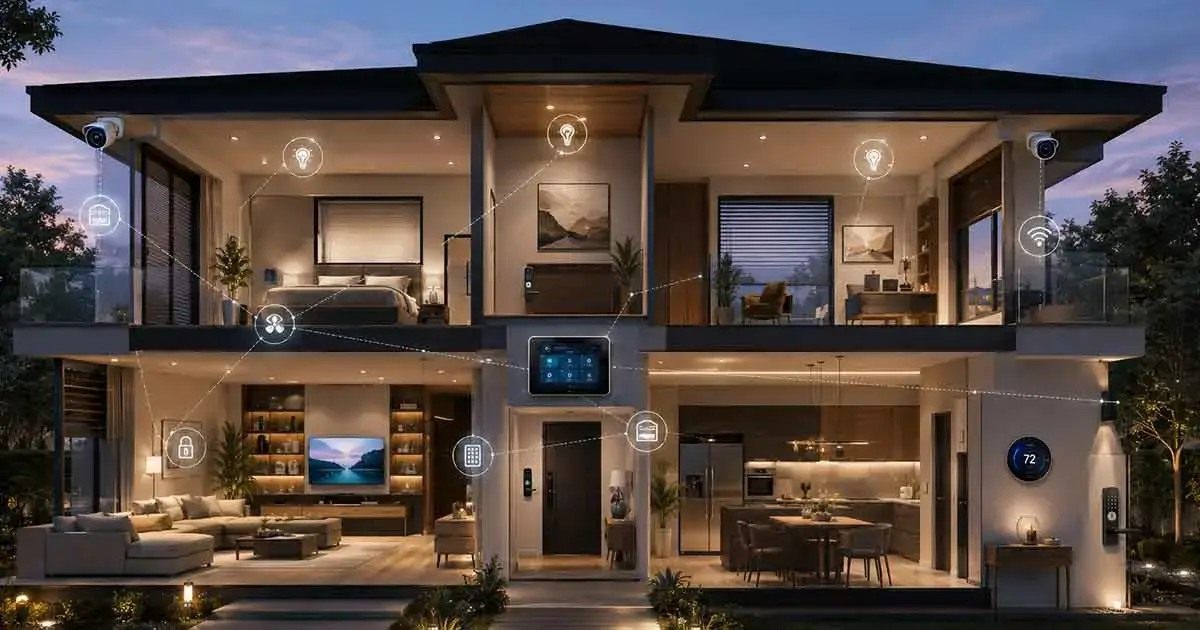
Whole home automation brings different smart devices and home systems together so they can work as one coordinated environment. Instead of controlling lights, climate, security, entertainment, and other devices separately, homeowners can create automated routines that respond to schedules, occupancy, sensors, and everyday activities.
A well-designed whole home automation system can make a home more convenient, efficient, secure, and comfortable. It can also simplify daily routines by allowing multiple actions to happen automatically instead of requiring separate commands for every device.
However, automating an entire home requires more planning than simply purchasing individual smart products. Compatibility, networking, control systems, device placement, security, and automation logic all need to be considered.
This guide explains how whole home automation works, what systems can be automated, the technologies involved, and how to plan a reliable setup.
Table of Contents
What Is Whole Home Automation?
Whole home automation is the integration of multiple smart devices and home systems into a coordinated automation environment.
Instead of treating every device as an independent product, a whole-home setup allows different systems to communicate and respond to predefined conditions.
For example, a homeowner could create a “Good Night” routine that:
- Turns off selected lights
- Locks compatible doors
- Adjusts the thermostat
- Closes motorized shades
- Activates selected security devices
- Turns off unnecessary appliances
The goal is not simply to connect more devices. The goal is to make the home respond intelligently to the way people use it.
How Whole Home Automation Systems Work
Whole home automation systems typically consist of several layers.
Smart Devices
The first layer includes the physical devices being controlled.
These can include:
- Smart lights
- Smart thermostats
- Smart locks
- Security cameras
- Motion sensors
- Door and window sensors
- Smart plugs
- Motorized shades
- Smart appliances
- Entertainment equipment
Each device performs a specific function within the larger system.
Communication Network
Devices need a way to communicate with controllers, apps, or cloud services.
Depending on the products involved, communication may use Wi-Fi, Bluetooth, Zigbee, Z-Wave, Thread, or other technologies.
The choice of communication technology can affect reliability, range, power consumption, and compatibility.
Controller or Platform
A controller or smart home platform coordinates devices and automation rules.
It may receive information from sensors and then instruct other devices to respond.
For example, when a motion sensor detects movement at night, the system could automatically turn on hallway lighting.
Automation Rules
Automation rules define what should happen when certain conditions are met.
A rule might be based on:
- Time
- Motion
- Occupancy
- Temperature
- Door status
- Location
- Lighting conditions
- Security events
- Device status
These rules transform a collection of smart devices into an automated home environment.
What Can You Automate in an Entire Home?
Almost every major area of a modern home can potentially be integrated into a whole-home automation system.
Smart Lighting
Lighting is one of the most common starting points.
Whole-home lighting automation can control individual rooms, groups of lights, or entire zones.
Examples include:
- Turning lights on when someone enters a room
- Dimming lights at night
- Creating morning lighting scenes
- Turning off lights when everyone leaves
- Adjusting outdoor lighting automatically
Lighting automation can also work with other systems.
For example, a “Movie Night” routine could dim the living room lights while activating the entertainment system.
Heating and Cooling
Climate control is another major component.
A smart thermostat can adjust temperature settings based on schedules, occupancy, or other conditions.
Whole-home automation can coordinate climate control with other systems.
For example, the system could lower heating or cooling when the house is empty and restore the preferred temperature before occupants return.
Home Security
Security automation can connect locks, cameras, sensors, lighting, alarms, and other security devices.
A system could automatically:
- Lock doors at night
- Activate selected security modes
- Turn on exterior lighting when motion is detected
- Send alerts when doors or windows open
- Trigger cameras when a security event occurs
Automation can reduce the number of manual steps required to maintain a consistent security routine.
Entertainment
Whole-home automation can also coordinate entertainment systems.
A home might have different audio or video zones that can be controlled individually or together.
For example, a morning routine could start selected music in the kitchen while leaving other rooms silent.
A movie routine could lower shades, adjust lighting, and activate the home theater.
Motorized Shades
Smart blinds and shades can become part of larger automation routines.
They can be scheduled to open and close based on time, sunlight, occupancy, or other conditions.
Automated shades can also work with lighting and climate systems to create a more coordinated environment.
Smart Appliances
Connected appliances can provide additional automation opportunities.
Depending on the appliance and platform, users may be able to monitor status, receive notifications, or integrate certain functions into broader routines.
However, appliances should be automated carefully because some actions may require additional safety considerations.
Whole Home Automation vs Individual Smart Devices
There is an important difference between owning many smart devices and having a truly automated home.
A home can contain dozens of connected products while still requiring manual control of each device.
Whole-home automation focuses on coordination.
For example, having smart lights and a smart thermostat does not automatically mean the two systems work together.
A whole-home approach could create a rule where the thermostat changes its settings when the home enters an away mode while selected lights turn off and compatible locks secure the doors.
The value comes from the interaction between systems.
Whole Home Automation Scenes and Routines
Scenes and routines are central to whole-home automation.
A scene changes several devices at the same time.
A routine typically combines conditions and actions to create an automated sequence.
Good Morning
A morning routine might:
- Gradually increase bedroom lighting
- Open selected shades
- Adjust the thermostat
- Provide a weather update through a smart speaker
- Turn on kitchen lighting
Leaving Home
An away routine could:
- Turn off selected lights
- Adjust the thermostat
- Lock compatible doors
- Activate security settings
- Turn off selected smart plugs
Arriving Home
An arrival routine could:
- Unlock a compatible entrance
- Turn on entry lighting
- Restore preferred climate settings
- Activate selected interior lights
Good Night
A bedtime routine could:
- Turn off unnecessary lights
- Lock doors
- Close shades
- Adjust the thermostat
- Activate overnight security settings
These routines can eliminate repetitive manual actions.
Whole Home Automation Systems and Compatibility
Compatibility is one of the most important considerations when designing whole-home automation.
Different manufacturers may use different communication technologies and ecosystems.
A device may support one platform but not another.
Before purchasing equipment, check:
- Supported platforms
- Communication protocols
- Hub requirements
- Local versus cloud control
- Automation capabilities
- Future expansion options
Choosing compatible products from the beginning can prevent expensive replacements later.
The Role of Smart Home Standards
Smart home standards can make it easier for products from different manufacturers to communicate.
Standards and protocols such as Matter, Thread, Zigbee, and Z-Wave can play different roles within a connected home.
However, compatibility should always be checked at the individual product level.
Two products may use the same general technology but still have different feature support or integration requirements.
Whole Home Automation Networking
A reliable network is critical when many connected devices are operating throughout a property.
As the number of devices increases, homeowners should consider:
- Wi-Fi coverage
- Router capacity
- Network congestion
- Access point placement
- Wired Ethernet connections
- Internet reliability
- Network security
Not every smart device needs a high-speed internet connection, but the overall network should provide reliable communication throughout the home.
Large homes may benefit from strategically placed access points or mesh networking.
Local vs Cloud-Based Automation
Some automation depends heavily on cloud services, while other systems can perform certain actions locally.
Cloud-based systems can provide convenient remote access and integration with online services.
Local automation can provide advantages such as faster response times and continued operation during some internet outages.
The best choice depends on the platform, devices, and homeowner’s requirements.
For important functions such as security and access control, understanding what happens when the internet connection is unavailable is especially important.
Whole Home Automation and Energy Efficiency
Automation can also help manage energy consumption.
For example, a system can adjust heating and cooling based on occupancy or schedules.
Lighting can be turned off automatically when rooms are unoccupied.
Smart plugs can help prevent selected equipment from remaining unnecessarily active.
Automated shades can also interact with climate-control strategies.
However, automation does not automatically guarantee energy savings. The results depend on how the system is configured and how the home is used.
Whole Home Automation Security
Connecting many devices also creates additional security considerations.
A whole-home system may include devices that control:
- Door access
- Cameras
- Lighting
- Climate
- Appliances
- Sensors
- Entertainment systems
Homeowners should use strong, unique passwords and keep device firmware and software updated.
The home network should also be protected with appropriate security settings.
It is useful to review which devices have remote access and which accounts have administrative control over the automation system.
How Much Does Whole Home Automation Cost?
The cost of whole home automation varies considerably.
A small system using existing Wi-Fi and a handful of smart devices may cost relatively little.
A larger installation involving multiple rooms, dedicated controllers, smart switches, security equipment, motorized shades, networking upgrades, and professional installation can cost thousands of dollars.
Major cost factors include:
- Number of devices
- Type of equipment
- Installation requirements
- Electrical work
- Networking infrastructure
- Controllers and hubs
- Security equipment
- Motorized systems
- Professional programming
- Ongoing subscriptions
The best way to control costs is to identify the most valuable automation goals before purchasing equipment.
DIY Whole Home Automation
Some homeowners can build a substantial automated home without professional installation.
DIY projects are particularly practical for devices such as:
- Smart bulbs
- Smart plugs
- Sensors
- Smart speakers
- Smart displays
- Some cameras
- Compatible thermostats
A DIY approach allows the system to grow gradually.
However, electrical installations, complex wiring, advanced networking, and highly customized systems may require professional assistance.
Professional Whole Home Automation
Professional installation can be useful when multiple systems need to operate together.
A professional integrator may help with:
- System design
- Device selection
- Wiring
- Network planning
- Device installation
- Automation programming
- Security integration
- Troubleshooting
- Long-term maintenance
Professional automation can be especially valuable for larger homes or projects involving lighting, climate, security, entertainment, and motorized systems simultaneously.
How to Plan a Whole Home Automation System
A successful project starts with planning rather than purchasing.
Identify Your Priorities
First decide what you want the home to accomplish.
Common priorities include:
- Convenience
- Security
- Energy management
- Lighting control
- Entertainment
- Accessibility
- Climate control
Map the Home
Create a simple list of rooms and identify which systems you want to automate in each area.
For example:
Kitchen
- Lighting
- Appliances
- Sensors
- Smart speaker
Living Room
- Lighting
- Shades
- Entertainment
- Climate
Bedrooms
- Lighting
- Shades
- Climate
- Sensors
This makes it easier to identify missing equipment and avoid unnecessary purchases.
Choose an Ecosystem
Select a platform that supports the devices and automation features you need.
Do not choose an ecosystem based only on one device.
Consider the entire system and how easily it can expand.
Start With High-Value Automations
Begin with routines that solve real problems.
For example, an automated bedtime routine may be more useful than creating dozens of complicated rules that rarely provide practical benefits.
Expand Gradually
Once the initial system works reliably, add additional rooms and devices.
This approach reduces compatibility problems and allows you to learn how the system behaves before expanding it.
Common Whole Home Automation Mistakes
Buying Devices Before Choosing a Platform
Purchasing products without checking compatibility can result in a fragmented system.
Automating Everything Immediately
More automation does not always mean a better experience.
Too many unnecessary routines can make a system confusing.
Ignoring the Network
A weak or poorly configured network can create unreliable automation.
Forgetting Manual Controls
Important functions should not necessarily depend entirely on automation.
Whenever practical, provide convenient manual control for lighting, climate, and other frequently used systems.
Ignoring Privacy and Security
Connected devices should be treated as part of the home’s technology infrastructure.
Use strong credentials, update software, and understand which services have remote access.
Is Whole Home Automation Worth It?
Whole home automation can be worthwhile when it solves meaningful problems and makes everyday tasks easier.
The greatest benefits usually come from well-designed interactions between systems rather than from simply increasing the number of connected devices.
A carefully planned system can provide:
- Greater convenience
- More consistent routines
- Centralized control
- Better visibility into the home
- Potential energy savings
- Integrated security
- Flexible expansion
The key is to design the automation around the people living in the home rather than forcing everyday life to adapt to technology.
Final Thoughts
Whole home automation connects different smart home systems so they can work together through coordinated routines, scenes, sensors, and rules.
A successful system may combine lighting, climate control, security, entertainment, access, shades, appliances, and networking into a unified experience.
The best approach is to start with clear goals, choose compatible technology, build a reliable network, and expand gradually.
You do not need to automate every device in your home to benefit from whole-home automation. A smaller number of well-designed automations can often provide more value than a large collection of disconnected smart products.