
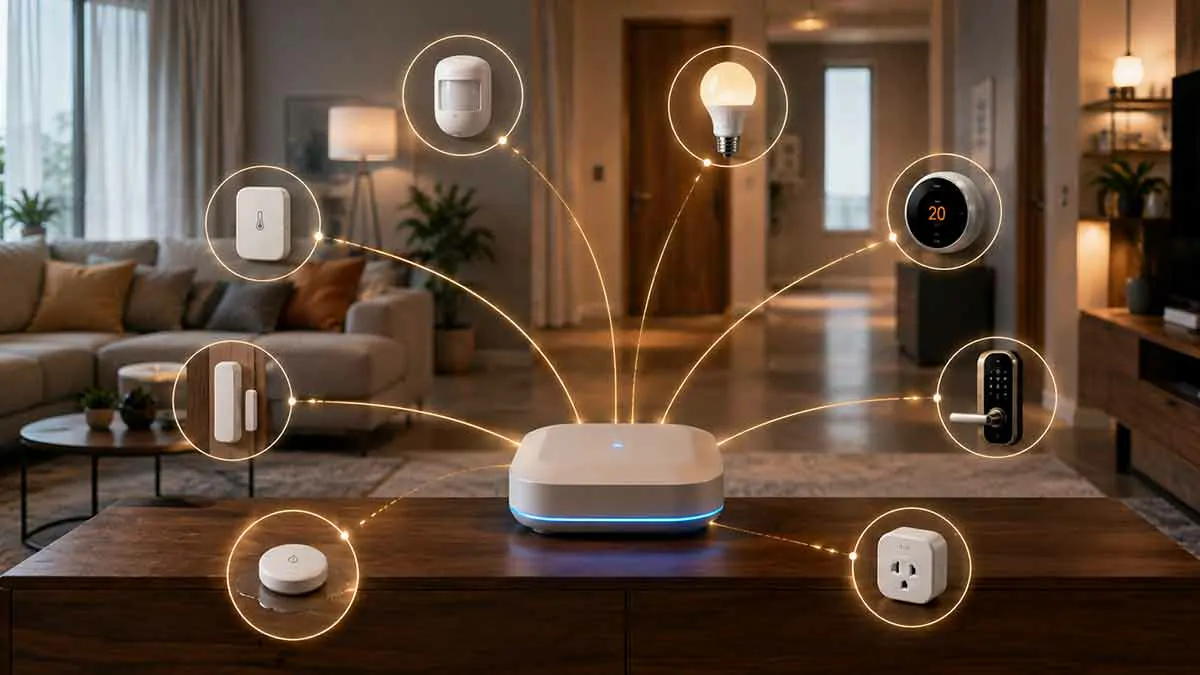
Smart home technology includes everything from motion sensors and door sensors to smart lights, plugs, thermostats, and locks. While all of these products can be part of a connected home, they do not perform the same role.
One of the most useful distinctions to understand is the difference between smart home sensors and smart devices.
A sensor primarily detects or measures something. A smart device, on the other hand, usually performs an action or provides a function that can be controlled or automated.
For example, a motion sensor can detect movement, while a smart light can turn on when movement is detected.
This simple relationship forms the foundation of many smart home automations.
In this guide, we’ll explain the difference between smart home sensors and smart devices, how they work together, the most common sensor types, when you need each category, and how to choose the right products for your home.
Table of Contents
What Is a Smart Home Sensor?
A smart home sensor is a device designed primarily to detect a physical condition or change and report that information to a smart home system.
Sensors can detect things such as:
- Motion
- Presence
- Door or window position
- Temperature
- Humidity
- Light levels
- Water leaks
- Smoke
- Air quality
- Energy consumption
The sensor generally provides information rather than performing a major physical action.
For example:
Motion sensor → detects movement
The smart home system can then use that information to trigger an action.
What Is a Smart Home Device?
The term smart home device is much broader.
It can refer to almost any connected product that can communicate with a smart home platform or network.
Examples include:
- Smart lights
- Smart plugs
- Smart switches
- Smart locks
- Smart thermostats
- Smart speakers
- Smart displays
- Smart appliances
- Security cameras
Some of these devices can also contain sensors.
This is why the distinction is not always absolute.
Sensor vs Smart Device: The Basic Difference
The simplest way to understand the difference is:
Sensor = detects or measures
Smart device = performs an action or provides a controllable function
For example:
Door sensor → detects that a door opened
Smart light → turns on
The sensor provides the information, while the smart device performs the action.
Are Sensors Also Smart Devices?
Technically, yes.
A smart sensor is itself a smart device because it communicates with a network or controller.
However, when people compare “sensors vs smart devices,” they are usually distinguishing between:
Input devices
and
Output or controllable devices
A sensor acts primarily as an input.
A smart light or smart plug acts primarily as an output.
Inputs and Outputs in a Smart Home
This distinction makes smart home automation easier to understand.
Inputs
Inputs provide information.
Examples:
- Motion sensor
- Door sensor
- Temperature sensor
- Presence sensor
- Light sensor
Outputs
Outputs perform actions.
Examples:
- Smart light
- Smart lock
- Smart plug
- Smart switch
- Smart thermostat
A typical automation connects the two:
Input → Automation → Output
For example:
Motion detected → Automation → Hallway light turns on
How Smart Home Sensors Work
A sensor monitors a specific physical condition.
When that condition changes, the sensor sends information to a controller or smart home platform.
For example:
Door closed → Sensor reports closed
Door opens → Sensor reports open
The smart home system can then decide what to do with that information.
How Smart Devices Work
A smart device usually receives commands and changes its state or performs an action.
For example:
Smart light → receives ON command → light turns on
Smart plug → receives OFF command → connected appliance loses power
Smart thermostat → receives temperature setting → HVAC system adjusts
The device may also report its current state back to the platform.
Common Types of Smart Home Sensors
There are many types of sensors available.
Motion Sensors
Motion sensors detect movement within a specific area.
They are commonly used for:
- Lighting
- Security
- Occupancy detection
- Energy-saving automations
A common automation is:
Motion detected → Lights turn on
Door and Window Sensors
These sensors detect whether an opening is open or closed.
They are useful for:
- Security
- Lighting
- Notifications
- Energy management
For example:
Window opens → Notification sent
Or:
Door opens after sunset → Entry light turns on
Temperature Sensors
Temperature sensors measure the temperature in a room or area.
They can help with:
- Heating
- Cooling
- Energy savings
- Comfort
- Room-specific automation
A thermostat may have a built-in temperature sensor, while separate sensors can provide readings from other rooms.
Humidity Sensors
Humidity sensors measure moisture levels in the air.
They can be used for:
- Bathroom ventilation
- Indoor comfort
- Mold prevention strategies
- HVAC automation
For example:
Humidity rises above threshold → Bathroom fan turns on
Light Sensors
Light sensors detect ambient brightness.
They can help automate lighting based on actual environmental conditions rather than fixed schedules.
For example:
Room becomes dark → Lights turn on
This can be more adaptive than simply turning lights on at a fixed time.
Water Leak Sensors
Water sensors detect the presence of unwanted water.
They are commonly placed near:
- Washing machines
- Water heaters
- Sinks
- Dishwashers
- Basement equipment
A typical automation might be:
Water detected → Alert sent
More advanced systems may also activate a compatible shutoff valve.
Air Quality Sensors
Air quality sensors can measure various environmental factors.
Depending on the product, they may monitor:
- Particulate matter
- Carbon dioxide
- Volatile organic compounds
- Temperature
- Humidity
These readings can be used to trigger ventilation or notifications.
Energy Sensors
Energy monitoring devices measure electricity consumption.
They can help identify:
- High energy usage
- Appliance consumption
- Standby power
- Changes in electricity demand
The data can then be used for energy-management automations.
Presence Sensors
Presence sensors are designed to determine whether someone is present in an area rather than simply detecting movement.
This distinction can be important.
A motion sensor may stop detecting movement when someone sits still.
A presence sensor may continue to recognize that someone remains in the room, depending on its technology.
Smart Home Devices With Built-In Sensors
Many smart devices combine sensing and action.
For example, a smart thermostat can contain:
- Temperature sensor
- Humidity sensor
- Display
- HVAC control
A smart camera can include:
- Image sensor
- Motion detection
- Microphone
- Speaker
A smart lock may include sensors that determine whether the lock is locked or unlocked.
Therefore, the line between sensors and smart devices can become blurred.
Smart Lights vs Sensors
A smart light is primarily an output device.
It can:
- Turn on
- Turn off
- Dim
- Change color
- Respond to automation
A motion sensor is primarily an input device.
It tells the system:
“Movement was detected.”
Together:
Motion sensor → Smart home platform → Smart light
This is one of the simplest smart home automations.
Smart Plugs vs Sensors
A smart plug controls electrical power.
A sensor provides information.
For example:
Water sensor detects leak → Smart plug turns off washing machine
The sensor detects the event.
The smart plug performs the action.
Smart Switches vs Sensors
A smart switch controls lighting or another connected circuit.
A sensor can provide the trigger.
For example:
Motion detected → Smart switch turns on lights
This can be more useful than using a smart bulb alone in some installations.
Smart Locks vs Door Sensors
These devices are often confused.
A door sensor tells you whether a door is open or closed.
A smart lock controls the locking mechanism.
You can use both together.
For example:
Door opens → Check lock status → Send notification if unlocked
The sensor provides information while the lock provides control.
Smart Thermostats vs Temperature Sensors
A smart thermostat controls your heating and cooling system.
A temperature sensor primarily measures temperature.
A thermostat may contain its own sensor, but separate sensors can provide readings from other areas.
This can be useful when the thermostat is installed in a location that does not represent the temperature of the entire home.
Smart Cameras vs Motion Sensors
Security cameras and motion sensors can both detect activity, but they serve different purposes.
A camera provides visual information and can potentially record video.
A motion sensor simply detects movement.
Using a sensor as the primary trigger can reduce unnecessary camera recordings in some systems.
For example:
Motion sensor → Camera begins recording
Why Sensors Are Important for Automation
Sensors make smart homes responsive to real-world conditions.
Without sensors, many automations rely primarily on:
- Time
- Manual commands
- Device states
Sensors allow the system to react to what is actually happening.
For example:
Motion → Light
Temperature → Thermostat
Water → Alert
Door opening → Notification
This makes automation more dynamic.
Sensors Create the “Input” Layer
A useful way to visualize a smart home is:
Sensors → Controller → Smart Devices
Sensors provide information.
The controller evaluates that information.
Smart devices perform the requested actions.
For example:
Temperature sensor
↓
Automation rule
↓
Smart thermostat
This structure can be expanded to include multiple conditions and devices.
Sensors and Smart Home Automation
Sensors can trigger automations directly or indirectly.
Direct Trigger
Motion detected → Light turns on
Conditional Trigger
Motion detected + after sunset → Light turns on
Multi-Sensor Automation
Door opens + nobody is home → Security alert
The more sensors you combine, the more sophisticated your automations can become.
Why Smart Home Sensors Can Save Energy
Sensors can prevent devices from operating unnecessarily.
For example:
No motion for 15 minutes → Lights turn off
Or:
Window opens → Heating temporarily adjusts
This allows the system to respond to actual occupancy and environmental conditions.
Sensors vs Timers
Timers are predictable.
Sensors are responsive.
A timer might say:
Lights turn on at 7:00 PM.
A sensor-based automation might say:
Lights turn on when someone enters the room after sunset.
The second approach can avoid turning lights on when nobody is home.
Both methods can be useful.
Sensors vs Manual Controls
Manual control requires a person to initiate an action.
A sensor can automate that process.
For example:
Manual: Press switch → Light turns on
Automated: Motion detected → Light turns on
The best systems often combine both.
You should not eliminate manual controls simply because automation exists.
Smart Home Sensors and Privacy
Some sensors raise more privacy considerations than others.
A simple door sensor provides limited information.
A camera can collect much more sensitive data.
Presence sensors may also reveal information about occupancy patterns.
When selecting sensors, consider:
- What data is collected
- Where it is processed
- Whether data is stored in the cloud
- How long data is retained
- Who can access it
Choose the least intrusive technology that accomplishes your goal.
Wired vs Wireless Sensors
Smart home sensors can be wired or wireless.
Wireless Sensors
Advantages:
- Easy installation
- Flexible placement
- No wiring required
Disadvantages:
- Battery maintenance
- Wireless interference
- Signal limitations
Wired Sensors
Advantages:
- No battery replacement
- Potentially stable communication
- Suitable for permanent installations
Disadvantages:
- More difficult installation
- Requires wiring
- Less flexible placement
Battery Life of Smart Sensors
Battery-powered sensors need periodic maintenance.
Battery life depends on:
- Communication protocol
- Reporting frequency
- Sensor type
- Temperature
- Network quality
- Battery quality
A sensor that reports frequently may consume more energy than one that reports only when a state changes.
Sensor Placement Matters
Even a high-quality sensor can perform poorly if positioned incorrectly.
For example, a motion sensor may have blind spots.
A temperature sensor placed next to a heater may report misleading readings.
A water sensor installed too far from the likely leak source may detect water too late.
Placement is part of smart home design.
Smart Home Sensor Range
Every wireless sensor has practical communication limits.
Range depends on:
- Walls
- Floors
- Building materials
- Interference
- Wireless technology
- Device placement
Mesh protocols such as Zigbee, Z-Wave, and Thread can help extend coverage through compatible network devices.
Sensors and Smart Home Protocols
Sensors can use several communication technologies.
Common options include:
- Wi-Fi
- Bluetooth
- Zigbee
- Z-Wave
- Thread
- Matter over supported networks
The protocol affects:
- Power consumption
- Range
- Network architecture
- Hub requirements
- Compatibility
Wi-Fi Sensors
Wi-Fi sensors can connect directly to your network.
They can be convenient because many homes already have Wi-Fi infrastructure.
However, battery-powered sensors may benefit from lower-power technologies.
Zigbee Sensors
Zigbee is widely used for low-power smart home sensors.
It can support:
- Motion sensors
- Door sensors
- Temperature sensors
- Water sensors
Zigbee devices can form a mesh network when compatible powered devices are available.
Z-Wave Sensors
Z-Wave is another common technology for smart home sensors.
It is frequently used for:
- Security sensors
- Motion sensors
- Door sensors
- Water sensors
- Temperature sensors
A compatible Z-Wave controller is generally required.
Thread Sensors
Thread is designed for low-power mesh networking.
It can be especially attractive for modern battery-powered sensors.
Thread itself is not the same thing as Matter.
A Thread sensor may or may not use Matter, depending on the product.
Matter Sensors
Matter can provide an interoperability layer for supported sensor types.
A Matter sensor can potentially integrate with multiple supported ecosystems.
However, exact feature support depends on the device and platform.
How to Choose Smart Home Sensors
Start with the problem you want to solve.
Do not begin with the product.
Ask:
What do I want my smart home to know?
For example:
- Is someone moving?
- Is a door open?
- Is there water on the floor?
- Is the room too hot?
- Is someone present?
- Is electricity consumption unusually high?
Then choose the sensor that provides that information.
How to Choose Smart Devices
Next ask:
What do I want my smart home to do?
Examples:
- Turn lights on
- Turn power off
- Lock a door
- Adjust temperature
- Activate a fan
- Send a notification
Choose the output device that can perform the required action.
A Simple Smart Home Automation Model
A basic automation can be represented as:
Sensor → Trigger → Condition → Action → Smart Device
For example:
Motion sensor
→ Motion detected
→ After sunset
→ Turn on
→ Smart light
This model makes it easier to understand how sensors and smart devices work together.
Can Smart Home Sensors Work Without Smart Devices?
Yes, but their usefulness may be limited.
A sensor can still provide information to an app or controller.
For example:
Water sensor → Notification
No physical smart device needs to perform an action.
However, sensors become more powerful when connected to other devices.
Can Smart Devices Work Without Sensors?
Yes.
Many smart devices can be controlled manually or through schedules.
For example:
Smart light → App → Light on
You do not need a motion sensor.
However, adding sensors can make the system more responsive.
Sensor-Based vs Schedule-Based Automation
Schedule-Based
7:00 PM → Lights on
Sensor-Based
Motion detected after sunset → Lights on
Combined
Motion detected + after sunset → Lights on
Combined automations can provide more precise behavior.
Multi-Sensor Automation
Advanced systems can combine multiple sensors.
For example:
Door opens
Motion detected
Nobody is home
→ Send security notification
This reduces false triggers compared with relying on a single sensor.
Avoiding False Triggers
Sensors can sometimes generate unwanted events.
Common causes include:
- Pets
- Temperature changes
- Poor placement
- Sensor sensitivity
- Reflections
- Environmental interference
Use conditions and appropriate placement to reduce false triggers.
Sensor Accuracy Matters
Not all sensors are equally accurate.
For measurements such as:
- Temperature
- Humidity
- Air quality
- Energy
accuracy can affect automation decisions.
A small measurement error may be irrelevant for monitoring but important if it controls another device automatically.
Sensors and Reliability
A sensor should be reliable enough for the role it performs.
A missed event may be annoying when controlling lights.
It can be much more serious when monitoring:
- Water leaks
- Security
- Freezing temperatures
For important applications, consider redundancy and manual backup methods.
Sensors and Security
Security sensors can include:
- Door sensors
- Window sensors
- Motion sensors
- Glass-break sensors
- Water sensors
- Smoke or environmental sensors
Use them as part of a broader security strategy rather than assuming one sensor can protect an entire property.
Smart Home Sensors vs Security Sensors
A smart home sensor can serve many purposes.
A security sensor is specifically intended to detect conditions relevant to security.
For example:
Motion sensor → Lighting automation
versus:
Motion sensor → Security alert
The same hardware may sometimes support both functions, but the application and reliability requirements can differ.
Sensors and Smart Home Notifications
Sensors can trigger notifications.
Examples include:
Water detected → Phone alert
Door opened → Notification
Freezer temperature too high → Alert
Notifications can be useful even when there is no physical smart device involved.
Sensors and Remote Monitoring
When combined with remote access, sensors can provide information while you are away.
For example:
Water sensor detects leak → Notification → Check home remotely
This can be particularly useful for homeowners who spend extended periods away from their property.
Sensors and Local Control
Sensors can also work with local automation.
For example:
Motion sensor → Local controller → Smart light
This can reduce dependence on cloud services.
However, whether an automation works locally depends on the specific sensor, controller, and smart device.
Common Smart Home Sensor Mistakes
Buying the Wrong Sensor
Choose the sensor based on the condition you need to detect.
Ignoring Placement
A poor installation location can reduce accuracy.
Forgetting Battery Maintenance
Battery-powered sensors require periodic checks.
Choosing the Wrong Protocol
Make sure the sensor works with your controller.
Relying on One Sensor for Critical Protection
Important systems may benefit from redundancy.
Creating Overly Sensitive Automations
Too many triggers can create false alarms or unnecessary actions.
Common Smart Device Mistakes
Ignoring Compatibility
Make sure the device works with your chosen platform.
Buying Too Many Cloud-Dependent Devices
Consider how the system behaves if internet access is lost.
Ignoring Manual Control
Maintain manual alternatives for important functions.
Using Devices Without Long-Term Support
Check whether the manufacturer provides firmware and security updates.
How Sensors and Smart Devices Work Together
The strongest smart home systems use both categories.
For example:
Lighting
Motion sensor → Smart light
Security
Door sensor → Security notification
Energy Management
Temperature sensor → Smart thermostat
Water Protection
Leak sensor → Smart shutoff valve
Comfort
Presence sensor → Smart lighting and thermostat
Each system follows the same basic concept:
Detect → Decide → Act
A Practical Sensor and Device Setup
A simple smart home might include:
Sensors
- Motion sensors
- Door sensors
- Temperature sensors
- Water sensors
Smart Devices
- Smart lights
- Smart plugs
- Smart thermostat
- Smart lock
Controller
- Smart home hub or compatible platform
The controller connects the inputs and outputs.
How Many Sensors Do You Need?
There is no universal number.
Start with areas where sensors provide clear value.
For example:
- Entry door
- Hallway
- Main living area
- Kitchen
- Utility area
- Bedrooms
Add more only when a specific automation or monitoring requirement justifies them.
How Many Smart Devices Do You Need?
The same principle applies.
Do not automate every device simply because it can be automated.
Focus on repetitive tasks that save:
- Time
- Energy
- Effort
- Attention
Good automation should solve a real problem.
A Simple Buying Strategy
Before purchasing a sensor or smart device:
Step 1: Identify the problem.
What do you want to detect or control?
Step 2: Choose the sensor or device.
Select the hardware that solves that problem.
Step 3: Check compatibility.
Verify platform, protocol, and controller support.
Step 4: Check installation requirements.
Consider power, batteries, placement, and wiring.
Step 5: Test one device.
Confirm reliability before buying many units.
Step 6: Build the automation.
Connect the sensor to the smart device.
Step 7: Test real-world behavior.
Make sure the automation works under normal conditions.
Smart Home Sensors vs Smart Devices: Quick Comparison
| Feature | Smart Home Sensors | Smart Devices |
|---|---|---|
| Primary role | Detect or measure | Perform or control actions |
| Typical examples | Motion, door, temperature | Lights, plugs, locks |
| Automation role | Usually trigger/input | Usually action/output |
| Battery use | Often battery-powered | Often mains-powered |
| Data collection | Usually primary function | Usually secondary |
| Manual control | Usually limited | Usually available |
| Can work together | Yes | Yes |
Final Thoughts
The difference between smart home sensors and smart devices becomes much easier to understand when you think in terms of inputs and outputs.
Sensors tell your smart home what is happening.
Smart devices allow your smart home to do something about it.
A motion sensor can detect movement. A door sensor can detect an opening. A temperature sensor can measure environmental conditions. A smart light can respond by turning on, while a smart thermostat can adjust the temperature.
Together, these components create the basic structure of automation:
Detect → Decide → Act
You do not need dozens of sensors or smart devices to create a useful smart home. Start with real problems, choose the appropriate sensor or controllable device, verify compatibility, and build simple automations before adding complexity.
A well-designed system uses sensors where information is valuable and smart devices where automated action provides a clear benefit.