
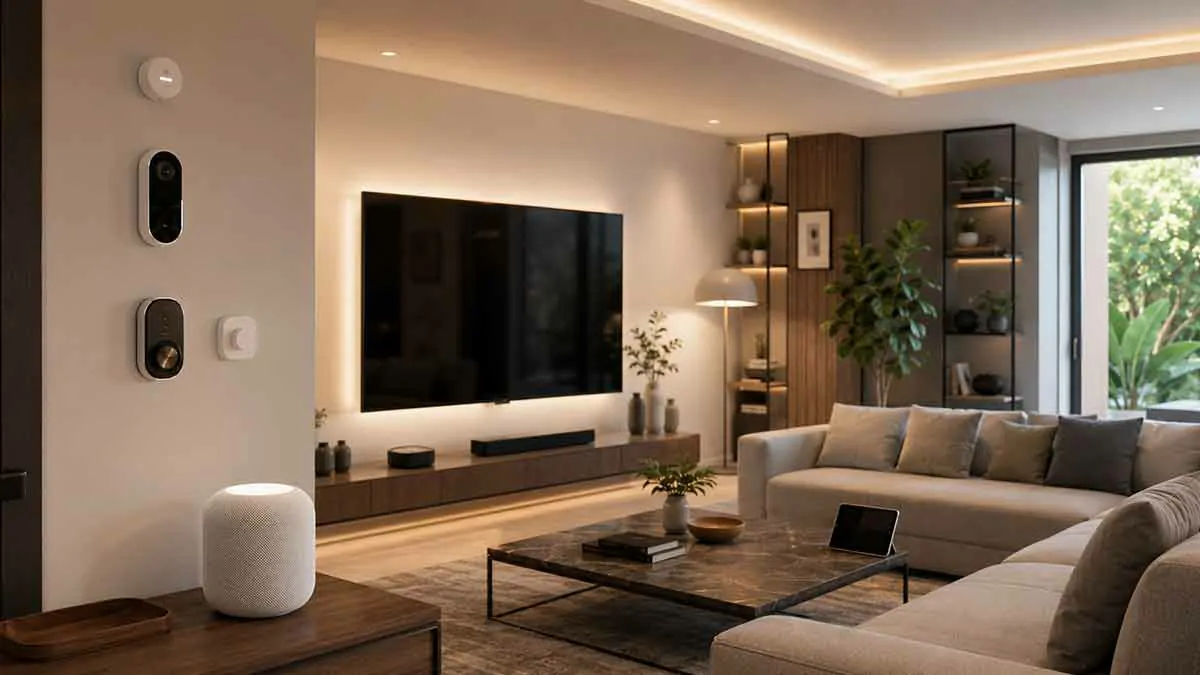
Apple Home has become a powerful platform for controlling smart home devices across an Apple ecosystem. Although many people still refer to the platform as Apple HomeKit, the modern experience is centered around the Home app, with support for HomeKit and Matter-compatible accessories.
A well-designed Apple smart home can connect lights, locks, thermostats, cameras, sensors, speakers, televisions, and other devices into a unified system. You can control compatible accessories from an iPhone, iPad, Apple Watch, Mac, or through Siri, while automations can make selected devices respond automatically to schedules and events.
The best Apple Home devices are not necessarily the most expensive products. The right choices are the ones that provide useful features, work reliably with your existing setup, and support the controls you actually need.
This guide covers the best types of Apple Home-compatible devices for different parts of a smart home and explains what to consider before buying.
What Are Apple HomeKit Devices?
Apple HomeKit devices are smart home accessories designed to work with Apple’s home automation ecosystem.
Today, the Home app supports both HomeKit and Matter accessories. Supported categories include products such as:
- Smart lights
- Smart plugs
- Smart switches
- Smart locks
- Thermostats
- Sensors
- Cameras
- Smart TVs
- Window shades
- Other compatible home accessories
Apple’s Home app can be used to organize accessories by rooms, create scenes, and build automations around supported devices.
For homeowners using iPhone, iPad, Apple Watch, or other Apple devices, Apple Home can provide a convenient central control system.
Best Apple Home Devices at a Glance
| Device Type | Best For | Main Benefit |
|---|---|---|
| HomePod mini | Voice control | Siri and smart home control |
| HomePod | Whole-home audio | Premium audio and home control |
| Apple TV 4K | Entertainment and home hub | TV plus smart home integration |
| Smart Lights | Lighting automation | Scenes and schedules |
| Smart Plugs | Existing appliances | Simple remote control |
| Smart Thermostats | Climate control | Temperature management |
| Smart Locks | Entry control | Convenient access |
| HomeKit Secure Video Cameras | Home monitoring | Connected security |
| Smart Sensors | Automation | Environmental and activity triggers |
| Smart Shades | Comfort and privacy | Automated window control |
| Matter Devices | Flexible smart homes | Broader interoperability |
1. HomePod mini
The HomePod mini is one of the most useful starting points for an Apple-centered smart home.
It combines a compact smart speaker with Siri and smart home functionality.
A HomePod mini can be used for:
- Controlling compatible accessories
- Running scenes and automations
- Playing music
- Using Siri voice commands
- Intercom communication
- Acting as a home hub
- Supporting Thread-based smart home accessories
Apple lists HomePod mini as a home hub, and it also supports Thread for compatible accessories.
Its small size makes it suitable for bedrooms, kitchens, offices, and living areas.
For many Apple households, one or more HomePod mini speakers provide a practical foundation for voice control and home automation.
2. HomePod
The larger HomePod is designed for households that want stronger audio while maintaining integration with Apple Home.
It can serve as:
- A Siri-enabled smart speaker
- A home control device
- A home hub
- A whole-home audio component
A HomePod can also work with other Apple devices to create a more integrated living environment.
The larger speaker makes the most sense in a living room or another area where sound quality matters.
3. Apple TV 4K
Apple TV 4K is more than a streaming device for an Apple smart home.
Compatible Apple TV 4K models can serve as home hubs, allowing supported accessories to be controlled remotely and participating in automations. Apple also lists compatible Apple TV 4K models among Thread-enabled home hubs.
This makes Apple TV 4K particularly useful in a living room where you want to combine:
- Streaming entertainment
- Home control
- Siri
- Smart home automations
- A central home hub
For a household already using Apple TV, it can therefore serve two important purposes without requiring another dedicated device.
4. Apple Home-Compatible Smart Lights
Smart lighting is one of the easiest ways to expand an Apple smart home.
Compatible bulbs, switches, and fixtures can be controlled through the Home app or Siri and included in scenes and automations.
Useful lighting scenes include:
Good Morning
Selected lights turn on at a scheduled time.
Evening
Living room and exterior lights activate around sunset.
Movie Night
Selected lights dim while entertainment begins.
Bedtime
Lights throughout the home turn off or switch to lower levels.
A good lighting setup should reflect how each room is used rather than relying on identical schedules throughout the home.
5. Smart Plugs
Smart plugs are an easy way to bring compatible appliances and lamps into Apple Home.
They can be useful for:
- Lamps
- Fans
- Decorative lighting
- Suitable small appliances
- Seasonal lighting
A smart plug can allow an ordinary lamp to become part of a scene or automation without replacing the lamp itself.
However, the connected appliance should be suitable for smart plug control and behave safely when power is restored.
6. Apple Home-Compatible Smart Thermostats
A smart thermostat can bring heating and cooling into the Apple Home ecosystem.
Depending on the model, you may be able to:
- Adjust temperature
- View the current temperature
- Create schedules
- Include climate control in scenes
- Automate temperature changes
Thermostat compatibility is especially important because heating and cooling systems vary considerably.
Before purchasing, verify compatibility with your existing HVAC system and check which features are available through Apple Home.
7. Smart Locks
Smart locks are one of the most useful security-oriented additions to an Apple smart home.
Depending on the model, compatible locks can support features such as:
- Keyless entry
- Smartphone control
- Temporary access
- Automatic locking
- Home automations
- Home Key support on compatible products
A smart lock can be useful for family members and authorized visitors while reducing the need to distribute physical keys.
Before buying, check compatibility with your door, installation requirements, battery life, and how the lock behaves when connectivity or battery power is unavailable.
8. HomeKit Secure Video Cameras
Security cameras can be integrated into Apple Home through supported products and HomeKit Secure Video.
The Home app supports compatible cameras and can provide features such as viewing camera feeds and receiving notifications for recognized activity, depending on the camera and Apple Home configuration.
Potential uses include monitoring:
- Front entrances
- Driveways
- Yards
- Garages
- Indoor areas
When choosing a camera, consider:
- Indoor or outdoor use
- Power source
- Field of view
- Night visibility
- Local network performance
- Storage requirements
- Privacy features
Security cameras should complement other appropriate security measures rather than becoming the only protection for a property.
9. Smart Doorbells
A compatible smart doorbell can extend an Apple smart home to the front entrance.
Depending on the product, you may be able to:
- View visitors
- Receive notifications
- Communicate with visitors
- Monitor deliveries
- Integrate doorbell events into supported automations
Compatibility with Apple Home and HomeKit Secure Video should be verified before buying because not every smart doorbell provides the same features.
Power options also matter. Wired and battery-powered doorbells can have very different installation requirements.
10. Smart Sensors
Sensors are among the most useful devices for Apple Home automation.
They can detect events or environmental changes such as:
- Motion
- Door and window opening
- Temperature
- Humidity
- Light levels
- Occupancy
- Water leaks
Sensors allow the smart home to react to what is happening rather than relying entirely on fixed schedules.
For example:
Motion detected → Turn on hallway light
or:
Water detected → Send an alert
This makes sensors an important building block for more intelligent automations.
11. Smart Temperature Sensors
A temperature sensor can provide information from rooms that are far away from the main thermostat.
This can be useful in homes where different areas experience different temperatures.
For example, the upstairs bedroom may be warmer or cooler than the hallway where the thermostat is installed.
Additional temperature information can help homeowners make better decisions about heating and cooling.
12. Smart Leak Sensors
Water leak sensors are small but potentially valuable smart home devices.
A sensor can be placed near areas such as:
- Water heaters
- Washing machines
- Sinks
- Dishwashers
- Toilets
- Plumbing connections
If moisture is detected, the system can provide an alert or trigger another supported action.
Leak sensors are especially useful because a small warning can potentially help identify a problem before it develops into major water damage.
13. Smart Window Shades
Motorized shades can add convenience, privacy, and light management to an Apple smart home.
Depending on the product, you can create scenes or automations that:
- Open shades in the morning
- Close them at night
- Reduce direct sunlight
- Increase privacy
- Coordinate window coverings with lighting
They can be particularly useful in bedrooms, living rooms, and rooms with large windows.
Installation requirements vary substantially, so check the window dimensions and motor configuration before purchasing.
14. Matter-Compatible Devices
Matter is an important consideration for anyone building a new Apple smart home.
Apple’s Home app currently supports Matter accessories in categories including lights, locks, outlets, switches, thermostats, blinds and shades, and several types of sensors.
Matter is designed to improve interoperability across supported smart home ecosystems.
This can make it easier to select compatible products from different manufacturers rather than being restricted to a single brand.
However, Matter compatibility does not mean every device offers identical features across every platform.
Check the manufacturer’s documentation for the exact features supported by the product.
15. Thread-Compatible Devices
Thread is another technology worth understanding when building an Apple smart home.
Thread is a low-power mesh networking technology used by many modern smart home devices.
Apple lists HomePod mini, HomePod (2nd generation), and compatible Apple TV 4K models among its Thread-enabled home hubs.
For Thread-based accessories, having an appropriate Thread-enabled home hub can be important for features such as automations, notifications, and remote control.
When buying a new device, check whether it uses Thread, Wi-Fi, or another communication method and whether your existing Apple setup supports it.
16. Smart TVs
Apple Home can integrate with supported smart TVs and related entertainment devices.
A compatible television can become part of the broader home experience, allowing supported controls and scenes to include entertainment.
The exact functionality varies by manufacturer and model.
Before purchasing a TV specifically for Apple Home, verify its support for Apple Home or HomeKit rather than assuming that AirPlay compatibility means full Home integration.
17. Smart Air Quality Devices
Air-quality monitors and smart air purifiers can add environmental information to an Apple smart home.
Depending on the product, you may be able to monitor:
- Temperature
- Humidity
- Air quality
- Particulate matter
- Other environmental measurements
A monitor can help identify changes in indoor conditions, while a compatible purifier can respond to those conditions.
The value depends heavily on sensor accuracy and the quality of the connected appliance.
18. Smart Fans and Air Conditioners
Compatible smart fans and air conditioners can provide more convenient climate control.
Depending on the device, you may be able to:
- Turn the unit on or off
- Adjust settings
- Create schedules
- Include it in scenes
- Control it remotely
Before buying a connected climate device, check both its Apple Home compatibility and the exact functions exposed through the Home app.
19. Smart Garage Controllers
A smart garage controller can connect an existing garage door opener to the Apple smart home.
Depending on the compatible system, you may be able to:
- Check garage status
- Open or close the door
- Receive notifications
- Integrate garage events with automations
Compatibility with the existing garage door opener is essential.
A garage controller is most useful when it solves a genuine daily problem, such as checking whether the garage was left open.
20. Smart Irrigation Controllers
For homes with gardens, a smart irrigation controller can bring outdoor watering into the connected home.
Depending on the product, features may include:
- Scheduling
- Zone management
- Remote control
- Weather-based adjustments
- Automation
Before buying one, check compatibility with the irrigation system and the number of zones you need to control.
Apple Home Hubs
A home hub is an important part of an Apple smart home, particularly when you want remote access and more advanced automation.
Apple currently supports HomePod, HomePod mini, and compatible Apple TV devices as home hubs.
Apple also recommends a home hub for the best experience with supported Matter and Thread accessories.
For an Apple-focused household, using an appropriate home hub can provide a more consistent foundation for automations and remote control.
How Apple Home Devices Work Together
The real advantage of Apple Home is not any individual accessory.
It is the ability to combine multiple devices into scenes and automations.
For example:
Good Morning
Lights turn on and other compatible devices respond to the morning schedule.
Leaving Home
Selected lights turn off and other devices change to an away state.
Welcome Home
Selected lights activate when the household returns.
Movie Night
Lighting changes while compatible entertainment devices are prepared.
Bedtime
Lights turn off, shades close, and selected devices move to nighttime settings.
Apple Home supports automations that can run at specific times or respond to events from compatible accessories.
Siri and Apple Home
Siri provides voice control for compatible Apple Home accessories.
You can use Siri to perform actions such as controlling lights, checking compatible devices, or activating scenes.
Clear names are important.
Instead of calling a device:
Device 1
use names such as:
Living Room Floor Lamp
Kitchen Ceiling Light
Bedroom Thermostat
This makes voice control easier and helps prevent confusion as the smart home grows.
Apple Home and Apple Watch
An Apple Watch can also provide convenient access to compatible Home accessories.
The Home app on Apple Watch can control supported devices such as lights, locks, thermostats, window shades, smart plugs, and other compatible accessories.
This can be useful when you want quick control without reaching for your iPhone.
Apple Home and Privacy
Privacy is an important consideration when selecting smart home products.
Cameras, microphones, sensors, and cloud-connected services can collect information about activities in and around your home.
When buying a device, consider:
- What information it collects
- Whether video is stored locally or in the cloud
- Whether a subscription is required
- Which account controls the device
- What permissions are requested
- What happens when internet access is unavailable
Apple states that Matter pairing information stored in iCloud Keychain is end-to-end encrypted.
Third-party products can have separate privacy policies, so their documentation should also be reviewed before purchase.
What to Look for When Buying Apple Home Devices
Apple Home Compatibility
Check specifically for compatibility with Apple Home, HomeKit, or Matter.
Do not assume that an accessory works with Apple Home simply because it supports AirPlay or another Apple feature.
Matter Support
Matter can provide additional flexibility for supported device categories.
Thread Support
Thread can be useful for compatible low-power accessories and may reduce dependence on conventional Wi-Fi connections.
Home Hub Requirements
Check whether a home hub is required for the features you want.
Installation
Some devices are easy to install while others may require electrical, plumbing, or professional work.
Subscription Costs
Security cameras and other devices may offer important features only through a paid service.
Manual Control
Important home functions should remain usable when the network or smart home platform is unavailable.
Building an Apple Smart Home From Scratch
You do not need dozens of devices.
A simple starting system could include:
- HomePod mini
- Several Apple Home-compatible smart lights
- One or two smart plugs
- A useful scene or automation
You can then expand to:
- Smart thermostat
- Smart lock
- Security cameras
- Doorbell
- Sensors
- Smart shades
- Matter devices
- Additional speakers
Building gradually makes it easier to test compatibility and reliability.
Best Apple Home Devices by Room
Living Room
Consider:
- HomePod or HomePod mini
- Apple TV 4K
- Smart lights
- Smart shades
- Compatible television
Kitchen
Useful devices include:
- HomePod mini
- Smart lights
- Smart plugs
- Smart display or compatible accessories
- Air-quality sensors
Bedroom
Consider:
- HomePod mini
- Smart lighting
- Temperature sensors
- Smart shades
- Compatible thermostat controls
Entryway
Useful options include:
- Smart lock
- Smart doorbell
- Motion sensor
- Smart lighting
Home Office
Consider:
- HomePod mini
- Smart lights
- Smart plugs
- Temperature sensors
- Smart shades
Common Apple Home Mistakes
Buying Without Checking Compatibility
A product may support another Apple feature without supporting Apple Home.
Ignoring Home Hub Requirements
Some Matter and Thread configurations require appropriate hub hardware for the best experience and remote features.
Using Too Many Brands Without Checking Features
Matter improves interoperability, but product features can still vary between manufacturers.
Creating Too Many Automations
Complicated automation systems can become difficult to troubleshoot.
Ignoring Network Reliability
Smart accessories need dependable connectivity during setup and normal use.
Choosing Devices Only for Their Smart Features
A product should still be good at its primary job.
A smart thermostat should provide good temperature control.
A camera should provide reliable monitoring.
A lock should provide dependable physical access.
Are Apple HomeKit Devices Worth Buying?
Apple Home-compatible devices can be an excellent choice for households already using Apple products.
The platform combines smart home control with Siri, the Home app, Apple Watch, Apple TV, HomePod, and supported third-party accessories.
Matter also gives Apple Home users more flexibility when choosing compatible products from different manufacturers.
The strongest setups are not necessarily the largest ones.
A small group of reliable accessories can provide significant convenience when they are selected carefully and connected through useful scenes and automations.
Final Thoughts
The best Apple HomeKit devices for smart homes depend on your household, your existing Apple devices, and the tasks you want to automate.
HomePod mini provides an excellent foundation for voice control and home hub functionality, while HomePod and Apple TV 4K can extend the system into whole-home audio and entertainment.
Smart lights, plugs, thermostats, locks, sensors, cameras, and shades can then add practical automation throughout the home.
For new purchases, Apple Home compatibility, Matter support, Thread connectivity, installation requirements, and home hub requirements are all worth checking before buying.
The goal is not to make every device in your house smart.
The goal is to create a connected home where the devices you choose work together reliably and make everyday life easier.