
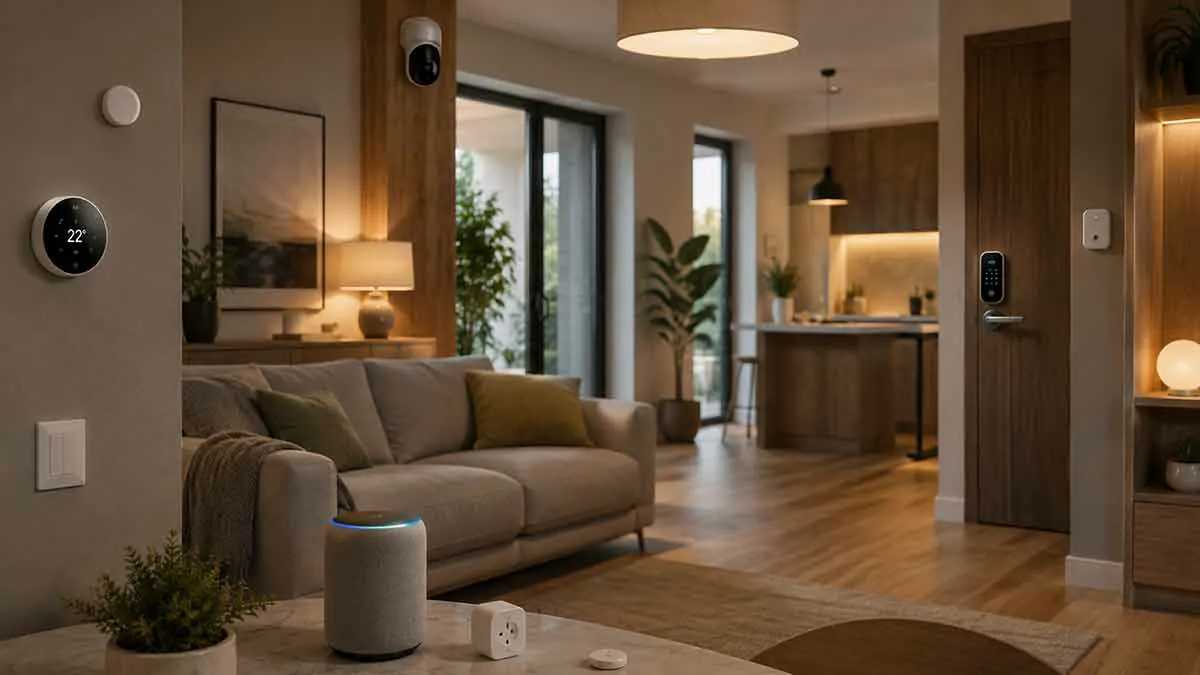
Shopping for smart home devices can quickly become confusing. There are smart lights, plugs, thermostats, cameras, locks, sensors, speakers, appliances, hubs, and dozens of competing brands and ecosystems.
The biggest mistake is choosing devices one at a time without considering how they will work together.
A better approach is to start with what you want your smart home to accomplish and then choose products that fit your home, network, budget, and preferred platform.
The right smart home devices should make everyday tasks easier without creating unnecessary complexity.
This guide explains how to shop for smart home devices, what specifications matter, how to compare different products, and how to build a system that can grow over time.
Start With Your Smart Home Goals
Before looking at products, identify what you want to improve.
Common goals include:
- Automating lighting
- Improving home security
- Controlling heating and cooling
- Reducing energy waste
- Managing entertainment
- Monitoring the home remotely
- Making repetitive tasks easier
- Improving comfort
Your goal should determine what you buy.
For example, someone primarily interested in energy saving may benefit from smart thermostats, energy monitors, and smart plugs.
Someone focused on security may prioritize cameras, doorbells, locks, sensors, and exterior lighting.
Someone building a more comfortable home may focus on smart lighting, climate control, shades, and room sensors.
Choose Your Smart Home Ecosystem
The ecosystem is one of the most important decisions you will make.
Common smart home platforms include:
- Google Home
- Amazon Alexa
- Apple Home
- Samsung SmartThings
- Home Assistant
- Other manufacturer ecosystems
The platform determines which devices can work together, how automations are created, and which controls are available.
Before buying your first major device, decide which ecosystem you want to use as the central part of your smart home.
You do not necessarily need products from one brand, but you should understand how your devices will integrate with your chosen platform.
Check Compatibility Before Buying
A device being described as “smart” does not mean it will work with your existing setup.
Always check:
- Smart home platform compatibility
- Communication technology
- Hub requirements
- App requirements
- Automation support
- Voice assistant support
- Matter support
- Thread support where relevant
Compatibility should be checked before purchase rather than after installation.
A product that requires an additional bridge or does not support the feature you need can become much more expensive than expected.
Understand Matter
Matter is an important consideration when shopping for modern smart home devices.
Matter is an industry standard designed to improve interoperability between supported smart home devices and platforms.
For buyers, Matter can make it easier to choose compatible products from different manufacturers.
However, Matter does not mean every device will provide exactly the same capabilities on every platform.
A device may support Matter for basic control while exposing additional features only through its manufacturer’s app or another integration.
Therefore, check the exact capabilities of the product you want to buy.
Understand Thread
Thread is another technology worth understanding when shopping for smart home products.
It is a low-power mesh networking technology designed for connected devices such as sensors, lights, locks, and other smart home equipment.
Thread can be particularly useful for battery-powered devices because it is designed for low-power operation.
However, a Thread device typically requires appropriate Thread infrastructure.
Before purchasing a Thread product, check whether your existing smart home equipment can provide the required network support.
Wi-Fi vs Zigbee vs Z-Wave vs Thread
Smart devices can communicate in several different ways.
Wi-Fi
Advantages:
- Widely available
- No dedicated hub for many devices
- Easy setup for many products
Disadvantages:
- Large numbers of devices can increase network load
- Battery-powered products may have different limitations
Zigbee
Advantages:
- Low power consumption
- Mesh networking
- Large ecosystem of sensors and lighting products
Disadvantages:
- Usually requires a coordinator or compatible hub
Z-Wave
Advantages:
- Designed specifically for smart home applications
- Reliable mesh networking
- Broad range of sensors and controls
Disadvantages:
- Often requires dedicated hub hardware
- Product availability can vary by region
Thread
Advantages:
- Low power
- Mesh networking
- Designed for modern smart home devices
- Works with Matter in supported products
Disadvantages:
- Requires appropriate Thread infrastructure
There is no universally best technology.
The right choice depends on your ecosystem, device count, network, and the products you want to use.
Decide Whether You Need a Hub
Not every smart home requires a dedicated hub.
Many Wi-Fi devices connect directly to your home network.
Other devices using Zigbee, Z-Wave, or certain other technologies may require a hub or coordinator.
A hub can also provide additional functions such as local control, device management, or automation.
Before buying a dedicated hub, check whether your existing smart speaker, display, router, streaming device, or home automation platform already provides the required functionality.
Think About Your Home Network
Your network is the foundation of many smart homes.
A connected device installed in a weak Wi-Fi area may perform poorly regardless of how good the product is.
Before purchasing network-dependent devices, consider:
- Router location
- Wi-Fi coverage
- Number of connected devices
- Outdoor coverage
- Garage or basement coverage
- Mesh Wi-Fi requirements
- Ethernet availability
Large homes may benefit from additional access points or a properly designed mesh network.
For stationary infrastructure and important devices, wired Ethernet can provide greater reliability where practical.
Choose Devices by Room
A room-by-room approach makes shopping easier.
Living Room
Potential purchases include:
- Smart lights
- Smart speaker
- Smart display
- TV or streaming device
- Smart plugs
- Smart shades
Kitchen
Consider:
- Smart lighting
- Smart display
- Smart plugs
- Compatible appliances
- Environmental sensors
Bedroom
Useful options include:
- Smart lighting
- Smart speaker
- Temperature sensor
- Smart thermostat
- Smart shades
Entryway
Consider:
- Smart lock
- Video doorbell
- Motion sensor
- Exterior lighting
Garage
Possible devices include:
- Smart garage controller
- Security camera
- Motion sensor
- Leak sensor
Outdoor Areas
Depending on your property:
- Floodlight cameras
- Smart lights
- Irrigation controllers
- Outdoor smart plugs
- Environmental sensors
You do not need to make every room smart.
Focus on the areas where connected technology provides the most value.
Choose Devices Based on Use Cases
Another effective shopping strategy is to start with a task rather than a product.
For example:
Task: Turn on a porch light automatically at sunset.
Possible solution:
Smart light + smart home platform
Another example:
Task: Know when the washing machine area has a leak.
Possible solution:
Water leak sensor + notification system
This prevents you from buying devices simply because they have interesting features.
Smart Lighting Buying Guide
Smart lighting includes:
- Smart bulbs
- Smart switches
- Smart dimmers
- Smart fixtures
- Light strips
Smart Bulbs
Best when you want easy installation and color or brightness control.
Smart Switches
Best when you want to control existing fixtures and maintain normal wall-switch operation.
Smart Dimmers
Useful when lighting levels are important.
Smart Light Strips
Useful for accent lighting, cabinets, entertainment areas, and decorative applications.
When shopping, compare:
- Brightness
- Color options
- Dimming
- Connectivity
- Compatibility
- Physical size
- Power requirements
Smart Plug Buying Guide
Smart plugs are simple but useful.
Before buying, check:
- Maximum electrical load
- Plug size
- Indoor or outdoor rating
- Energy monitoring
- Platform compatibility
- Manual button
- Scheduling
- Matter support where desired
Do not use a smart plug with an appliance unless the plug and appliance are appropriate for automated power control.
Smart Thermostat Buying Guide
A smart thermostat should be chosen based on the heating and cooling system first.
Check compatibility with:
- Boiler
- Furnace
- Central HVAC
- Heat pump
- Electric heating
- Underfloor heating
- Other equipment
Then compare:
- Room sensors
- Scheduling
- Remote control
- Energy information
- Smart home integration
- Presence detection
- Zoning support
A thermostat with many features is not useful if it cannot properly control your heating system.
Smart Camera Buying Guide
When choosing a security camera, look beyond resolution.
Compare:
- Indoor or outdoor installation
- Field of view
- Night vision
- Motion detection
- Person detection
- Two-way audio
- Storage options
- Local storage
- Cloud storage
- Subscription requirements
- Privacy features
- Smart home compatibility
Think about where the camera will be installed.
A driveway camera and an indoor room camera have different requirements.
Smart Doorbell Buying Guide
For a smart doorbell, consider:
- Wired or battery power
- Video quality
- Night visibility
- Motion detection
- Package detection where supported
- Two-way communication
- Storage
- Subscription
- Smart home compatibility
Also check Wi-Fi strength at the entrance before installation.
Smart Lock Buying Guide
A smart lock should be selected primarily for security, reliability, and compatibility.
Important considerations include:
- Door compatibility
- Lock type
- Battery life
- Keypad access
- Smartphone access
- Temporary codes
- Automatic locking
- Physical key backup
- Home hub requirements
- Smart home compatibility
A smart lock should always have an appropriate method of access if the battery or smart home network becomes unavailable.
Smart Sensor Buying Guide
Sensors are small, but they can make a smart home much more responsive.
Common categories include:
- Motion
- Door and window
- Temperature
- Humidity
- Occupancy
- Water leak
- Light
- Smoke and safety-related sensors
Choose sensors based on the information you actually want your home to use.
A motion sensor is useful for lighting.
A leak sensor is useful for water damage detection.
A temperature sensor is useful for climate management.
Wired vs Battery-Powered Devices
Power requirements can significantly affect your shopping decision.
Wired Devices
Advantages:
- Continuous power
- No battery replacement
- Suitable for permanent installations
Disadvantages:
- More difficult installation
- May require electrical work
Battery Devices
Advantages:
- Easier placement
- More installation flexibility
- Useful where wiring is unavailable
Disadvantages:
- Batteries require replacement or charging
- Battery life varies with usage and communication technology
For permanently installed high-power devices, wired products are often more practical.
For sensors and devices placed in difficult locations, battery power can be more convenient.
Local vs Cloud-Dependent Devices
A smart device may depend heavily on cloud services or may provide local control.
Cloud-dependent products can offer:
- Remote access
- Online storage
- Manufacturer-managed services
- Easy account-based setup
Local-capable devices can provide:
- Lower cloud dependence
- Potentially faster response
- Continued operation during some internet outages
- Greater control over local data
A hybrid approach is also common.
Before buying a device, check which functions remain available when internet access is unavailable.
Subscription Costs Matter
The purchase price is only part of the cost.
Some smart home products require subscriptions for advanced features such as:
- Cloud video storage
- Advanced detection
- Extended history
- AI features
- Additional automation capabilities
Calculate the cost over several years.
A slightly more expensive device with no recurring fee may cost less in the long term than a cheaper product with a permanent subscription.
Privacy Should Be Part of Your Decision
Smart home devices can collect information about your home.
Cameras can record video.
Speakers can process voice commands.
Sensors can reveal activity patterns.
Heating and lighting systems can reveal household routines.
Before buying, check:
- What data the device collects
- Where data is stored
- Whether cloud services are required
- How accounts are secured
- Whether local storage is available
- What privacy controls are provided
This is particularly important for devices installed inside bedrooms, living spaces, and other private areas.
Check Installation Requirements
Some products are easy to install.
Others may require:
- Electrical work
- Plumbing
- HVAC modifications
- Door hardware changes
- Professional installation
Examples include:
- Wired floodlights
- Smart thermostats
- Smart locks
- Water shutoff systems
- Hardwired cameras
- Irrigation controllers
Read the installation requirements before purchasing.
A device that requires professional installation may have a much higher total cost than the advertised product price.
Think About Maintenance
Every additional device creates some level of maintenance.
You may need to:
- Replace batteries
- Clean cameras
- Update firmware
- Replace filters
- Check connections
- Review automations
- Maintain subscriptions
A smart home with 50 devices can require more maintenance than one with 15 carefully selected products.
Choose devices that provide enough value to justify the ongoing maintenance.
Avoid Buying Too Many Devices at Once
A common mistake is trying to build a complete smart home in one shopping trip.
Instead, build in stages.
Stage 1
Choose your ecosystem and network foundation.
Stage 2
Add a few high-value devices.
Stage 3
Create simple automations.
Stage 4
Test reliability.
Stage 5
Expand into other rooms.
This approach makes it easier to identify compatibility problems before they affect a larger installation.
Compare Total Cost of Ownership
When comparing two devices, consider more than the purchase price.
The total cost can include:
- Device price
- Hub or bridge
- Installation
- Subscription
- Batteries
- Replacement parts
- Additional network equipment
A device that costs less initially may become more expensive over several years.
Read the Exact Compatibility List
Product descriptions can sometimes use broad statements such as:
Works with smart home systems
That is not enough.
Look for specific support for:
- Google Home
- Amazon Alexa
- Apple Home
- Matter
- Home Assistant
- Zigbee
- Z-Wave
- Thread
Also check whether the device works with the exact version of your platform.
Check What Features Are Actually Supported
Compatibility does not always mean full functionality.
A camera may be visible in a smart home app but not expose all its advanced detection features.
A thermostat may allow temperature control but not every scheduling feature.
A light may support on/off commands but not every color or scene function.
Read the supported feature list before buying.
Buy for the Long Term
Smart home standards and ecosystems evolve.
When selecting new devices, consider whether the product gives you reasonable flexibility for the future.
Matter support can be useful for new purchases.
Replaceable batteries can be easier to maintain.
Local storage can reduce cloud dependence.
Open integrations can give advanced users more options.
A product that works well today and remains flexible tomorrow is usually a better purchase than one that locks you into a narrow system.
Avoid Vendor Lock-In Where Practical
Vendor lock-in occurs when devices work well only within one manufacturer’s ecosystem.
Sometimes this is perfectly acceptable.
A homeowner who likes one brand and wants a simple setup may prefer a single ecosystem.
However, if flexibility matters, prioritize products that support broader standards or multiple platforms.
This can make it easier to replace one device without rebuilding the entire smart home.
Smart Home Shopping for Renters
Renters have different priorities from homeowners.
Look for:
- Wireless devices
- Smart bulbs
- Smart plugs
- Portable sensors
- Removable cameras where permitted
- Battery-powered devices
- Products that do not require permanent wiring
Avoid major modifications unless the property owner permits them.
Smart Home Shopping for New Construction
New construction provides more opportunities.
You can plan:
- Ethernet cabling
- Wi-Fi access point locations
- Thermostat wiring
- Camera power
- Doorbell wiring
- Smart switches
- Motorized blinds
- Network equipment
- Central equipment locations
Planning infrastructure before the walls are finished can make future smart home expansion much easier.
How to Compare Two Smart Home Devices
When two products appear similar, compare them using the same criteria.
Compatibility
Which platforms and standards are supported?
Connectivity
Does it use Wi-Fi, Thread, Zigbee, Z-Wave, or another technology?
Power
Is it wired or battery-powered?
Features
Which functions do you actually need?
Installation
How difficult is setup?
Subscription
Are ongoing fees required?
Privacy
How is data stored and handled?
Reliability
What happens if the internet is unavailable?
Expansion
Will the device work well as your smart home grows?
This makes comparisons more objective.
Red Flags When Shopping for Smart Devices
Be careful when a product:
- Requires several unnecessary apps
- Has unclear compatibility information
- Depends entirely on a cloud service for basic functionality
- Requires an expensive subscription for essential features
- Has poor manufacturer support
- Provides little information about security
- Uses proprietary technology without explaining requirements
- Has no clear replacement or maintenance strategy
A low purchase price is not always a sign of good value.
Build a Simple Smart Home Shopping List
A basic shopping plan can look like this:
Foundation
- Smart home platform
- Reliable Wi-Fi
- Appropriate hub if required
Lighting
- Smart bulbs or switches
- Smart dimmers where needed
Convenience
- Smart plugs
- Smart speaker
Climate
- Smart thermostat
- Room sensors
Security
- Smart doorbell
- Camera
- Sensors
- Smart lock if needed
Advanced
- Matter devices
- Smart shades
- Energy monitoring
- Water protection
- Irrigation
Not every home needs every category.
The Best Way to Shop for Smart Home Devices
The best smart home shopping strategy is to start with a problem, choose the appropriate device category, confirm compatibility, and then compare products within that category.
Do not start with a product list and try to find problems for the devices to solve.
Instead:
Problem → Device type → Ecosystem → Compatibility → Features → Total cost → Purchase
This keeps the shopping process focused and prevents unnecessary spending.
Final Thoughts
Choosing smart home devices is easier when you think about the system instead of individual products.
Start with your goals, select a suitable ecosystem, check compatibility, and make sure your network can support the devices you plan to install.
Pay attention to communication standards such as Wi-Fi, Zigbee, Z-Wave, Thread, and Matter. Consider installation, power, subscriptions, privacy, maintenance, and long-term compatibility before making a purchase.
Most importantly, buy devices that solve real problems.
A smart home does not need dozens of gadgets to be useful. A small collection of reliable products that work well together can provide more value than a large system filled with devices you rarely use.
The right smart home shopping strategy is therefore not about buying the most technology. It is about choosing the right technology for the way you actually live.