
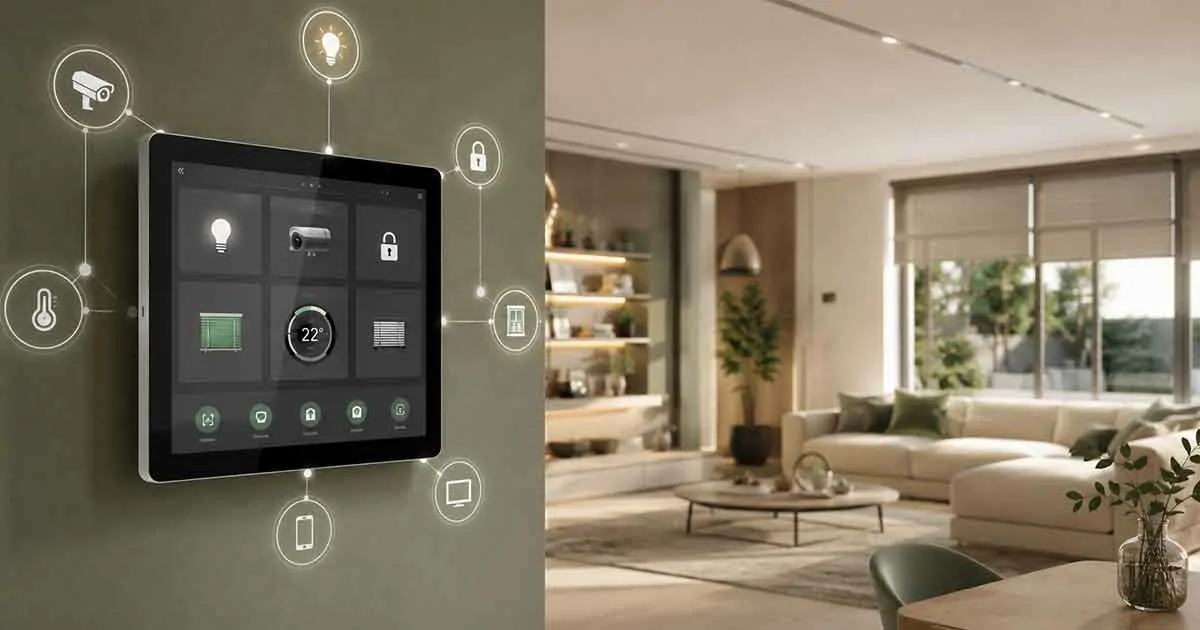
A smart home can start with a few connected devices, but managing dozens of lights, locks, thermostats, cameras, shades, and other systems can quickly become complicated. A smart home control panel provides a central interface for managing these devices from one place, making a connected home easier to operate.
Instead of opening separate apps for lighting, security, climate control, and entertainment, a control panel can bring many of these functions together. Depending on the system, homeowners may be able to control devices through a wall-mounted touchscreen, mobile app, voice commands, or automated scenes.
This guide explains what smart home control panels are, how they work, what they can control, the main types available, and what to consider before choosing one.
What Is a Smart Home Control Panel?
A smart home control panel is a centralized interface used to monitor and control connected devices and systems throughout a home.
It can provide access to functions such as:
- Smart lighting
- Thermostats and heating
- Smart locks
- Security cameras
- Door and window sensors
- Alarm systems
- Motorized blinds and shades
- Smart speakers
- Home entertainment
- Energy monitoring
The panel may communicate with devices directly or connect through a central hub or home automation platform.
Some control panels are simple touchscreens designed for basic commands, while advanced systems can coordinate multiple systems and execute complex automation routines.
How Do Smart Home Control Panels Work?
A control panel normally sits between the homeowner and the connected devices in the home.
When you select an action, such as turning off the lights, the command is transmitted through the appropriate communication network to the smart device.
Depending on the system, communication may use:
- Wi-Fi
- Zigbee
- Z-Wave
- Matter
- Bluetooth
- Ethernet
- Proprietary wireless protocols
Some systems use a dedicated smart home hub to coordinate devices, while others rely heavily on cloud services.
The overall architecture can look like this:
Control Panel → Hub or Platform → Smart Devices
More advanced systems may also connect directly to certain devices while using a hub for others.
What Can a Smart Home Control Panel Control?
The capabilities vary considerably between products and platforms. A well-designed system can become the central interface for several areas of the home.
Smart Lighting
Lighting is one of the most common uses.
You can use a control panel to:
- Turn lights on and off
- Dim compatible lights
- Control individual rooms
- Create lighting scenes
- Schedule lighting
- Control outdoor lighting
For example, a “Movie Night” scene could dim selected lights while turning on entertainment equipment.
Climate Control
A control panel can also provide centralized access to thermostats and heating or cooling equipment.
Depending on compatibility, users may be able to:
- Adjust temperature
- Change heating or cooling modes
- Set schedules
- Monitor indoor conditions
- Control multiple zones
This can make whole-home climate management considerably easier.
Home Security
Security integration can bring several devices into one interface.
A control panel may display or control:
- Door and window sensors
- Motion sensors
- Security cameras
- Smart locks
- Alarm systems
- Video doorbells
- Security lighting
For example, opening the security section of the panel could provide quick access to camera feeds and sensor status.
Smart Locks and Access
Compatible smart locks can be controlled from a central interface.
Depending on the system, homeowners may be able to:
- Lock doors
- Unlock doors
- Check lock status
- Create access codes
- Monitor access events
Remote unlocking should be used carefully because it can have security implications.
Motorized Blinds and Shades
Smart shades can also be integrated into whole-home control.
Users can create scenes that automatically adjust shades based on time, sunlight, or other conditions.
For example, a morning scene could open selected blinds while gradually turning on bedroom lighting.
Entertainment
Advanced systems can integrate televisions, speakers, receivers, and other entertainment equipment.
A single interface may allow users to:
- Start entertainment scenes
- Control volume
- Select sources
- Control compatible televisions
- Manage music playback
This is particularly useful in larger homes with multiple entertainment zones.
Types of Smart Home Control Panels
Not every control panel is designed for the same type of home.
Wall-Mounted Touchscreen Panels
Wall-mounted touchscreens provide a permanent interface in a convenient location.
They are commonly installed near:
- Entryways
- Kitchens
- Living rooms
- Master bedrooms
- Home offices
Their biggest advantage is accessibility. Anyone in the household can access the system without searching for a phone.
Mobile Control Panels
A smartphone or tablet can function as a control interface through a compatible app.
This approach is flexible and usually less expensive than installing dedicated hardware.
It also allows homeowners to control their systems remotely when the platform supports remote access.
Smart Displays
Smart displays combine touchscreen controls with voice assistants and other smart home features.
They can provide access to compatible devices while also functioning as information or entertainment displays.
Professional Home Automation Panels
Professional systems are designed for more complex installations.
They can integrate multiple home systems and provide advanced automation, centralized control, scheduling, and customized interfaces.
These systems are generally more expensive and may require professional installation.
Smart Home Control Panel vs Smart Home Hub
These two terms are often confused, but they perform different roles.
A smart home hub primarily handles communication between devices and the smart home platform.
A control panel is primarily the interface through which people interact with the system.
One system can contain both.
For example:
Touchscreen Control Panel → Smart Home Hub → Lights, Sensors, Locks, Thermostats
Some modern platforms combine these functions, while others separate them into different components.
Understanding this distinction is important when designing a whole-home smart system.
Benefits of a Smart Home Control Panel
A centralized control interface can provide several practical advantages.
Centralized Control
Instead of switching between numerous applications, users can access many devices from one interface.
This becomes increasingly valuable as the number of smart devices grows.
Easier Everyday Operation
A dedicated control panel can make common tasks faster.
Instead of manually adjusting several devices, a single scene can perform multiple actions.
For example, a “Good Night” scene might:
- Turn off downstairs lights
- Lock selected doors
- Adjust the thermostat
- Close smart shades
- Arm the security system
Better Visibility
A control panel can provide an overview of the home’s current status.
Depending on the system, you may be able to see whether:
- Doors are locked
- Windows are open
- Lights are on
- Security sensors are active
- The temperature is comfortable
More Convenient Automation
The real value of a control panel often comes from its connection to automation.
Instead of controlling every device manually, users can create rules that respond to schedules, sensors, occupancy, or other conditions.
Potential Drawbacks
A control panel is not automatically the best solution for every home.
Cost
Dedicated hardware and professional automation systems can be significantly more expensive than controlling devices through smartphone apps.
Compatibility
Not every control panel works with every smart device.
Compatibility should be checked before purchasing equipment.
Installation
Wall-mounted and professional systems may require wiring, network configuration, or professional installation.
Dependence on the Platform
Some systems are closely tied to a particular manufacturer or ecosystem.
If that platform changes its policies, hardware support, or cloud services, your control options may also be affected.
Security and Privacy
A centralized system can become an important part of your home’s digital infrastructure.
Strong passwords, secure Wi-Fi, software updates, and appropriate access controls are essential.
What to Look for When Choosing a Control Panel
Choosing the right panel starts with the devices and systems you already use.
Device Compatibility
Check whether the panel supports the products you intend to control.
Look for compatibility with relevant standards and ecosystems rather than assuming that all smart devices will work together.
Matter Support
Matter is becoming increasingly important for smart home interoperability.
A control system with appropriate Matter support can make it easier to integrate compatible devices from different manufacturers.
However, Matter support does not automatically mean that every feature of every device will be available through every platform.
Communication Protocols
Consider whether your system needs support for:
- Wi-Fi
- Zigbee
- Z-Wave
- Matter
- Bluetooth
- Ethernet
Supporting multiple protocols can provide greater flexibility.
User Interface
The interface should be easy to understand.
A technically powerful system is less useful if household members cannot operate it comfortably.
Look for:
- Clear menus
- Responsive controls
- Easy scene creation
- Readable status information
- Simple device organization
Automation Features
If your goal is whole-home automation, look beyond basic on/off control.
Consider whether the system supports schedules, scenes, sensors, triggers, and conditional automation.
Local vs Cloud Control
Some systems rely heavily on cloud services, while others can perform important functions locally.
Local control can provide advantages for reliability, privacy, and response time.
Remote Access
If you want to control your home while away, verify how remote access works and whether it requires a subscription.
Expandability
Your smart home will probably grow over time.
Choose a platform that can accommodate additional devices and systems rather than one that only meets your current needs.
How Many Control Panels Does a Home Need?
There is no universal number.
A small home may only need one central panel combined with smartphone access.
Larger homes may benefit from multiple strategically positioned panels.
For example, a larger property could use:
- One panel near the main entrance
- One in the main living area
- One in the primary bedroom
The objective should not be to install as many panels as possible. The goal is to provide convenient access where it is actually useful.
Smart Home Control Panels for Different Homes
For Beginners
A beginner does not necessarily need an expensive professional control panel.
A compatible smart display, tablet, or simple hub-based system may be enough to control lighting, thermostats, plugs, and other basic devices.
For Medium-Sized Homes
A centralized touchscreen combined with a compatible smart home platform can provide a good balance between convenience and complexity.
This setup can bring lighting, climate control, security, and shades together.
For Large or Complex Homes
Large properties with multiple zones and integrated security, lighting, climate, and entertainment systems may benefit from a professional automation platform.
These installations should be planned around the entire home’s infrastructure rather than selecting the control panel first.
How to Plan a Whole-Home Control System
The best approach is to design the system before buying individual devices.
Start by identifying the systems you want to control.
Then determine which communication standards and platforms can support them.
A practical planning process is:
- List your existing smart devices.
- Identify the systems you want to automate.
- Check device compatibility.
- Choose the main smart home platform.
- Select the hub or controller if required.
- Choose the control interface.
- Create basic scenes and automations.
- Test the system before expanding it.
This approach reduces compatibility problems and unnecessary purchases.
Are Smart Home Control Panels Worth It?
For homes with only a few smart devices, a dedicated control panel may not be necessary.
A smartphone, voice assistant, or existing smart display may provide sufficient control.
However, a smart home control panel becomes more valuable as the number of connected systems increases.
If your home includes lighting, security, climate control, locks, shades, and entertainment, a centralized interface can significantly simplify everyday operation.
The key is to choose the control system based on your home’s devices, communication standards, automation requirements, and future expansion plans.
Final Thoughts
A smart home control panel can serve as the central interface for a connected home, bringing multiple systems together into a more convenient experience.
The best solution depends on the size of the home, the devices being used, the desired level of automation, and the importance of compatibility and local control.
For a simple smart home, a basic touchscreen or mobile interface may be enough. For a larger property, a dedicated whole-home automation system can provide deeper integration and centralized management.
Rather than choosing a control panel based only on its appearance or features, start with the devices and systems you want to connect. Then choose a platform and control interface that can support those needs today while leaving room for the smart home to grow.