
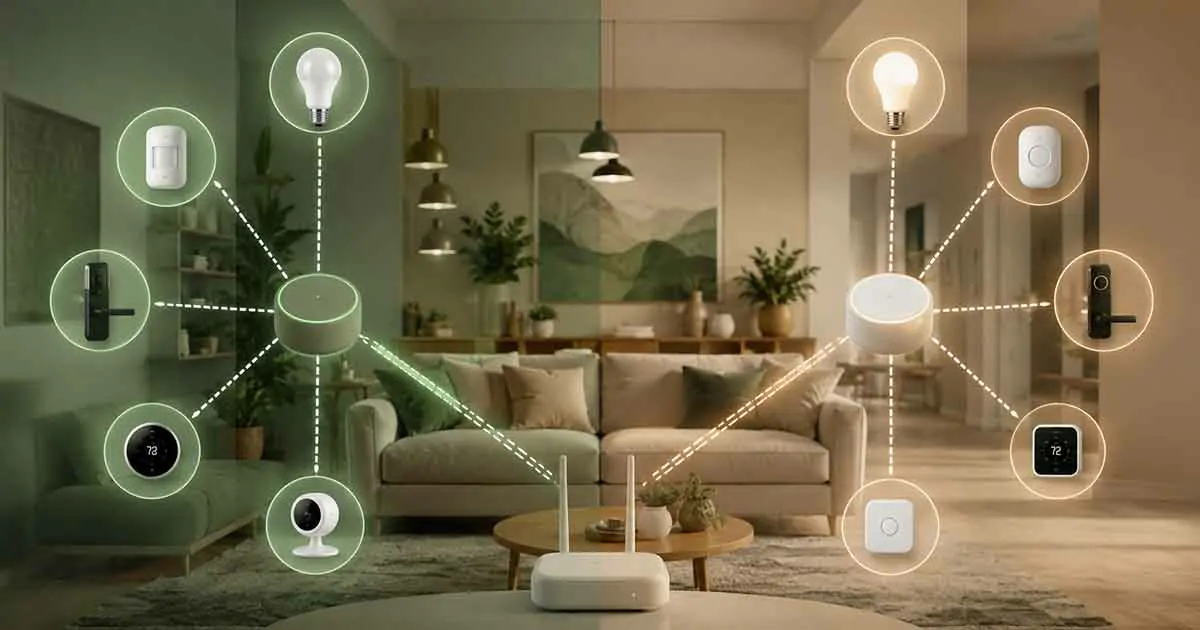
When building a smart home, choosing compatible devices is only part of the decision. The wireless technology connecting those devices can have a major impact on reliability, range, responsiveness, and how easily your system can grow.
Two of the best-known wireless technologies for smart home devices are Z-Wave and Zigbee.
Both are designed for low-power communication between connected devices, and both can create mesh networks that allow devices to communicate with one another. However, they differ in compatibility, device availability, network characteristics, and how they fit into a modern smart home.
In this guide, we compare Z-Wave vs Zigbee, explain how each technology works, and help you determine which option makes more sense for your home.
Table of Contents
What Is Z-Wave?
Z-Wave is a wireless communication technology designed specifically for home automation and connected devices.
Unlike traditional Wi-Fi devices, Z-Wave devices generally use a low-power mesh network. Compatible devices can communicate with one another, allowing signals to travel through multiple nodes instead of relying entirely on a single wireless connection.
Z-Wave is commonly used for products such as:
- Smart locks
- Motion sensors
- Door and window sensors
- Smart switches
- Smart plugs
- Lighting controls
- Security devices
- Thermostats
A Z-Wave controller manages the Z-Wave network and allows compatible devices to communicate with your smart home system.
What Is Zigbee?
Zigbee is another low-power wireless technology widely used for smart home and Internet of Things devices.
Like Z-Wave, Zigbee can create a mesh network. This means compatible devices can communicate with other devices nearby and help extend the network throughout the home.
Zigbee is used in a wide range of products, including:
- Smart lights
- Sensors
- Smart switches
- Smart plugs
- Thermostats
- Security devices
- Smart buttons
- Other home automation products
The technology has been adopted by many manufacturers, making Zigbee devices available across different categories and price ranges.
How Z-Wave and Zigbee Work
Both technologies use mesh networking rather than depending entirely on a traditional Wi-Fi connection.
In a mesh network, some powered devices can act as network nodes. Signals can travel from one device to another until they reach the intended destination.
For example, a sensor located far from the controller may communicate through another compatible device positioned between them.
This can provide better coverage than relying on a single wireless connection.
However, the exact performance of a mesh network depends on the number and placement of devices, building materials, interference, and the specific hardware being used.
Z-Wave vs Zigbee: Key Differences
Although Z-Wave and Zigbee serve similar purposes, there are several important differences to consider.
| Feature | Z-Wave | Zigbee |
|---|---|---|
| Primary purpose | Smart home automation | Smart home and broader IoT |
| Network type | Mesh | Mesh |
| Power consumption | Low | Low |
| Device range | Generally suitable for home use | Generally suitable for home use |
| Device ecosystem | Broad | Very broad |
| Controller required | Typically yes | Typically yes |
| Interference considerations | Generally lower congestion in many regions | Can share crowded 2.4 GHz space |
| Device selection | Large | Very large |
| Best for | Reliable home automation networks | Flexible and extensive device selection |
The most important point is that neither technology is universally better. The right choice depends on the devices you want to use and the type of smart home you are building.
Z-Wave vs Zigbee: Frequency and Interference
One important difference is the radio spectrum used by these technologies.
Zigbee commonly operates in the 2.4 GHz band, although regional implementations can use other frequencies.
Because 2.4 GHz is also widely used by Wi-Fi and Bluetooth, Zigbee networks can potentially encounter more radio-frequency congestion depending on the environment.
Z-Wave uses different sub-GHz frequency bands depending on the region.
This can provide an advantage in environments where the 2.4 GHz spectrum is heavily occupied.
However, interference is only one part of wireless performance. Network design, device placement, antenna quality, and the surrounding environment also matter.
Z-Wave Mesh Networks
One of the strengths of Z-Wave is its focus on home automation.
Z-Wave devices can form a mesh network in which compatible powered devices help relay communication.
This means adding suitable devices throughout the home can improve network coverage.
A well-designed Z-Wave network can therefore work effectively across multiple rooms without requiring every device to communicate directly with the central controller.
Battery-powered devices generally behave differently from continuously powered devices because they need to conserve energy.
Zigbee Mesh Networks
Zigbee also uses mesh networking.
Powered Zigbee devices can act as routers, allowing communication to travel across the network.
This makes Zigbee particularly useful for larger installations where many compatible devices are distributed throughout the home.
As with Z-Wave, the quality of the network depends heavily on device placement and the number of devices participating in the mesh.
A single Zigbee device placed far away from the rest of the network may not perform well if there are insufficient routing devices between it and the coordinator.
What Is a Z-Wave Controller?
A Z-Wave controller is the component responsible for managing a Z-Wave network.
It allows compatible Z-Wave devices to join the network and provides a way for a smart home platform to communicate with them.
Depending on the system, the controller may be built into a dedicated smart home hub or provided through another compatible device.
The controller is important because Z-Wave devices generally cannot simply communicate with a standard Wi-Fi router in the same way a Wi-Fi smart plug or camera can.
Before buying Z-Wave devices, check which controller or hub will manage them and whether it supports the specific devices you intend to use.
Z-Wave Device Compatibility
One of the major considerations when buying Z-Wave devices is compatibility.
Z-Wave has historically placed strong emphasis on interoperability between certified devices. However, compatibility with a specific smart home platform can still vary.
A device may support Z-Wave but have features that require specific platform support.
Before purchasing a product, check:
- Z-Wave compatibility
- Regional frequency requirements
- Controller compatibility
- Supported device features
- Required software
- Whether firmware updates are available
This is particularly important when building a system from products made by different manufacturers.
Zigbee Device Compatibility
Zigbee has an extensive selection of smart home products.
However, Zigbee compatibility can sometimes be more complicated than simply seeing the Zigbee logo on a product.
Different Zigbee implementations and device profiles can affect how products interact with specific platforms.
A Zigbee device may technically use the same wireless technology as another product but still require appropriate support from the coordinator or smart home platform.
For this reason, compatibility lists and platform documentation are worth checking before buying.
Which Has Better Range: Z-Wave or Zigbee?
There is no universal winner.
Actual wireless range depends on:
- Building construction
- Walls and floors
- Device placement
- Antenna design
- Interference
- Network topology
- The number of routing devices
Z-Wave’s use of sub-GHz frequencies in many markets can provide favorable propagation characteristics through walls compared with 2.4 GHz signals.
Zigbee can compensate with a well-designed mesh network and strategically positioned powered devices.
For a typical home, either technology can provide sufficient coverage when the network is designed correctly.
Which Is More Reliable?
Both Z-Wave and Zigbee can provide reliable communication when properly configured.
Reliability depends on more than the wireless protocol itself.
A poorly designed network with too few routing devices can experience problems regardless of whether it uses Z-Wave or Zigbee.
For important devices such as security sensors and smart locks, reliability should be evaluated based on the complete ecosystem rather than the protocol name alone.
Z-Wave vs Zigbee for Smart Lighting
Both technologies can work well for smart lighting.
Zigbee has a particularly large selection of smart lighting products, including bulbs, switches, remotes, and sensors.
Z-Wave also offers lighting controllers, switches, dimmers, and related devices.
If your primary goal is building a large lighting installation, Zigbee may provide more product choices.
If you are building a broader automation system where locks, sensors, security devices, and switches are equally important, Z-Wave can also be an excellent option.
Z-Wave vs Zigbee for Home Security
Both technologies are suitable for many security-related applications.
Compatible products can include:
- Door sensors
- Window sensors
- Motion detectors
- Sirens
- Smart locks
- Alarm devices
- Water leak sensors
- Smoke and safety sensors
The most important factor is reliability.
For security-related devices, choose products with strong reviews, dependable hardware, appropriate battery life, and compatibility with a reliable controller.
Do not choose a protocol solely because it is advertised as faster or more popular.
Z-Wave vs Zigbee for Smart Locks
Smart locks are one area where Z-Wave has historically been popular.
Z-Wave’s focus on home automation and its presence in security products make it a common option for connected locks.
Zigbee also supports smart locks and other access-control products.
When selecting a smart lock, however, the individual product matters more than simply choosing between Z-Wave and Zigbee.
Consider battery life, security features, local control, compatibility with your controller, and whether the lock remains usable if your internet connection goes down.
Power Consumption
Both Z-Wave and Zigbee are designed for low-power applications.
This makes them suitable for battery-powered sensors that may need to operate for long periods.
A sensor can remain mostly inactive and communicate only when an event occurs, reducing energy consumption.
Actual battery life varies considerably depending on the device, reporting frequency, battery type, environmental conditions, and software configuration.
Is Z-Wave Faster Than Zigbee?
Speed is often discussed when comparing these technologies, but maximum theoretical data rates are not necessarily the most important factor in a smart home.
Most smart home devices transmit very small amounts of data.
A motion sensor, door sensor, or smart switch does not require the same bandwidth as a video camera.
For these applications, reliability, latency, network stability, and compatibility are usually more important than raw throughput.
Z-Wave vs Zigbee vs Wi-Fi
Z-Wave and Zigbee are not direct replacements for every Wi-Fi smart home device.
Wi-Fi is better suited to devices that require higher bandwidth, such as:
- Security cameras
- Video doorbells
- Smart TVs
- Streaming devices
- Some smart speakers
Z-Wave and Zigbee are better suited to low-bandwidth devices such as:
- Sensors
- Switches
- Locks
- Smart plugs
- Lighting controls
A modern smart home can use all three technologies.
For example, cameras can use Wi-Fi or Ethernet while sensors and switches use Z-Wave or Zigbee.
Z-Wave vs Zigbee vs Matter
Matter is a newer smart home standard designed to improve interoperability between compatible smart home products and platforms.
Matter is different from Z-Wave and Zigbee because it operates at a different layer of the smart home technology stack.
A Matter-compatible product can use underlying network technologies such as Wi-Fi, Ethernet, or Thread depending on the device.
This means Matter does not simply replace Z-Wave or Zigbee in every existing installation.
If you are building a new smart home, it is worth considering Matter and Thread alongside Z-Wave and Zigbee rather than assuming that one technology must replace all others.
Which Is Better for Beginners?
For beginners, the easiest technology is usually the one supported by the smart home platform and devices they already plan to use.
Zigbee can be attractive because of its large selection of affordable devices.
Z-Wave can be attractive for users who prioritize a dedicated home automation ecosystem and want access to a wide range of sensors, switches, locks, and security products.
Neither requires you to understand every technical detail before getting started.
The important thing is to choose one compatible ecosystem and avoid buying devices randomly from multiple incompatible platforms.
Which Should You Choose?
Choose Z-Wave if:
- You want a dedicated home automation network.
- You are interested in smart locks and security devices.
- You prefer sub-GHz wireless communication where available.
- You want a mature smart home technology.
- Your chosen controller has strong Z-Wave support.
Choose Zigbee if:
- You want a large selection of smart home devices.
- You are particularly interested in smart lighting.
- You want access to many affordable devices.
- Your chosen platform has strong Zigbee support.
- You are comfortable building a mesh network with compatible devices.
For many households, the best choice is determined by the controller and devices they already own.
How to Build a Reliable Z-Wave or Zigbee Network
Regardless of which technology you choose, network design matters.
Start With the Controller
Place the controller in a practical central location when possible.
Avoid hiding it behind large appliances, inside metal cabinets, or in areas with excessive wireless interference.
Add Powered Devices
Powered switches, plugs, and other continuously connected devices can help build the mesh network.
This is especially useful when you need to reach sensors located farther away.
Avoid Building the Network Too Quickly
Start with a few reliable devices.
Confirm that they communicate properly before adding a large number of products.
Test Difficult Areas
If you have a basement, garage, upper floor, or detached area, test connectivity before installing important devices there.
Keep Firmware Updated
Controller and device firmware updates can improve compatibility, stability, and security.
Common Mistakes to Avoid
One of the biggest mistakes is choosing devices before choosing the technology and controller.
It is better to establish your smart home architecture first and then purchase compatible products.
Another mistake is assuming that every Zigbee device works perfectly with every Zigbee controller or that every Z-Wave device exposes every feature on every platform.
Protocol compatibility does not always guarantee identical feature support.
Finally, avoid creating an unnecessarily complicated system.
A smaller network with reliable devices is often better than a large network filled with products that are difficult to manage.
Final Verdict: Z-Wave or Zigbee?
There is no single winner in the Z-Wave vs Zigbee debate.
Both technologies provide low-power wireless communication, mesh networking, and support for a broad range of smart home devices.
Z-Wave can be an excellent choice for homeowners who prioritize home automation, security devices, smart locks, and a dedicated wireless ecosystem.
Zigbee can be a strong choice for homeowners who want extensive device selection, flexible smart lighting options, and an affordable way to build a large mesh network.
The most important decision is not simply choosing the protocol with the better specifications. Choose the technology that fits your controller, existing devices, preferred smart home platform, and future plans.
A well-designed Z-Wave or Zigbee network can provide a reliable foundation for a smarter, more automated home.