
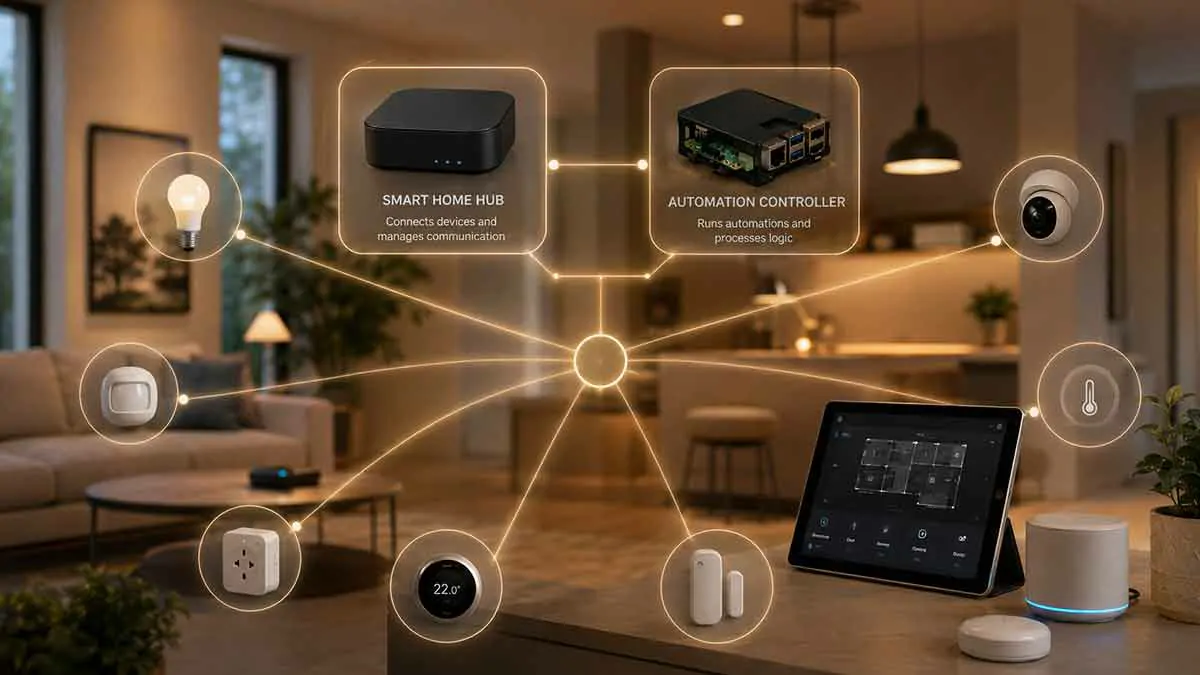
Smart home hubs and controllers are often described as if they are the same thing, but they can serve different roles in a connected home.
The confusion is understandable because manufacturers and smart home platforms sometimes use terms such as hub, controller, bridge, gateway, and home hub differently. A device can also perform more than one role at the same time.
Understanding the difference is useful when building a smart home because choosing the wrong hardware can lead to unnecessary costs, compatibility problems, or a system that is more complicated than it needs to be.
In this guide, we explain what a smart home hub is, what a controller does, how the two differ, when you need each one, and how modern standards such as Matter and Thread affect the decision.
What Is a Smart Home Hub?
A smart home hub is a device or system that helps smart home devices communicate and work together.
Depending on the technology, a hub may provide communication with devices using protocols such as Zigbee, Z-Wave, or other supported technologies.
For example:
Smart sensor → Hub → Smart home platform
The hub can act as an intermediary between devices that cannot communicate directly with your main network or smart home platform.
A hub may also provide additional functions such as:
- Device management
- Local communication
- Automation support
- Protocol conversion
- Remote access
- Integration with other smart home platforms
The exact role depends on the specific product.
What Is a Smart Home Controller?
A smart home controller is the system that determines how devices should behave.
It can receive information from sensors and devices, evaluate rules, and then send commands to other devices.
For example:
Motion detected → Controller checks conditions → Light turns on
The controller is therefore closely associated with the logic and management of the smart home.
A controller can be software running on a computer, a dedicated smart home hub, a cloud service, or another capable device.
This is where much of the automation logic happens.
Hub vs Controller: The Basic Difference
The simplest way to understand the difference is:
Hub = communication and connectivity
Controller = management and automation logic
A hub helps devices communicate.
A controller decides what should happen.
However, modern smart home products frequently combine both roles in one device.
That is why the terminology can become confusing.
Can One Device Be Both a Hub and a Controller?
Yes.
Many modern smart home systems combine hub and controller functions.
For example, a smart home hub may:
- Connect Zigbee devices
- Manage compatible accessories
- Run automations
- Provide a dashboard
- Communicate with cloud services
In that situation, the same physical device is both a hub and controller.
This combined approach is common because it simplifies installation.
Instead of purchasing separate hardware for communication and automation, one device can provide both functions.
What Does a Hub Actually Do?
A hub is primarily concerned with connecting devices and making different communication technologies available to your smart home system.
For example, a Zigbee hub can communicate with compatible Zigbee lights and sensors.
A Z-Wave hub can communicate with Z-Wave devices.
A Thread border router can provide network connectivity for Thread devices.
The hub is therefore closely associated with the communication layer of the smart home.
A useful analogy is to think of a hub as part of the home’s transport infrastructure.
It helps information move between devices and the systems controlling them.
What Does a Controller Actually Do?
A controller is more concerned with decision-making.
It can evaluate rules such as:
If motion is detected and it is nighttime, turn on the hallway light.
The controller processes the trigger and condition, then performs the required action.
Controllers can also manage:
- Scenes
- Automations
- Schedules
- Device states
- Notifications
- Presence
- Energy rules
- Other smart home logic
This is why the controller is often the most important part of a sophisticated automation system.
Smart Home Hub vs Controller Example
Imagine a motion sensor and smart light that use Zigbee.
The sensor detects movement.
The Zigbee hub receives the sensor event.
The controller evaluates the automation:
Motion detected + after sunset = turn on hallway light
The command is then sent to the smart light through the appropriate communication path.
In a combined system, the same device may perform all of these functions.
In a more modular system, different components may handle them.
Dedicated Hubs
Some smart home ecosystems use dedicated hubs.
Examples can include hubs designed specifically for:
- Zigbee
- Z-Wave
- Proprietary wireless devices
- Security systems
- Lighting systems
A dedicated hub can be useful when you have many devices using the same technology.
The main advantage is compatibility.
The disadvantage is that adding several ecosystems can mean adding several hubs.
This can increase hardware requirements and make the overall setup more complicated.
Smart Home Controllers
Controllers can take several forms.
Dedicated Controller
A physical device designed to manage a smart home.
Home Automation Server
A computer or small server running software that manages devices and automations.
Smart Home Hub With Controller Functions
A hub that also runs the automation logic.
Cloud Controller
A cloud-based service that processes commands and automations remotely.
The best approach depends on your preferred ecosystem, technical experience, and requirements for local control.
Software Controllers
A controller does not have to be a physical box.
Home automation software can act as the controller.
For example, software running on a Raspberry Pi, mini PC, or dedicated smart home hardware can manage connected devices and execute automations.
This approach is useful when you want greater control over your system.
It can also make it easier to combine devices from different manufacturers.
Hub vs Controller in a Matter Smart Home
Matter changes the picture because it is designed to improve interoperability between compatible smart home devices and platforms.
A Matter ecosystem can still involve several different roles.
For example:
- A Matter controller manages Matter devices.
- A Thread border router connects Thread devices to the IP network.
- The smart home platform provides automation and user control.
These functions can be built into the same product or provided by separate devices.
This modular structure is one reason modern smart home terminology can be confusing.
What Is a Matter Controller?
A Matter controller is a device or software component that manages Matter devices within a Matter fabric.
It is responsible for functions such as commissioning and controlling compatible Matter accessories.
A Matter controller is therefore not simply the same thing as a conventional wireless hub.
The roles are related, but they address different parts of the smart home architecture.
Modern smart home platforms can combine Matter controller functionality with other home automation functions.
What Is a Thread Border Router?
A Thread border router is not the same thing as a smart home controller.
Its main job is to connect a Thread network to another IP network.
Thread devices can communicate with one another using the Thread mesh, while the border router provides connectivity between Thread and the broader network.
A single product can sometimes act as:
- Thread border router
- Matter controller
- Smart home controller
- Smart speaker
- Home hub
When several roles are combined in one device, the differences become much less visible to the homeowner.
Hub, Bridge, Gateway, and Controller
These terms are often confused.
Hub
Usually connects or manages compatible devices using a particular protocol or ecosystem.
Bridge
Usually connects one ecosystem or technology to another.
For example, a bridge can expose devices from one manufacturer’s ecosystem to another smart home platform.
Gateway
A gateway connects different networks or systems and can perform communication or protocol-related functions.
Controller
Manages device behavior and automation logic.
These definitions can vary by manufacturer, so the product documentation should always be checked.
Do You Need a Smart Home Hub?
Not necessarily.
Some devices connect directly to Wi-Fi and do not require a dedicated hub.
Others use technologies such as Zigbee, Z-Wave, or Thread and may need additional infrastructure.
Your need for a hub depends on:
- Device communication technology
- Smart home platform
- Number of devices
- Required automation features
- Local control requirements
- Whether your existing equipment already provides hub functions
A small smart home may operate with only Wi-Fi devices and a compatible smart home platform.
A larger system may benefit from a hub-based architecture.
Do You Need a Separate Controller?
Again, not necessarily.
You may already own a device that provides controller functionality.
For example, a compatible smart home hub, smart speaker, streaming device, or home automation server may already manage automations.
A separate controller is more likely to be useful when you want:
- Advanced automation
- Multi-brand compatibility
- Local processing
- More complex logic
- Greater customization
- A dedicated home automation server
Before buying additional hardware, check whether your existing system already performs the required function.
Hub vs Controller for Beginners
For beginners, the easiest approach is usually to choose a smart home ecosystem that combines as many functions as possible.
A combined device can reduce:
- Number of hubs
- Configuration steps
- Compatibility issues
- Maintenance requirements
For example, a smart home platform may include:
- Device connectivity
- Automation
- Voice control
- Dashboard
- Remote access
This can provide a simpler entry point than building a fully modular system.
Hub vs Controller for Advanced Users
Advanced users may prefer a more modular architecture.
A system could include:
Zigbee coordinator → Home automation server → Smart home dashboard
or:
Thread border router → Matter controller → Automation platform
This approach offers greater flexibility but also increases the amount of hardware and configuration involved.
It is most useful when you have specific technical requirements rather than simply wanting a larger number of smart devices.
Local vs Cloud Controllers
One of the most important controller decisions is whether automation runs locally or in the cloud.
Local Controller
The controller runs inside your home network.
Potential benefits include:
- Faster response
- Greater independence from internet outages
- More control over data
- Reduced cloud dependency
Cloud Controller
Automation processing occurs through an external service.
Potential advantages include:
- Easier remote access
- Simpler setup
- Managed infrastructure
The disadvantage is greater dependence on internet access and third-party services.
Some modern systems use a hybrid model, with local and cloud functions operating together.
Why Local Control Matters
Local control can be valuable for automations that need to work quickly or remain functional during an internet outage.
For example:
Motion sensor → Local controller → Hallway light
can potentially operate without sending the event to a remote cloud service.
However, local operation depends on the devices and integrations involved.
A smart home platform may support local control for one device while requiring cloud access for another.
Hub vs Controller for Security
Security systems deserve particular attention.
A smart home hub can provide communication with sensors, locks, and other devices.
A controller can coordinate those devices and trigger automations.
However, critical security functions should not depend entirely on a single consumer smart home controller.
Consider maintaining:
- Physical access
- Independent safety systems
- Manual controls
- Backup power where appropriate
- Reliable network infrastructure
Smart home automation should support your security strategy rather than becoming its only protection.
Hub vs Controller for Energy Saving
The distinction also matters for energy automation.
A hub can connect energy sensors and smart plugs.
The controller can then analyze information and automate actions.
For example:
Energy sensor → Controller detects high consumption → Smart plug changes state
This allows the communication infrastructure and automation logic to work together.
The same architecture can be used for lighting, climate control, and other energy-related functions.
Common Mistakes When Choosing a Hub or Controller
Buying a Hub Without Checking Compatibility
A hub may support one protocol but not another.
Buying Multiple Hubs Unnecessarily
Several devices can sometimes be managed through one platform.
Assuming Matter Eliminates Everything Else
Matter improves interoperability, but it does not remove the need for appropriate network infrastructure and controllers.
Ignoring Local Control
Check whether your important automations continue to work without internet access.
Confusing a Bridge With a Controller
A bridge may connect ecosystems without providing the full automation capabilities of a controller.
Choosing Hardware Before Planning the System
Start with the devices and automations you actually need, then determine what infrastructure supports them.
How to Choose Between a Hub and Controller
Ask these questions before buying anything:
What devices do I want to connect?
Which wireless technologies do they use?
Which smart home platform do I want?
Do I need advanced automation?
Do I want local control?
Do I need remote access?
Can my existing equipment already act as a hub or controller?
The answers will determine whether you need a dedicated hub, a controller, or a device that combines both.
A Simple Smart Home Architecture
A beginner system could look like:
Smart devices → Home hub → Smart home app
An intermediate system might look like:
Smart devices → Hub → Controller → Dashboard
A more advanced Matter and Thread system could look like:
Thread devices → Thread border router → Matter controller → Automation platform
These architectures can overlap, and a single physical product may perform several roles.
Hub vs Controller: Which One Should You Buy?
There is no universal winner because the two components serve different purposes.
Choose a hub when you need a communication layer for devices using a specific technology or ecosystem.
Choose a controller when you need a system that manages automations, rules, device states, and smart home behavior.
Choose a device that combines both when you want a simpler setup.
For most beginners, a combined solution is usually the easiest starting point.
For advanced users, separating the roles can provide greater flexibility and customization.
Final Thoughts
The difference between a smart home hub and controller becomes clearer when you separate communication from decision-making.
A hub generally helps devices communicate with the smart home system.
A controller manages the logic that determines what those devices should do.
Modern smart home products often combine both roles, which is why the terminology can seem inconsistent.
Matter, Thread, Zigbee, Wi-Fi, and other technologies add additional layers to the architecture, but the fundamental concept remains the same.
Before buying new hardware, identify the devices you want to use, the protocols they require, and the automation features you need.
For a beginner, a device that combines hub and controller functionality can keep the system simple. For a more advanced installation, separating communication and control can provide greater flexibility.
The best smart home architecture is not the one with the most hardware. It is the one that gives you the connectivity, automation, reliability, and control your home actually needs.