
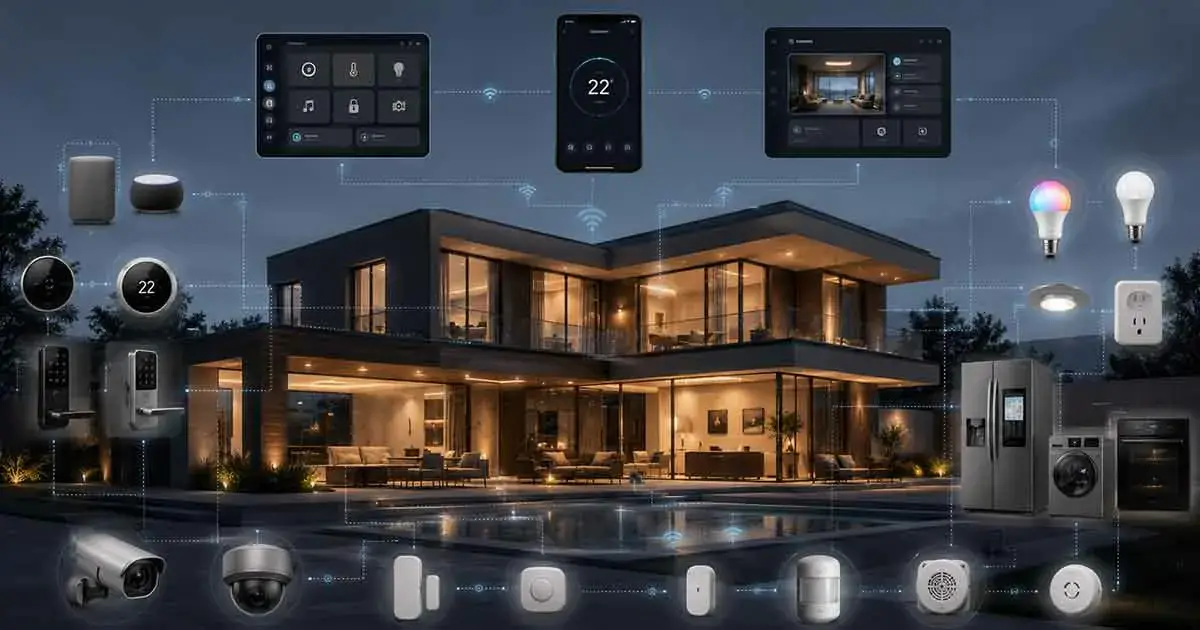
Choosing the best smart home automation system is not simply about finding the system with the most compatible devices. A good automation platform should make it easy to connect devices, create useful routines, expand the system over time, and maintain reliable control of the home.
The right choice also depends on how much control you want, which devices you already own, whether you prefer local or cloud-based automation, and which ecosystem fits your household.
Some homeowners want a simple system that works with voice commands and popular smart devices. Others want advanced automation, local processing, broad protocol support, or greater control over their data.
This guide compares some of the strongest smart home automation systems for modern homes and explains what each one does best.
Table of Contents
What Is a Smart Home Automation System?
A smart home automation system is a platform that connects compatible smart devices and allows them to be controlled or automated through a central software environment.
Depending on the platform, you may be able to connect:
- Smart lights
- Smart plugs
- Thermostats
- Sensors
- Smart locks
- Security devices
- Motorized shades
- Smart appliances
- Speakers and displays
- Energy management devices
The platform then provides the tools needed to create routines and automations.
For example:
Motion detected after sunset → hallway light turns on.
Or:
Everyone leaves home → lights turn off and the thermostat changes to an energy-saving setting.
The quality of the automation platform determines how easily these relationships can be created and maintained.
How We Evaluate Smart Home Automation Systems
There is no single system that is best for every household.
For this comparison, the most important factors are:
Device Compatibility
A good platform should support a broad selection of devices and standards.
Compatibility becomes increasingly important as the system grows.
Automation Flexibility
Basic systems can handle simple schedules and routines.
More advanced platforms can combine multiple triggers, conditions, devices, and actions.
Ease of Use
A powerful system is not necessarily a good choice if everyday users find it confusing.
The best platform should make common tasks straightforward.
Local Control
Some platforms can perform important automations locally rather than depending entirely on remote cloud services.
Local operation can reduce dependence on an internet connection and may improve response times for certain tasks.
Smart Home Standards
Modern platforms increasingly support standards such as Matter and wireless technologies such as Thread.
Matter is designed to improve interoperability between compatible smart home devices and platforms.
Expansion Potential
A system should continue to be useful when you add more rooms and devices.
Privacy and Security
The platform’s approach to accounts, data, cloud services, local processing, and device security should also be considered.
Best Smart Home Automation Systems at a Glance
| System | Best For | Main Strength |
|---|---|---|
| Home Assistant | Advanced users | Maximum customization |
| Homey Pro | Broad device integration | Powerful all-in-one automation |
| Hubitat Elevation | Local automation | Local processing and advanced rules |
| Samsung SmartThings | Balanced smart homes | Broad ecosystem integration |
| Google Home | Google users | Easy everyday control |
| Amazon Alexa | Voice-focused homes | Broad device compatibility and routines |
| Apple Home | Apple households | Simple ecosystem integration and privacy focus |
The best option depends more on your priorities than on a universal ranking.
1. Home Assistant — Best for Advanced Automation
Home Assistant is one of the strongest choices for homeowners who want extensive control over their automation environment.
It is particularly attractive to technically experienced users who want to build highly customized automations.
Instead of treating the smart home as a collection of isolated products, Home Assistant can act as a central automation platform connecting devices and services from different ecosystems.
Why Choose Home Assistant?
Its biggest advantage is flexibility.
Advanced users can create detailed automations based on:
- Time
- Presence
- Motion
- Temperature
- Energy consumption
- Device states
- Multiple conditions
- External events
This makes it possible to create highly specific automation logic.
Advantages
- Extensive customization
- Strong automation capabilities
- Large integration ecosystem
- Excellent potential for local control
- Suitable for complex smart homes
- Strong option for avoiding dependence on one manufacturer
Disadvantages
- Higher learning curve
- Setup can require more technical knowledge
- Configuration can become complex
- Troubleshooting may require more effort
Best For
Home Assistant is best for homeowners who want maximum control and customization rather than the simplest possible setup.
2. Homey Pro — Best for Broad Multi-Protocol Automation
Homey Pro is designed as an all-in-one smart home controller with support for multiple communication technologies and device ecosystems.
Its appeal is particularly strong for homeowners who want broad compatibility without building the entire automation environment themselves.
Why Choose Homey Pro?
A modern smart home may contain devices using different communication technologies.
Instead of designing the system around one protocol, a multi-protocol controller can provide a central point for managing different types of devices.
This can be useful in homes that contain a mixture of technologies.
Advantages
- Broad device integration
- Strong automation capabilities
- Designed as a central smart home controller
- Suitable for multi-room installations
- Good option for users who want advanced features without building everything from scratch
Disadvantages
- Higher upfront cost than simple smart home platforms
- Some features may be unnecessary for basic users
- Requires planning when building a large system
Best For
Homey Pro is particularly suitable for homeowners who want a powerful central automation platform with broad device support.
3. Hubitat Elevation — Best for Local Automation
Hubitat Elevation is designed around local smart home automation.
This makes it appealing to users who prioritize fast automation, reliability, and reduced dependence on cloud services.
Why Choose Hubitat?
Local processing means that compatible automations can operate within the home rather than relying entirely on remote services.
This can be particularly useful for important routines that need to continue operating when internet connectivity is interrupted.
Advantages
- Strong local automation
- Advanced automation rules
- Good support for complex routines
- Suitable for experienced users
- Reduced dependence on cloud processing for supported functions
Disadvantages
- Less beginner-friendly than mainstream platforms
- Configuration can require more effort
- The interface may feel less polished to casual users
Best For
Hubitat is a strong choice for homeowners who prioritize local automation and advanced control.
4. Samsung SmartThings — Best Balanced Ecosystem
Samsung SmartThings is a strong option for homeowners looking for a balance between accessibility, device integration, and automation capabilities.
It can connect a broad range of smart home products and can serve as the central platform for many types of connected devices.
Why Choose SmartThings?
SmartThings can be particularly attractive for households that already use Samsung products.
It also supports automation and integrations beyond Samsung hardware, making it more flexible than a platform restricted to one manufacturer’s products.
Advantages
- Broad ecosystem
- Good automation capabilities
- Suitable for beginners and intermediate users
- Strong integration with Samsung products
- Supports modern smart home standards
Disadvantages
- Experience can depend on the devices and services connected to it
- Some advanced automations require more configuration
- Ecosystem changes can affect long-term platform decisions
Best For
SmartThings is a good choice for households wanting a balanced smart home platform without the technical complexity of a fully customized system.
5. Google Home — Best for Google-Centered Homes
Google Home is a strong option for households already using Google’s ecosystem.
The platform combines device control, routines, automations, smart displays, and voice interaction.
Google distinguishes between routines and automations, with automations able to respond to events or conditions such as motion, door activity, or time of day.
Why Choose Google Home?
Google Home can be attractive for users who want a relatively straightforward way to control compatible devices.
It is especially useful for households that already use Google services and compatible Nest products.
Advantages
- Easy everyday control
- Strong integration with Google’s ecosystem
- Voice control
- Smart display support
- Matter support
- Useful automation features
Google Home supports Matter-compatible devices through compatible hubs and controllers within its ecosystem.
Disadvantages
- Advanced users may want more customization
- Experience can depend on supported devices
- Platform changes can affect long-term workflows
Best For
Google Home is a good choice for households already invested in Google devices and services.
6. Amazon Alexa — Best for Voice-Focused Smart Homes
Amazon Alexa remains a major smart home platform and is particularly well suited to households that prefer voice control.
Alexa supports many categories of smart devices, including lighting, appliances, thermostats, and cameras.
Compatible Echo devices can also act as Matter administrators for supported Matter devices, allowing compatible products to connect locally to Alexa.
Why Choose Alexa?
Alexa can be useful when voice interaction is an important part of the household’s smart home experience.
Users can combine voice commands with routines and automated actions.
Advantages
- Strong voice control
- Broad device ecosystem
- Large selection of compatible products
- Useful routines
- Matter support
- Good option for households already using Amazon devices
Disadvantages
- Some advanced functionality can depend on specific devices or services
- Cloud services remain important for many features
- Privacy considerations should be reviewed carefully
Best For
Alexa is a strong choice for voice-focused households and users who want broad compatibility.
7. Apple Home — Best for Apple Households
Apple Home is particularly attractive to households that already use iPhone, iPad, Apple TV, or other Apple products.
Its main strength is integration with Apple’s ecosystem.
Matter also allows compatible smart home accessories from different manufacturers to work with supported smart home platforms, including Apple Home.
Why Choose Apple Home?
Apple Home can provide a clean and familiar experience for users already invested in Apple hardware.
It can also be attractive to users who place a high value on privacy and ecosystem integration.
Advantages
- Excellent Apple ecosystem integration
- Simple device management
- Siri voice control
- Strong privacy positioning
- Matter support
- Good choice for Apple-centric households
Disadvantages
- Best experience generally requires Apple hardware
- Compatibility can be more restrictive than highly open platforms
- Advanced users may prefer a more customizable system
Best For
Apple Home is best for households heavily invested in the Apple ecosystem.
Smart Home Automation System Comparison
The following comparison summarizes the main differences.
| Platform | Ease of Use | Automation | Customization | Local Control | Best For |
|---|---|---|---|---|---|
| Home Assistant | Moderate | Excellent | Excellent | Excellent | Advanced users |
| Homey Pro | Good | Excellent | Very good | Strong | Multi-protocol homes |
| Hubitat | Moderate | Excellent | Very good | Excellent | Local automation |
| SmartThings | Good | Very good | Good | Good | Balanced setups |
| Google Home | Very good | Good | Moderate | Good for supported features | Google households |
| Alexa | Very good | Very good | Moderate | Good for supported Matter/local features | Voice control |
| Apple Home | Very good | Very good | Moderate | Strong for supported features | Apple households |
These ratings are best understood as relative strengths rather than absolute technical scores.
Which Smart Home Automation System Is Best Overall?
There is no single system that wins for every homeowner.
For advanced users who want maximum customization, Home Assistant is one of the strongest options.
For a multi-protocol system designed to bring many types of devices together, Homey Pro is a strong choice.
For local automation, Hubitat Elevation deserves serious consideration.
For a balanced ecosystem, Samsung SmartThings is an attractive option.
For households already using Google products, Google Home is a natural choice.
For voice-focused homes, Amazon Alexa remains highly competitive.
For Apple users, Apple Home is often the most natural ecosystem.
Best System for Beginners
Beginners should generally prioritize simplicity over maximum technical flexibility.
A complicated automation platform may offer hundreds of advanced possibilities, but those features have little value if setting up a basic routine becomes frustrating.
For beginners, mainstream ecosystems such as Google Home, Amazon Alexa, Apple Home, and SmartThings can provide a relatively accessible starting point.
The best choice should be based on the devices already present in the home.
Best System for Advanced Users
Advanced users often have different priorities.
They may want:
- Complex automation rules
- Local processing
- Multiple protocols
- Custom integrations
- Advanced sensors
- Energy monitoring
- Presence detection
- Detailed conditions
- Greater control over data
Home Assistant and Hubitat are particularly compelling for this type of user.
Homey Pro can also be attractive when broad device compatibility and a centralized controller are important.
Best System for Apple Users
If most members of the household already use Apple devices, Apple Home is a logical starting point.
The main advantage is ecosystem consistency.
Before buying new accessories, however, verify compatibility with the current Apple Home and Matter environment.
Choosing compatible products from the beginning can prevent unnecessary platform switching later.
Best System for Google Users
Google Home makes sense for households already using Google services and compatible Nest products.
It can provide a relatively simple way to manage devices, voice interactions, routines, and automations from one ecosystem.
Google’s current platform also emphasizes Matter compatibility and automation based on household events and conditions.
Best System for Alexa Users
Alexa is particularly attractive for households that already use Echo devices or other Amazon hardware.
Its broad device ecosystem can make it easier to add different categories of smart products.
Matter support also expands the range of compatible products that can be integrated into Alexa.
Best System for Local Automation
If local processing is a major priority, consider platforms designed around local automation.
Home Assistant and Hubitat are particularly strong candidates.
Local automation can provide advantages such as:
- Reduced cloud dependence
- Potentially faster responses
- Greater control over automation behavior
- Continued operation of supported automations during some internet outages
However, local operation varies by device and integration, so homeowners should verify how each specific device behaves offline.
Best System for a Large Home
Large homes require more than a powerful controller.
Network design, wireless coverage, device placement, and protocol selection can all affect reliability.
For a large installation, look for a platform that supports:
- Multiple rooms
- Multiple device types
- Reliable automation
- Good network architecture
- Local processing where appropriate
- Expandability
- Multiple communication protocols
A system that works well with ten devices may require additional planning when expanded to dozens or hundreds.
Best System for Mixed Smart Home Brands
If your home already contains devices from several manufacturers, interoperability should be a major consideration.
This is where standards such as Matter can become valuable.
Matter is designed to improve interoperability between compatible devices and supported platforms rather than forcing every device to remain inside one manufacturer’s ecosystem.
However, Matter compatibility does not mean that every feature of every device will automatically be identical across platforms.
Always check the supported device features before purchasing.
What to Consider Before Choosing a System
Check Your Existing Devices
Make a list of the smart devices already installed.
Your current ecosystem may strongly influence the best platform.
Check Compatibility Before Buying
Do not assume that two devices will work together simply because both are described as smart.
Check platform, protocol, and feature compatibility.
Consider Matter Support
Matter can make future device selection easier in compatible ecosystems.
However, it should be viewed as part of the compatibility picture rather than a guarantee that every advanced feature will work everywhere.
Consider Local vs Cloud Control
Determine which functions need internet access and which can operate locally.
This is particularly important for security, lighting, locks, and other devices that you may want to remain responsive during internet outages.
Think About Future Expansion
Do not select a platform only because it works with your first three devices.
Consider whether it will still meet your needs after adding additional rooms, sensors, appliances, and automation routines.
Consider Who Will Use the System
A technically advanced platform may be ideal for one homeowner but frustrating for another family member.
The best system should be usable by everyone who needs to interact with it.
Common Mistakes When Choosing an Automation System
Choosing Based Only on One Device
Do not choose an entire ecosystem simply because you like one smart speaker or light.
Think about the complete system.
Ignoring Compatibility
Always check compatibility before purchasing expensive devices.
Buying Too Many Devices at Once
Start with the functions that provide the most value.
Then expand gradually.
Prioritizing Features You Will Never Use
A platform with hundreds of advanced capabilities is not necessarily better if you only need basic lighting and thermostat automation.
Ignoring Network Requirements
A sophisticated automation platform cannot compensate for poor home networking.
Reliable connectivity should be part of the planning process.
Forgetting About Offline Operation
Understand what happens when the internet connection is interrupted.
This can make a significant difference for important automations.
How to Choose the Best Smart Home Automation System
Use this simple decision process.
Choose Home Assistant if:
You want maximum customization and are comfortable with a more technical platform.
Choose Homey Pro if:
You want a powerful multi-protocol controller with broad device integration.
Choose Hubitat if:
Local automation and advanced rules are your highest priorities.
Choose SmartThings if:
You want a balanced ecosystem with broad device integration.
Choose Google Home if:
Your household already uses Google products and services.
Choose Alexa if:
Voice control and broad compatibility are major priorities.
Choose Apple Home if:
Your household is deeply invested in Apple’s ecosystem.
Do You Need the Most Powerful System?
Not necessarily.
The best smart home automation system is the one that solves your actual problems without creating unnecessary complexity.
A homeowner who wants automated lights and thermostat control may not need an advanced automation server.
On the other hand, someone managing a large home with multiple protocols, sensors, energy devices, security equipment, and complex routines may quickly outgrow a basic platform.
Choose based on the level of automation you actually need.
Final Verdict
The best smart home automation system depends on the type of home you are building and how much control you want.
Home Assistant stands out for advanced customization.
Homey Pro is a strong choice for broad multi-protocol integration.
Hubitat Elevation is particularly appealing for local automation.
Samsung SmartThings provides a balanced option for many households.
Google Home is a natural choice for Google-centered homes.
Amazon Alexa remains a strong option for voice-focused households.
Apple Home is especially attractive for Apple users.
There is no universal winner.
Instead, choose the platform that matches your existing devices, preferred ecosystem, automation requirements, technical experience, and long-term plans.
Final Thoughts
A smart home automation system should make the home easier to manage rather than make it more complicated.
Start with your goals, identify the devices you need, check compatibility, and choose a platform that can grow with the home.
For a simple setup, an established ecosystem may be all you need.
For a complex installation, a more customizable local automation platform may provide significantly greater flexibility.
The most important decision is not choosing the platform with the longest feature list. It is choosing the platform that can reliably perform the automations you actually want while remaining easy enough for your household to use.