
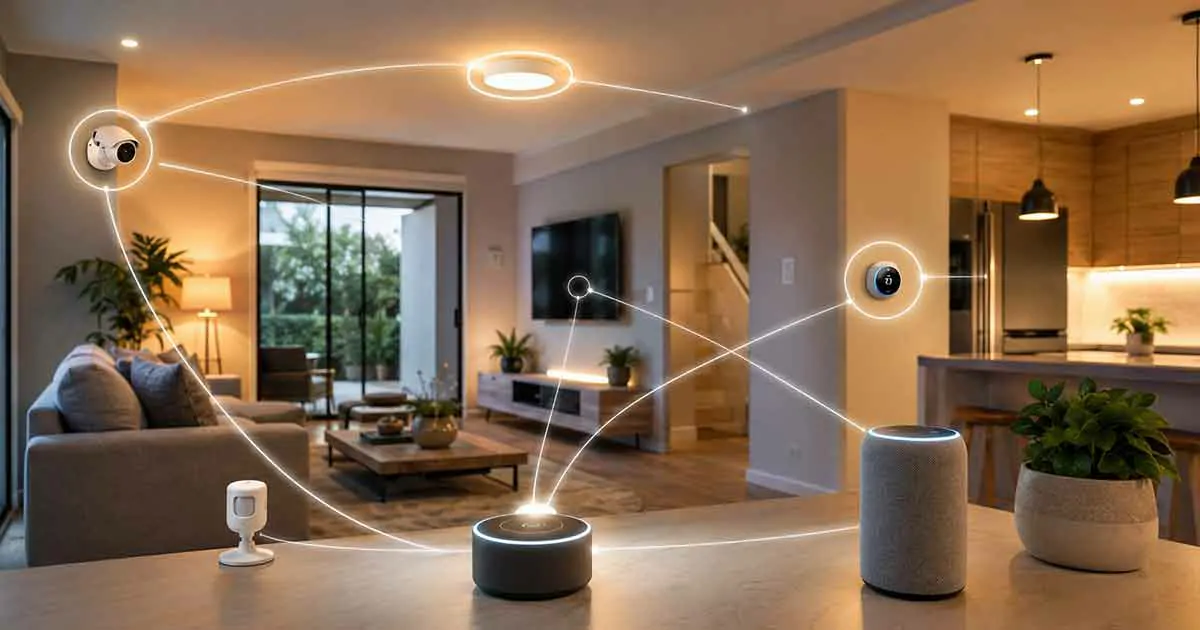
Smart home technology has made it possible to connect lighting, security systems, thermostats, sensors, entertainment devices, and appliances into a single connected environment. However, simply owning multiple smart devices does not automatically create a truly smart home.
The real advantage comes from smart home integration.
Smart home integration allows different connected devices and platforms to communicate with one another so they can be managed through a unified system. Instead of controlling every device separately, homeowners can create a more organized and responsive home where multiple products work together.
Whether you are building a smart home from scratch or expanding an existing setup, understanding how smart home integration works can help you choose compatible devices, avoid connectivity problems, and create a system that is easier to manage.
What Is Smart Home Integration?
Smart home integration is the process of connecting different smart devices, platforms, sensors, and services so they can communicate and work together.
A connected home may include products from several manufacturers. For example, a homeowner might have smart lights from one company, a thermostat from another, security cameras from a third manufacturer, and a smart speaker from another platform.
Without proper integration, these devices may operate independently.
With smart home integration, they can become part of a coordinated system.
For example, a motion sensor could detect movement and trigger several actions at the same time:
- Turn on hallway lights
- Adjust the thermostat
- Send a notification to a smartphone
- Activate a security camera
- Start a predefined automation routine
The goal is not simply to connect more devices. The goal is to make those devices work together in useful and practical ways.
How Does Smart Home Integration Work?
Smart home integration usually involves several components working together.
These may include:
- Smart devices
- Sensors
- Smart home hubs
- Wireless networks
- Mobile applications
- Voice assistants
- Automation platforms
- Communication protocols
- Cloud services
The exact setup depends on the devices and ecosystem being used.
A smart home device first connects to a network or compatible hub. The integration platform then allows other compatible devices to communicate with it.
For example:
Trigger: A door sensor detects that the front door has opened.
Actions:
- Turn on the entryway lights
- Send an alert to the homeowner
- Display the security camera feed
- Activate an automation
This type of interaction allows separate devices to become part of a larger smart home system.
Why Is Smart Home Integration Important?
Smart home integration can make connected technology significantly more useful.
Buying individual smart devices can provide convenience, but integrating them allows homeowners to create coordinated experiences.
Greater Convenience
Integrated devices can perform multiple tasks automatically.
Instead of opening several apps to control different products, homeowners may be able to manage many devices through one platform.
For example, a single command could:
- Turn off lights
- Lock doors
- Adjust the thermostat
- Arm security devices
This reduces the number of manual tasks required throughout the day.
Better Home Automation
Integration is one of the foundations of effective home automation.
When devices can communicate with each other, homeowners can create routines based on:
- Time
- Location
- Motion
- Temperature
- Door activity
- Device status
- Voice commands
This creates a home that responds to changing conditions rather than simply following individual schedules.
Improved Energy Efficiency
Integrated smart devices can also help manage energy consumption.
For example, a smart thermostat can work with occupancy sensors to adjust heating or cooling when rooms are empty.
Smart lights can automatically switch off when nobody is present.
Connected appliances can also be monitored and controlled according to schedules.
By coordinating these devices, homeowners can reduce unnecessary energy use.
Stronger Security
Security devices can become more effective when they are integrated.
A door sensor, security camera, smart lock, motion detector, and smart lighting system can work together as part of a broader security setup.
For example, when unusual motion is detected outside the home, an integrated system could activate outdoor lights and send a smartphone notification.
Integration can therefore provide a more coordinated approach to home security.
Common Smart Home Integration Platforms
Different platforms can serve as the central control point for a smart home.
Some ecosystems are designed around specific manufacturers, while others support devices from many brands.
Google Home
Google Home can provide centralized control for compatible smart home devices.
Users can organize devices into rooms, create routines, and control compatible products through the Google Home app or compatible voice commands.
It can be useful for households that already use Google services and compatible smart home products.
Amazon Alexa
Amazon Alexa is another widely used smart home platform.
Compatible devices can be connected to Alexa and controlled through the Alexa app or voice commands.
Alexa can also be used to create routines that trigger several actions together.
Apple Home
Apple’s smart home ecosystem allows compatible devices to be managed through Apple’s Home app.
It can be particularly useful for households that already rely heavily on Apple devices.
Compatibility should always be checked before purchasing products because not every smart home device works with every ecosystem.
SmartThings
Samsung SmartThings provides another option for integrating compatible smart home devices.
The platform is designed to connect different types of products and create automations across a connected home.
Matter-Compatible Ecosystems
Matter is an important development in smart home interoperability.
Rather than being a traditional smart home platform, Matter is a connectivity standard designed to improve compatibility between supported smart home products.
A Matter-compatible device may work with multiple major smart home ecosystems, depending on the specific product and platform.
This can make device selection easier and reduce concerns about being locked into a single ecosystem.
What Is a Smart Home Hub?
A smart home hub acts as a central point for managing or coordinating compatible devices.
Depending on the system, a hub may help devices communicate using different wireless technologies or provide centralized automation capabilities.
Not every modern smart home requires a dedicated physical hub.
Some systems use cloud services, smartphone applications, Wi-Fi, or built-in platform controllers instead.
However, hubs can still be useful when a home contains many devices or uses communication technologies that benefit from centralized coordination.
Before purchasing a hub, homeowners should check:
- Supported devices
- Supported communication protocols
- Matter compatibility
- Automation capabilities
- Voice assistant compatibility
- Local versus cloud processing
- Future expansion options
Choosing the right hub can prevent compatibility problems later.
Smart Home Integration Protocols
Smart devices use different communication technologies to exchange information.
Understanding these technologies can help homeowners build a more reliable system.
Wi-Fi
Wi-Fi is extremely common in smart home products.
It works well for devices that require relatively high bandwidth, such as:
- Security cameras
- Smart displays
- Video doorbells
- Streaming devices
However, large numbers of Wi-Fi devices can increase the load on a home network.
Zigbee
Zigbee is a low-power wireless technology commonly used for smart home sensors, lights, switches, and other devices.
Many Zigbee devices can form a mesh network, allowing compatible devices to communicate through one another.
Z-Wave
Z-Wave is another wireless technology designed specifically for smart home applications.
It is commonly associated with devices such as:
- Smart locks
- Sensors
- Switches
- Thermostats
- Security products
Z-Wave devices can also use mesh networking to improve communication across a home.
Matter
Matter is designed to improve interoperability between compatible smart home products and major platforms.
Instead of requiring homeowners to choose devices based solely on a particular ecosystem, Matter can make it easier for compatible products to work across supported platforms.
However, Matter compatibility does not mean every feature will automatically work identically across every ecosystem.
Always check the manufacturer’s compatibility information before purchasing a device.
How to Choose Compatible Smart Home Devices
Compatibility should be one of the first considerations when expanding a smart home.
A product may look attractive on its own but become difficult to use if it does not integrate with the rest of the system.
Before purchasing a new device, check:
Platform Compatibility
Determine whether the device works with your preferred smart home platform.
For example, check compatibility with:
- Google Home
- Amazon Alexa
- Apple Home
- SmartThings
Matter Support
If building a new system, consider whether Matter support could provide greater flexibility.
However, check the exact Matter features supported by the device rather than relying only on the Matter logo.
Communication Technology
Determine whether the device uses:
- Wi-Fi
- Zigbee
- Z-Wave
- Thread
- Matter
- Bluetooth
The technology should fit the rest of your smart home setup.
App Requirements
Some devices require a manufacturer’s app for setup or advanced features.
Using too many independent apps can make a smart home harder to manage.
Whenever possible, choose products that integrate well with your primary platform.
Future Expansion
Think about what your smart home may look like in the future.
A device that works today may not be the best choice if it makes future expansion difficult.
Choose products with broad compatibility and established support when possible.
Smart Home Integration Examples
The best way to understand integration is to look at practical examples.
Good Morning Routine
A morning routine could automatically:
- Turn on bedroom lights
- Open compatible smart blinds
- Adjust the thermostat
- Provide weather information
- Start a coffee maker
The exact actions depend on the devices installed in the home.
Leaving Home Routine
When everyone leaves the house, an automation could:
- Turn off lights
- Lock compatible doors
- Adjust the thermostat
- Arm security devices
- Turn off selected smart plugs
This can reduce energy waste and improve security.
Movie Night Routine
A movie night scene could:
- Dim the lights
- Close smart blinds
- Adjust the temperature
- Turn on the television
- Activate compatible speakers
Instead of controlling each device individually, one routine can coordinate the entire environment.
Nighttime Security Routine
A nighttime routine could:
- Lock doors
- Turn off selected lights
- Activate outdoor security lighting
- Arm compatible security devices
- Check selected sensors
This provides a simple way to prepare the home for the night.
Smart Home Integration for Home Security
Security is one of the strongest use cases for integrated smart home technology.
Instead of treating every security device separately, homeowners can create coordinated responses.
For example, a door sensor could trigger an automation that sends an alert and activates a nearby light.
Motion detection could also trigger a security camera recording or notification, depending on the capabilities of the system.
Smart locks can provide another layer of automation by allowing doors to lock according to schedules or specific conditions.
However, homeowners should avoid creating overly complicated security automations that could cause problems during emergencies.
Security-critical functions should always have reliable manual controls.
Smart Home Integration for Energy Saving
Energy management becomes more effective when multiple devices can share information.
For example, occupancy sensors can provide information that helps a smart thermostat determine whether certain areas of a home are being used.
Smart lighting can also respond to occupancy or schedules.
Other possibilities include:
- Turning off devices when the home is empty
- Adjusting temperatures automatically
- Scheduling high-energy appliances
- Monitoring electricity consumption
- Reducing unnecessary lighting
Integrated energy management can help homeowners understand where energy is being used and where automation may reduce waste.
Smart Home Integration for Different Rooms
Living Room
A living room could combine:
- Smart lights
- Smart speakers
- Smart displays
- Entertainment devices
- Smart blinds
- Temperature control
These devices can be coordinated into scenes such as movie mode or relaxation mode.
Bedroom
Bedroom integration could include:
- Smart lighting
- Smart thermostat
- Smart blinds
- Sleep routines
- Motion sensors
For example, a nighttime routine could gradually reduce lighting and adjust the temperature before sleep.
Kitchen
Smart kitchen integration may include:
- Smart appliances
- Smart lighting
- Leak sensors
- Smoke detection
- Smart plugs
Safety-related devices should be configured carefully and tested regularly.
Entryway
An entryway can combine:
- Smart locks
- Door sensors
- Motion sensors
- Smart lights
- Security cameras
When someone arrives, lighting can activate automatically while compatible systems provide notifications or access controls.
How to Build a Smart Home Integration System
Building an integrated smart home does not require purchasing everything at once.
A gradual approach is often more practical.
Step 1: Define Your Goals
Start by identifying the problems you want technology to solve.
Your priorities may include:
- Convenience
- Security
- Energy efficiency
- Comfort
- Monitoring
Clear goals make it easier to choose appropriate devices.
Step 2: Choose a Primary Ecosystem
Select the platform you expect to use most frequently.
Your choice may depend on the devices you already own and the ecosystem you are most comfortable using.
Step 3: Check Compatibility Before Buying
Never assume that two smart devices will work together.
Check official compatibility information before purchasing.
Look for support for your preferred platform, communication technology, and relevant standards.
Step 4: Start With a Small Group of Devices
Begin with a few useful products.
For example, you might start with:
- Smart lights
- Smart plugs
- A smart speaker
- A sensor
Once these devices work reliably together, expand the system.
Step 5: Create Simple Automations
Start with automations that solve everyday problems.
Examples include:
- Lights turning on automatically
- Doors locking at night
- Thermostat adjustments
- Notifications when doors open
Simple automations are easier to troubleshoot.
Step 6: Expand Gradually
Once the system is stable, add additional devices.
Avoid purchasing a large number of products before confirming that your network and chosen platform can support them.
Common Smart Home Integration Problems
Even well-designed systems can experience technical problems.
Devices That Do Not Communicate
A device may fail to communicate because it uses an unsupported platform or protocol.
Always verify compatibility before purchase.
Weak Wi-Fi Coverage
Devices located far from the router may experience unstable connections.
Improving Wi-Fi coverage can help resolve connectivity issues.
Too Many Separate Apps
Managing every device through a different application can make a smart home unnecessarily complicated.
Whenever possible, choose products that can be managed through a central platform.
Automation Conflicts
Multiple automations can sometimes trigger conflicting actions.
For example, one routine might turn a light on while another immediately turns it off.
Review automation rules regularly to identify conflicts.
Outdated Firmware
Older firmware can cause compatibility and security problems.
Keep devices updated according to manufacturer recommendations.
How to Improve Smart Home Integration Reliability
A reliable smart home should be designed with simplicity and maintainability in mind.
Keep Your Network Healthy
Use appropriate Wi-Fi coverage and keep networking equipment updated.
For larger homes, additional network infrastructure may be necessary.
Limit Unnecessary Devices
More devices do not necessarily mean a better smart home.
Every connected product adds another component that may require maintenance.
Choose devices that provide genuine value.
Keep Automations Simple
Complex automation chains can become difficult to troubleshoot.
Use clear triggers and actions whenever possible.
Maintain a Device Inventory
Keep track of the smart devices connected to your home.
Record:
- Device name
- Location
- Manufacturer
- Platform
- Communication technology
- Account used
This can make troubleshooting and replacement much easier.
Review Security Regularly
Change compromised passwords, enable two-factor authentication where available, review account access, and keep device software updated.
Smart home integration should improve convenience without sacrificing security.
Smart Home Integration and Privacy
Connected devices can collect information about activity inside and around a home.
Depending on the product, data may include:
- Motion activity
- Voice recordings
- Video
- Device usage
- Location information
- Household routines
Before purchasing a connected device, review its privacy settings and data policies.
Consider whether the device needs access to certain information and whether unnecessary permissions can be disabled.
Privacy should be considered part of smart home design rather than something addressed after installation.
Is Smart Home Integration Worth It?
For many homeowners, smart home integration can provide significant benefits.
The value depends on how well the system solves real problems.
An integrated system can make it easier to manage lighting, security, temperature, entertainment, and other connected devices.
However, integration should not be pursued simply for the sake of adding technology.
The best smart home is not necessarily the one with the largest number of devices. It is the one where the technology works reliably and provides useful benefits without creating unnecessary complexity.
Frequently Asked Questions
What is smart home integration?
Smart home integration is the process of connecting compatible smart devices and platforms so they can communicate and work together through a centralized system or coordinated automations.
Do all smart home devices work together?
No. Compatibility depends on the platform, communication technology, standards, and features supported by each device.
Do I need a smart home hub?
Not always. Some smart home systems can operate through Wi-Fi, apps, cloud services, or built-in platform controllers. A dedicated hub may be useful for certain devices and more advanced setups.
Is Matter enough to guarantee compatibility?
No. Matter can improve interoperability between compatible products, but supported features can vary between devices and platforms. Always check the manufacturer’s specifications.
Can I integrate smart devices from different brands?
Yes, provided the devices share a compatible platform, standard, or integration method.
Is smart home integration difficult?
Basic integration can be relatively simple. More advanced systems may require additional planning, networking knowledge, and careful configuration.
What should I integrate first?
Lighting, smart plugs, sensors, and basic security devices are practical starting points. Begin with devices that solve a specific problem and expand gradually.
Does smart home integration save energy?
It can. Coordinating thermostats, lighting, sensors, and other devices can reduce unnecessary energy use when automations are configured properly.
Final Thoughts
Smart home integration is what transforms a collection of connected products into a coordinated smart home system.
Instead of managing every device independently, homeowners can connect compatible technologies to create useful routines for lighting, security, comfort, entertainment, and energy management.
The best approach is to start with clear goals, choose a compatible ecosystem, verify device support before purchasing, and build the system gradually.
As smart home standards and technologies continue to evolve, interoperability is becoming increasingly important. By planning carefully and prioritizing compatibility, reliability, security, and privacy, homeowners can create a connected home that remains useful and manageable for years to come.