
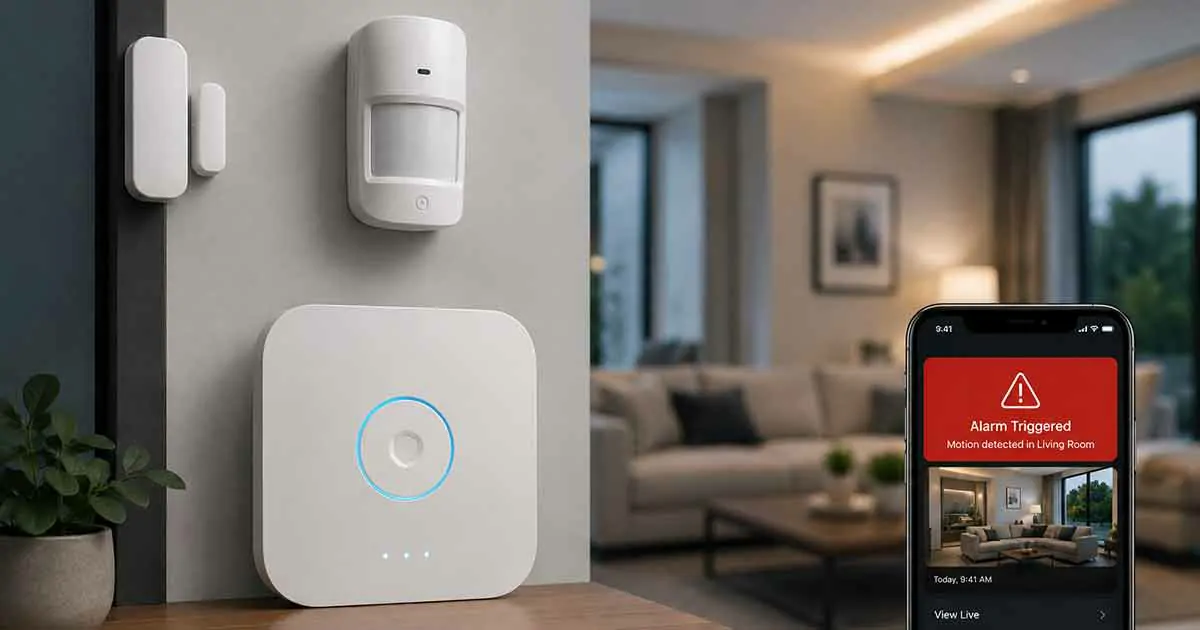
Smart alarm systems are becoming an important part of modern home protection. Unlike traditional alarms that simply sound a siren when an intrusion is detected, smart alarm systems can connect sensors, alarms, smartphones, and other connected devices to create a more responsive security solution.
A smart alarm system can notify you when a door or window opens unexpectedly, detect motion, identify unusual activity, and send alerts directly to your phone. Depending on the system, you may also be able to arm or disarm the alarm remotely, create automated routines, and connect the alarm with other smart home devices.
However, choosing the right smart alarm system requires more than looking at the loudest siren or the largest number of sensors. Compatibility, connectivity, monitoring options, battery backup, installation, and ongoing costs can all affect how useful a system will be.
This guide explains how smart alarm systems work, what components they include, the main features to consider, and how to choose a system that fits your home.
What Is a Smart Alarm System?
A smart alarm system is a connected security solution designed to detect specific events and notify homeowners when something unusual happens.
The system typically combines a central hub or control unit with sensors and an alarm. When a sensor detects an event, such as a door opening or motion inside a protected area, the system processes the information and can trigger an alarm or send an alert.
Unlike basic standalone alarms, smart systems can communicate with smartphones and other connected devices through a home network or dedicated wireless technologies.
Depending on the system, users may be able to:
- Arm and disarm the alarm remotely
- Receive smartphone notifications
- Monitor sensors from an app
- Create automated security routines
- Connect compatible devices
- Set different security modes
- Receive alerts about sensor activity
- Use professional or self-monitoring services
The exact capabilities vary significantly between systems, so it is important to evaluate the features rather than assuming every smart alarm works in the same way.
How Do Smart Alarm Systems Work?
Most smart alarm systems follow a relatively simple process.
First, sensors installed around the home monitor specific areas. A door sensor may detect when a door opens, while a motion sensor monitors movement within a room.
When a sensor detects activity, it communicates with the system’s central hub or controller. The hub determines what action should occur based on the current security mode and configured rules.
For example, when the system is armed and a protected door opens, it may:
- Receive the signal from the door sensor.
- Verify that the sensor event should trigger an alarm.
- Activate the siren.
- Send a notification to the homeowner.
- Trigger other compatible automation routines.
Some systems can also continue communicating during an internet outage if they have an alternative communication method or cellular backup.
Main Components of a Smart Alarm System
Although systems differ, most smart alarms are built around several core components.
Central Hub
The hub acts as the communication center for the system. It connects compatible sensors and manages the information they send.
Some hubs also provide connections to other smart home technologies, allowing the alarm to participate in broader automation routines.
A reliable hub should provide stable wireless communication, simple configuration, and appropriate backup options.
Door and Window Sensors
Door and window sensors are among the most common components of a smart alarm.
They usually consist of two small pieces installed near each other. When the protected door or window opens, the two components separate and the system detects the change.
These sensors are useful for monitoring:
- Front and back doors
- Garage doors
- Basement windows
- Ground-floor windows
- Patio doors
- Other vulnerable entry points
They are particularly useful because they can detect an opening before an intruder has moved far into the home.
Motion Sensors
Motion sensors monitor movement within a protected area.
They can be installed in locations such as:
- Hallways
- Living rooms
- Entry areas
- Garages
- Basements
Motion sensors can complement door and window sensors by providing another layer of detection.
However, placement matters. A poorly positioned sensor may create unnecessary alerts or fail to cover the intended area.
Smart Sirens
A siren provides an audible warning when the alarm is triggered.
Some smart sirens can also produce visual alerts using lights or indicators. The siren may be built into the central hub or installed as a separate device.
When selecting a siren, consider its volume, placement options, power source, and whether it continues operating during a power failure.
Keypads and Control Devices
Some systems include physical keypads that allow users to arm or disarm the alarm without opening a smartphone app.
Other systems may support dedicated remote controls or compatible smart home control devices.
A physical control method can be particularly useful for family members or situations where accessing a smartphone is inconvenient.
Smartphone App
The mobile application is one of the most useful features of a smart alarm.
A good app should make it easy to:
- Arm the system
- Disarm the system
- Check sensor status
- View alarm events
- Manage users
- Adjust settings
- Receive notifications
The quality of the app can have a significant impact on everyday usability.
Smart Alarm vs Traditional Alarm System
The main difference between a smart alarm and a traditional alarm is connectivity.
A traditional alarm may primarily detect an event and activate a local siren. A smart alarm can communicate with other devices and provide remote access through an application or online service.
| Feature | Traditional Alarm | Smart Alarm |
|---|---|---|
| Local siren | Usually | Usually |
| Smartphone alerts | Limited or unavailable | Common |
| Remote control | Limited | Common |
| Connected sensors | Sometimes | Yes |
| Automation | Limited | Often supported |
| App control | Usually unavailable | Common |
| Smart home integration | Limited | Often available |
| Remote monitoring | Depends on system | Often available |
Smart alarms are not automatically better for every household. A basic alarm may be sufficient for someone who wants simple local protection without additional connectivity.
The advantage of a smart system is the additional control, notification, and automation capabilities.
Important Smart Alarm Features to Consider
Not every smart alarm offers the same functionality. Before buying one, evaluate the features that matter most for your home.
Smartphone Notifications
Fast notifications are one of the biggest advantages of a connected alarm.
Instead of discovering an alarm only after returning home, you can receive an alert when an important event occurs.
Look for systems that allow notification settings to be customized so that important alerts are not buried under unnecessary notifications.
Remote Arm and Disarm
Remote control allows you to manage the alarm from your smartphone.
For example, you may be able to arm the system after leaving home or disarm it before a family member arrives.
This feature can make everyday operation much more convenient.
Multiple Security Modes
Some systems support different modes such as:
- Home
- Away
- Night
- Disarmed
These modes allow the system to behave differently depending on whether people are inside the home.
For example, a night mode may keep exterior entry sensors active while allowing movement inside selected rooms.
Battery Backup
Power outages can create a problem for connected security equipment.
A smart alarm with battery backup can continue operating for a period after the main power supply fails.
When comparing systems, check how long the backup battery is expected to operate and which components remain functional during an outage.
Internet and Cellular Backup
A system that depends entirely on a home internet connection may become less useful if the connection fails.
Some systems provide alternative communication methods, including cellular connectivity.
If reliable emergency notifications are particularly important, communication redundancy is worth considering.
Tamper Detection
Tamper detection can alert you if someone attempts to interfere with a sensor, hub, or other important component.
This is especially useful for equipment installed in accessible locations.
User Management
If several people use the alarm, look for systems that allow individual users or access codes.
This can make it easier to manage family members, guests, or other authorized users without sharing one primary account.
Wireless Technologies Used by Smart Alarms
Smart alarm systems can use several communication technologies.
Wi-Fi
Wi-Fi is common because most homes already have a wireless network.
It can provide convenient connectivity between the alarm system and internet services, but its performance depends on the quality and availability of the home network.
Z-Wave
Z-Wave is a wireless technology designed for smart home devices.
It can be used for communication between compatible sensors, controllers, and other connected devices.
Its use can be particularly useful when building a broader smart home environment.
Zigbee
Zigbee is another low-power wireless technology used by many smart home devices.
It can support networks containing multiple compatible devices and can be useful for connected sensors and automation.
When comparing Z-Wave and Zigbee, compatibility with your existing or planned smart home ecosystem is more important than simply choosing one technology because it sounds more advanced.
Smart Alarm Integration With Other Devices
One of the major advantages of a smart alarm is the ability to interact with other connected devices.
For example, an alarm event could potentially trigger compatible lighting, smart locks, or other automation.
A simple routine might work like this:
Alarm triggered → hallway lights turn on → smartphone notification is sent → compatible devices respond according to the configured routine.
However, integration depends on compatibility between the products and platforms involved.
Before purchasing, check which smart home platforms and devices the alarm officially supports.
Do Smart Alarm Systems Require Professional Monitoring?
No. A smart alarm can be used with self-monitoring, professional monitoring, or a combination depending on the system.
Self-Monitoring
With self-monitoring, you receive alerts and decide how to respond.
The main advantage is that you generally have more direct control and may avoid recurring professional monitoring fees.
The disadvantage is that you are responsible for responding to alerts.
Professional Monitoring
Professional monitoring services can provide another layer of response.
When an alarm event occurs, a monitoring center may receive the signal and follow its established response procedures.
The availability, pricing, and exact response process vary by provider and location.
Which Is Better?
There is no universal answer.
Self-monitoring may be appropriate for homeowners who want control and lower recurring costs. Professional monitoring may be more suitable for people who want an additional response layer when they cannot personally respond.
The important point is to understand exactly what the monitoring service includes before paying for it.
Where Should Smart Alarm Sensors Be Installed?
Sensor placement has a major effect on system performance.
Door and window sensors should generally be installed on entry points that need protection. Motion sensors should be positioned to cover important movement paths without creating unnecessary detection problems.
Avoid placing sensors where they can easily be damaged, blocked, or accidentally triggered.
For a larger home, consider dividing the property into logical areas rather than attempting to protect everything with a small number of sensors.
A basic assessment can include:
- Main entrance
- Secondary entrances
- Garage
- Ground-floor windows
- Patio or sliding doors
- Interior hallways
- High-value areas
The goal is not simply to install as many sensors as possible. The goal is to create sensible coverage for the home’s most important access points.
Smart Alarm Systems and False Alarms
False alarms can reduce the usefulness of a security system.
They may occur because of incorrect sensor placement, accidental activation, pets, low batteries, unreliable communication, or incorrect configuration.
To reduce unnecessary alarms:
- Install sensors correctly.
- Keep batteries charged or replace them when necessary.
- Configure appropriate security modes.
- Adjust motion detection settings when supported.
- Consider pet-friendly sensors if needed.
- Make sure household members understand how the system works.
A system that produces frequent false alarms can eventually cause users to ignore notifications, which defeats one of the main benefits of smart monitoring.
Are Smart Alarm Systems Secure?
Smart alarms introduce connected technology, so cybersecurity should be considered alongside physical security.
Use a strong, unique account password and enable multi-factor authentication when available.
You should also:
- Keep the alarm app updated.
- Install firmware updates when provided.
- Secure your home Wi-Fi network.
- Review connected users regularly.
- Remove access for people who no longer need it.
- Purchase devices from established manufacturers with ongoing support.
A smart alarm should be treated as both a physical security device and a connected computing device.
Smart Alarm System Costs
The total cost of a smart alarm system can include more than the initial hardware.
Potential expenses include:
- Central hub
- Door and window sensors
- Motion sensors
- Sirens
- Keypads
- Additional accessories
- Installation
- Monitoring subscriptions
- Replacement batteries
A low-cost starter kit may be enough for a small apartment, while a larger home may require several additional sensors.
When comparing systems, calculate the complete cost rather than comparing only the advertised starter-kit price.
How to Choose the Right Smart Alarm System
Start by identifying what you actually need the alarm to do.
For a Small Apartment
A compact system with a hub, several entry sensors, and a motion sensor may be sufficient.
Prioritize simple installation, smartphone notifications, and reliable connectivity.
For a Family Home
A larger system may benefit from multiple entry sensors, motion detection, multiple user accounts, and different security modes.
Integration with existing smart home devices may also become more valuable.
For a Large Home
A larger property may require additional sensors, multiple sirens, stronger wireless coverage, and backup communication options.
Pay particular attention to the maximum number of supported devices and the system’s communication range.
For a Smart Home Enthusiast
If you already use connected lighting, smart locks, sensors, or other automation devices, compatibility should be one of the first factors you evaluate.
A system that fits your existing smart home ecosystem can be much easier to expand later.
Common Mistakes to Avoid
Choosing a smart alarm based only on price is one of the most common mistakes.
Other mistakes include:
Buying Without Checking Compatibility
A device may look attractive but fail to work with the smart home platform or communication technology you already use.
Ignoring Subscription Costs
Some features may require a recurring subscription. Always check the service requirements before purchasing.
Using Too Few Sensors
A smart alarm cannot protect areas that are not adequately monitored.
Ignoring Backup Power
A power outage can affect connected equipment, so backup power can be an important consideration.
Installing Sensors Incorrectly
Even high-quality equipment can perform poorly if sensors are installed in unsuitable locations.
Creating Too Many Notifications
An excessive number of alerts can lead to notification fatigue. Configure alerts around events that actually require attention.
Smart Alarm System vs Smart Home Security System
These terms are sometimes used interchangeably, but they do not necessarily describe the same thing.
A smart alarm system primarily focuses on alarm detection and notification. Its core functions may include intrusion detection, sensors, sirens, and alerts.
A broader smart home security system can include additional technologies such as security cameras, video doorbells, smart locks, environmental sensors, and other security devices.
This distinction is important when researching products because a complete security ecosystem may contain an alarm as only one component.
Are Smart Alarm Systems Worth It?
For many homeowners, a smart alarm system can provide useful advantages over a basic standalone alarm.
The ability to receive notifications, remotely control the system, manage multiple sensors, and connect compatible devices can make home alarm management considerably more convenient.
However, the best system depends on the home’s size, entry points, budget, preferred smart home platform, monitoring requirements, and desired level of automation.
A simple system may be the best choice for one household, while another may benefit from a larger setup with backup connectivity and professional monitoring.
The important thing is to choose a system based on actual security requirements rather than the number of features listed on the product box.
Final Thoughts
A smart alarm system can provide a practical combination of intrusion detection, notifications, remote control, and smart home automation.
The most important components typically include a central hub, entry sensors, motion sensors, and an audible alarm. More advanced systems can add backup power, alternative communication, user management, automation, and professional monitoring.
Before choosing a system, evaluate your home’s entry points, determine which areas need protection, check compatibility with your existing smart home devices, and calculate both hardware and recurring costs.
A well-planned smart alarm does not need to be the most complicated system available. It needs to provide reliable detection, useful alerts, straightforward control, and enough flexibility to meet your home’s specific needs.