
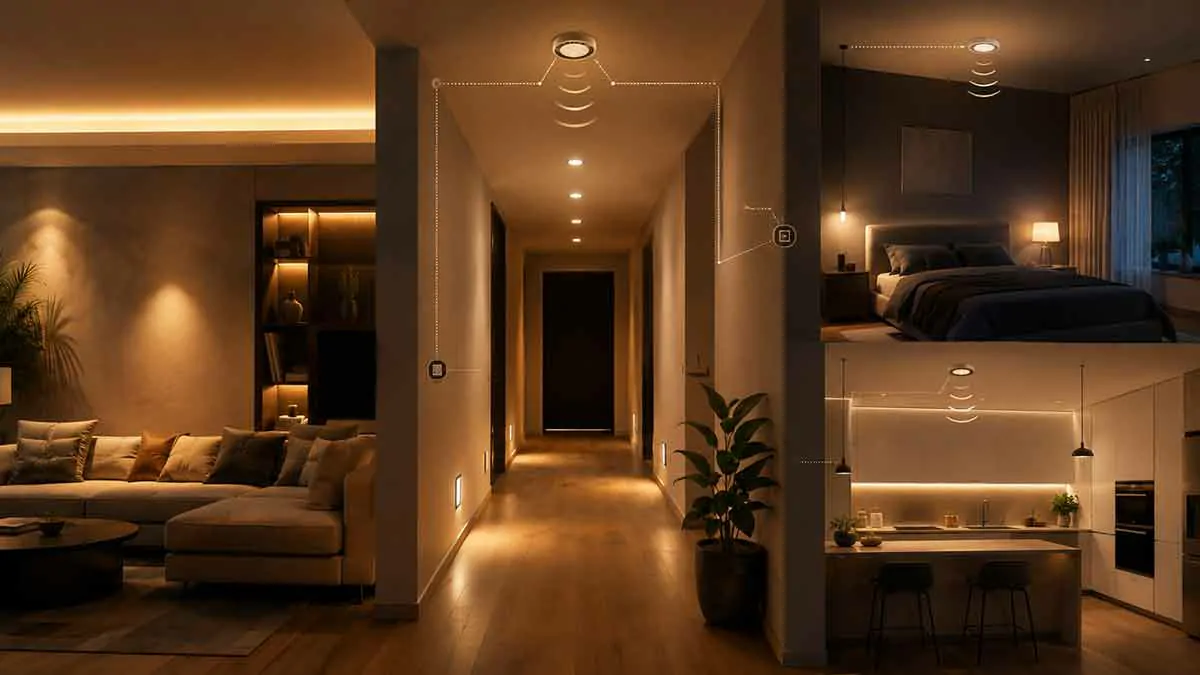
Smart lighting is often presented as a way to make a home feel more modern, but its biggest advantage may be much simpler: it can remove small lighting tasks from your daily routine.
Turning lights on when you enter a room, switching them off before bed, adjusting brightness in the evening, and remembering outdoor lights can all become automatic. When these routines are configured properly, smart lighting can save time without making your home unnecessarily complicated.
The key is to automate actions that you already perform repeatedly. A useful automation should solve a real problem rather than simply add another feature to your smart home.
In this guide, we’ll explore practical smart lighting automation ideas that actually save time, including motion-based lighting, schedules, bedtime routines, arrival automations, and room-specific lighting scenes.
Table of Contents
What Makes a Smart Lighting Automation Useful?
Not every smart lighting automation is worth creating.
A good automation should meet at least one of these goals:
- Eliminate a repetitive manual action
- Turn lights on when you actually need them
- Turn lights off when they are no longer needed
- Adapt lighting to the time of day
- Reduce the number of switches you need to operate
- Make nighttime movement easier
- Simplify your daily routines
The best automations usually run quietly in the background. You should not have to think about them once they are configured.
For example, a hallway light that turns on when motion is detected at night can be more useful than an elaborate lighting scene that requires you to activate it manually.
1. Automatically Turn On Entryway Lights
One of the simplest useful automations is automatic entryway lighting.
Instead of reaching for a switch when you arrive home, a smart light can turn on based on a schedule, motion, or another trigger supported by your smart home system.
For example, your entryway lights could automatically activate around sunset and remain available during the evening.
This can save time because you no longer need to remember to turn them on every day.
Make It More Efficient
Rather than keeping the lights at full brightness for several hours, consider using a moderate brightness level.
You can also combine the automation with a motion sensor so the lights become brighter when someone actually enters the area.
2. Use Motion Sensors in Hallways
Hallways are excellent candidates for motion-based lighting.
You usually need enough light to see where you are going, but there is little reason to keep hallway lights running continuously.
A motion sensor can detect movement and activate the lights automatically.
After a period without movement, the lights can turn off.
This is particularly useful when walking through the house with your hands full.
Add a Nighttime Rule
A better approach is to use different brightness levels depending on the time.
During the day, the hallway lights can operate at a normal brightness.
At night, they can activate at a much lower level.
This avoids the need to manually adjust the lights depending on when you are using the hallway.
3. Create an Automatic Bedtime Routine
Bedtime is one of the easiest routines to automate because it normally happens at a predictable time.
Instead of walking through the house switching off multiple lights, you can create a bedtime routine that turns off selected lights together.
For example, a bedtime routine could:
- Turn off living room lights
- Turn off kitchen lights
- Dim bedroom lighting
- Turn off hallway lights after a delay
- Leave a low-level bathroom light available
The exact actions will depend on your household and the devices you have installed.
The important part is that the routine should reflect what you actually do every evening.
4. Schedule Lights Around Your Daily Routine
If you regularly wake up, leave for work, return home, and go to bed at approximately the same times, schedules can eliminate several repetitive actions.
For example, bedroom lighting could gradually increase in the morning while selected living areas remain off.
Later in the day, entryway or living room lights could activate automatically.
At bedtime, unnecessary lights can be switched off together.
Scheduling is especially useful for routines that happen at nearly the same time every day.
However, avoid creating dozens of schedules that become difficult to maintain.
5. Automate Kitchen Lighting
Kitchen lighting is another area where automation can save small amounts of time every day.
Under-cabinet lighting, for example, can be scheduled to activate around the times when you normally prepare breakfast or dinner.
You can also use motion detection in areas such as a pantry where you may frequently enter and leave.
Keep Task Lighting Separate
You do not necessarily need to automate every kitchen light at once.
It can be more practical to automate task lighting while leaving the main ceiling lights under manual control.
This gives you automatic illumination where it is most useful without making the entire kitchen behave unpredictably.
6. Use Sunrise and Sunset Automations
Fixed schedules can become less convenient as the seasons change.
A light scheduled to turn on at 6:00 PM may work well during one part of the year but activate too early or too late during another.
Sunrise and sunset-based automation can adapt automatically to changing daylight conditions.
For example, outdoor lights can turn on around sunset and turn off later in the evening.
This reduces the need to constantly adjust schedules throughout the year.
7. Create a “Leaving Home” Lighting Routine
A leaving-home routine can eliminate the need to walk through the house checking every light.
When you leave, the automation can turn off selected lights that do not need to remain active.
This is particularly useful for:
- Living rooms
- Bedrooms
- Kitchens
- Home offices
- Hallways
- Decorative lighting
If your smart home system supports presence or location-based triggers, this type of automation can become even more convenient.
However, it is important to configure presence detection carefully. You do not want lights switching off simply because one person leaves while someone else remains at home.
8. Create a “Welcome Home” Routine
The opposite automation can make arriving home easier.
A welcome-home routine can activate selected lights when you return during the evening.
Instead of turning on every light in the house, choose the areas you actually use first.
For example, the entryway and living room may be enough.
You can also combine the routine with a sunset condition so the lights do not activate unnecessarily during daylight hours.
9. Automate Bathroom Lighting at Night
Nighttime bathroom trips are a perfect use case for smart lighting.
Turning on a bright ceiling light at night may be uncomfortable, and manually searching for a switch is inconvenient.
A motion sensor can activate a low-brightness light when movement is detected.
After several minutes without movement, the light can turn off automatically.
This type of automation saves only a few seconds at a time, but repeated every day, those small conveniences can make a noticeable difference.
10. Automate Stair Lighting
Stairs need adequate visibility, particularly during nighttime.
Instead of turning on a bright overhead fixture, consider using motion-triggered low-level lighting.
When someone approaches the stairs, the lights can activate automatically.
After the person has passed, the lights can switch off.
This works particularly well with LED strips or dedicated step lighting.
11. Create a Movie Night Lighting Scene
Some lighting automations are designed for convenience rather than necessity.
A movie-night scene can reduce the amount of manual adjustment required before watching television.
For example, one command could:
- Dim the main living room lights
- Turn off lights near the television
- Keep a small amount of ambient lighting active
- Adjust compatible accent lighting
Once configured, you can activate the entire scene instead of controlling several lights individually.
The same concept can be used for reading, entertaining guests, or relaxing in the evening.
12. Use One Command for Multiple Lights
Controlling individual lights can become tedious when you have several smart bulbs in the same room.
Grouping lights allows multiple devices to respond to one command.
For example, instead of saying or selecting each light separately, you can control the entire living room as a group.
This is particularly useful when a room contains:
- Ceiling lights
- Floor lamps
- Table lamps
- Accent lights
- LED strips
Grouping devices is one of the simplest ways to make a smart lighting system feel less complicated.
13. Automate Home Office Lighting
If you work from home on a predictable schedule, office lighting can be automated around your working hours.
A morning routine could activate your desk lamp at the beginning of your workday.
Later, the lighting can adjust as natural daylight decreases.
At the end of your normal work period, the office lighting can switch to a softer setting or turn off.
This can also create a useful separation between working hours and personal time.
14. Use Different Lighting Levels During the Day
Smart bulbs with adjustable brightness and color temperature can change automatically throughout the day.
For example:
Morning: Moderate brightness with a comfortable neutral tone.
Daytime: Brighter lighting when natural daylight is limited.
Evening: Warmer and softer lighting.
Night: Low brightness in areas that still need illumination.
This approach means you do not have to repeatedly adjust brightness manually.
It also allows each room to have lighting that better matches its purpose at different times.
15. Turn Off Forgotten Lights Automatically
One of the most practical smart lighting automations is simply turning off lights that are frequently forgotten.
This can be useful in rooms such as:
- Bathrooms
- Closets
- Laundry rooms
- Garages
- Home offices
- Storage areas
A timer, motion sensor, or scheduled automation can help ensure that lights do not remain on indefinitely.
The goal is not to automate every light in the home. Focus on the lights that you frequently forget.
16. Use Smart Lighting for Vacation Routines
When you are away from home, smart lighting can help create a more normal-looking lighting pattern.
Instead of leaving one light on continuously, selected lights can operate according to different schedules.
For example, a living room lamp could activate during part of the evening while another light operates at a different time.
Randomized or varied schedules can make the pattern less predictable than simply leaving the same light on every night.
This can be useful as part of a broader home security strategy, but lighting alone should not be treated as a complete security solution.
17. Connect Lighting With Other Smart Home Devices
Smart lighting becomes more useful when it can respond to other devices.
For example, a motion sensor can trigger hallway lighting.
A door sensor can activate an entryway light.
A smart home routine can turn several lights off when you leave.
A compatible smart assistant can activate a lighting scene with a voice command.
This is where smart lighting moves beyond remote control and becomes part of a larger home automation system.
18. Avoid Automations That Create More Work
Automation should save time, not create additional maintenance.
A common mistake is creating complicated rules with too many conditions.
For example, an automation might depend on the time, room occupancy, daylight, device status, and several other conditions.
If it frequently behaves differently than expected, you may spend more time troubleshooting it than you would have spent using the light switch.
Start with simple rules.
A motion sensor turning on a hallway light is easier to understand and maintain than a highly complex automation with multiple overlapping triggers.
How to Build Smart Lighting Automations That Work Reliably
Before creating an automation, identify the repetitive action you want to eliminate.
Ask yourself:
What do I repeatedly do with this light?
If the answer is “I always turn it on when I enter this room,” motion detection may be appropriate.
If the answer is “I turn it off every night before bed,” a bedtime routine may be better.
If the answer is “I only need it after sunset,” a sunset-based schedule could be the simplest solution.
This approach keeps automation focused on real household habits.
Start With the Most Useful Automations
You do not need dozens of smart lighting rules.
For most homes, a few well-designed automations can provide most of the convenience.
A practical starting point could be:
- Motion lighting for hallways
- Automatic nighttime bathroom lighting
- A bedtime routine
- Sunset-based outdoor lighting
- Automatic lights-off when leaving home
- A welcome-home lighting routine
After using these for a while, you can determine whether additional automations are actually useful.
Smart Lighting Automation and Energy Savings
Saving time is the primary goal of many lighting automations, but some can also reduce unnecessary electricity use.
Automatic shutoff, motion detection, dimming, and schedules can prevent lights from operating when they are not needed.
However, automation alone does not guarantee significant energy savings.
Efficient LED lighting and sensible usage remain important.
For homeowners looking at broader efficiency improvements, smart lighting can work alongside other smart energy-saving devices to create a more efficient home.
Final Thoughts
The best smart lighting automation ideas that actually save time are the ones that remove repetitive tasks from your everyday routine.
Motion sensors can handle hallway lighting. Schedules can manage predictable routines. Sunset automation can adapt outdoor lighting to changing daylight. Bedtime and leaving-home routines can switch off multiple lights without requiring a room-by-room check.
The key is to start with simple automations that solve obvious problems. Once those routines work reliably, you can gradually add more advanced features.
Smart lighting should make your home easier to manage, not give you another complicated system to maintain. When automation is built around the way you already live, even a few simple rules can make a noticeable difference.