
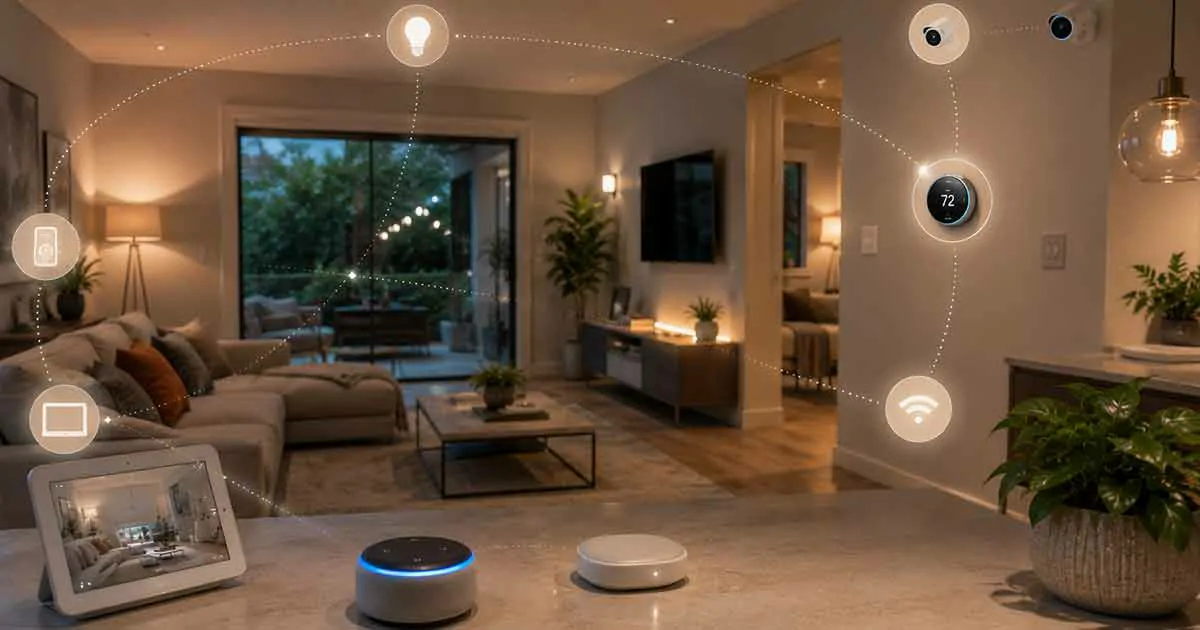
A smart home system connects compatible devices throughout your home so they can communicate, automate tasks, and be controlled from one central platform. Instead of operating lights, thermostats, locks, cameras, plugs, and other devices independently, a smart home system can bring them together into a coordinated environment.
Smart home technology has become much more accessible in recent years. You no longer need an expensive professional installation or advanced technical knowledge to automate many everyday tasks. A combination of smart devices, a reliable home network, and the right control platform can create a system that improves convenience, security, comfort, and energy efficiency.
However, choosing the right system can be confusing. Different ecosystems support different devices, wireless protocols, voice assistants, and automation features.
This guide explains how smart home systems work, what components you need, which technologies matter, and how to build a reliable system that can grow with your home.
Table of Contents
What Is a Smart Home System?
A smart home system is a connected network of devices that can be monitored, controlled, and automated through software or a central platform.
A basic setup might include smart lights and a smart speaker. A more advanced system could connect lighting, heating and cooling, security cameras, smart locks, motion sensors, appliances, blinds, leak detectors, and energy monitoring equipment.
The main idea is not simply having many connected devices. The real advantage comes from making those devices work together through automation.
For example, you could create an evening routine that:
- Turns on selected lights at sunset
- Locks the doors
- Adjusts the thermostat
- Closes smart blinds
- Activates security sensors
- Turns off unnecessary appliances
Instead of controlling every device separately, one automation can handle the entire sequence.
This is what separates a connected collection of gadgets from a properly designed smart home system.
How Does a Smart Home System Work?
Most smart home systems consist of several layers that work together.
Smart Devices
These are the physical products installed around your home. Examples include:
- Smart bulbs
- Smart plugs
- Smart thermostats
- Smart locks
- Security cameras
- Video doorbells
- Motion sensors
- Door and window sensors
- Smart speakers
- Smart appliances
- Smart blinds
- Water leak sensors
- Smoke detectors
Our guide to smart home devices explains the different types of connected products and how they can be used around a home.
Home Network
Your network provides the communication infrastructure for many smart devices.
Wi-Fi is commonly used for cameras, speakers, displays, appliances, and other devices that require more bandwidth. Lower-power technologies such as Zigbee, Z-Wave, and Thread can be useful for sensors, switches, locks, and other devices.
A reliable network becomes increasingly important as the number of connected devices grows.
If your home has weak Wi-Fi coverage, improving your smart home networking setup should be one of the first steps before adding dozens of devices.
Smart Home Platform
The platform is the software environment that allows devices to communicate and provides a central place for control and automation.
Popular ecosystems include:
- Google Home
- Amazon Alexa
- Apple Home
- Samsung SmartThings
- Home Assistant
- Hubitat
- Other manufacturer-specific platforms
Your choice of platform can affect which products you can use together, so it is worth deciding on your preferred ecosystem before buying large numbers of devices.
Smart Home Hub
Some systems use a dedicated hub or controller to coordinate connected devices.
A hub can provide communication between devices using protocols such as Zigbee, Z-Wave, or Thread. It can also help centralize automation rules.
If you are comparing different controllers, our best smart home hubs guide can help you understand the main features to consider.
Not every smart home requires a traditional dedicated hub. Some modern ecosystems use phones, speakers, displays, routers, or other devices as controllers.
What Can a Smart Home System Control?
A well-designed system can control much more than lighting.
Smart Lighting
Smart lighting is one of the easiest ways to introduce automation.
You can schedule lights, control them remotely, adjust brightness, create scenes, and trigger lighting based on motion or other conditions.
For example, hallway lights can automatically turn on when motion is detected at night.
Our guide to smart lighting systems covers the main technologies and options available for connected lighting.
Smart Thermostats
Smart thermostats can automate heating and cooling based on schedules, occupancy, temperature, and other conditions.
Some systems can also learn household patterns and provide energy-saving recommendations.
A smart thermostat can become even more useful when integrated with other devices. For example, a home could automatically adjust the temperature when occupants leave and restore a comfortable setting before they return.
See our guide to smart thermostats for more information about choosing and using connected temperature controls.
Smart Security
Security is another major reason homeowners build smart home systems.
A connected security setup may include:
- Smart locks
- Security cameras
- Video doorbells
- Motion sensors
- Door and window sensors
- Smart alarms
- Outdoor lighting
These devices can work together to provide notifications and automated responses.
For example, a motion sensor could trigger outdoor lights while simultaneously sending an alert to your phone.
Our smart home security systems guide explains how connected security components can work together.
Smart Appliances
Smart appliances can provide remote monitoring, scheduling, notifications, and automation.
Depending on the product, you may be able to control:
- Washing machines
- Dryers
- Refrigerators
- Ovens
- Dishwashers
- Robot vacuums
- Air purifiers
Not every appliance needs to be connected, so it is usually better to prioritize products that provide a useful automation or monitoring feature rather than buying smart versions simply because they are available.
Smart Plugs
Smart plugs are among the simplest ways to add automation to existing appliances.
A smart plug can allow you to schedule or remotely control devices such as lamps, fans, coffee makers, and selected small appliances.
If you are new to home automation, learning how smart plugs work and their best uses can be a practical starting point.
What Are the Main Smart Home Ecosystems?
Choosing an ecosystem is one of the most important decisions when building a smart home.
Google Home
Google Home is designed around Google’s smart home ecosystem and integrates with compatible devices, Google Assistant features, speakers, displays, thermostats, cameras, and other products.
It can be a convenient choice for households already using Google services and Android devices.
Amazon Alexa
Alexa supports a large range of smart home products and is widely used for voice control and automation.
Alexa can connect compatible lights, plugs, thermostats, locks, cameras, appliances, and other devices.
Apple Home
Apple Home is designed around Apple’s ecosystem and emphasizes integration with iPhone, iPad, Apple Watch, Apple TV, and other Apple products.
Privacy and ecosystem integration are important considerations for many Apple users.
Samsung SmartThings
SmartThings is designed to connect a broad range of smart home products and protocols.
It can be useful for households that want to integrate different categories of devices within one platform.
Home Assistant
Home Assistant takes a more flexible and technically oriented approach.
It can integrate devices from many manufacturers and gives users extensive control over automation and local processing.
However, it generally requires more configuration than mainstream platforms.
What Is Matter and Why Does It Matter?
Matter is a smart home connectivity standard designed to improve interoperability between compatible devices and ecosystems.
Instead of buying a device that works with only one ecosystem, Matter-compatible products are designed to work across supported platforms.
This can make purchasing decisions easier and reduce the risk of becoming locked into one manufacturer’s ecosystem.
However, Matter compatibility does not mean every feature will necessarily work identically across every platform.
Before purchasing a Matter device, check which features and platforms it supports.
Our Matter smart home guide provides a deeper explanation of the standard and why it is becoming increasingly important.
Wi-Fi, Zigbee, Z-Wave, and Thread: What’s the Difference?
Smart home devices can use several communication technologies.
Wi-Fi
Wi-Fi is familiar, widely available, and useful for devices that need more bandwidth.
It is commonly used for:
- Cameras
- Smart displays
- Speakers
- Appliances
- Some thermostats
- Smart plugs
However, filling a network with large numbers of Wi-Fi devices can place additional demands on your router.
Zigbee
Zigbee is a low-power wireless technology commonly used for smart lighting, sensors, switches, and other devices.
It can support mesh networking, allowing compatible devices to communicate through one another.
Z-Wave
Z-Wave is another wireless technology designed specifically for smart home applications.
It is commonly found in locks, sensors, switches, thermostats, and security products.
One advantage is its focus on interoperability between certified devices, although regional frequency differences should be considered when purchasing products.
Thread
Thread is a low-power mesh networking protocol that is becoming increasingly important in modern smart homes.
It is particularly relevant to newer ecosystems and Matter-compatible devices.
Thread can help create a reliable low-power network for compatible devices without relying entirely on traditional Wi-Fi connections.
Do You Need a Smart Home Hub?
Not necessarily.
A small smart home can operate without a traditional dedicated hub. For example, you might have a few Wi-Fi lights, smart plugs, and a smart speaker.
As your system becomes larger and more complex, however, a central controller can provide important advantages.
A hub may help with:
- Device compatibility
- Automation
- Local control
- Zigbee devices
- Z-Wave devices
- Thread devices
- Faster automation responses
- Centralized management
The right choice depends on how large and advanced you want your system to become.
How to Build a Smart Home System Step by Step
You do not need to automate your entire house at once.
A gradual approach is usually easier to manage.
Step 1: Identify Your Goals
Start by deciding what you actually want your smart home to accomplish.
Common goals include:
- Better home security
- Lower energy consumption
- Easier lighting control
- More comfortable heating and cooling
- Remote access
- Convenience
- Assistance for elderly or disabled household members
- Entertainment
Your goals should determine which devices you purchase.
Step 2: Choose Your Ecosystem
Select a primary platform before purchasing large numbers of devices.
Consider the devices you already own, the smartphones your household uses, preferred voice assistants, and the types of products you expect to add later.
Step 3: Improve Your Network
A stable network is essential.
If some areas of your home have poor connectivity, consider improving Wi-Fi coverage before installing many smart devices.
Our smart home networking recommendations can help you build a more reliable foundation.
Step 4: Start With a Few Devices
Do not immediately purchase dozens of products.
A good beginner setup might include:
- One smart speaker or controller
- Smart bulbs
- One or two smart plugs
- A smart thermostat
- A security device
Once you understand how your ecosystem works, you can expand.
Step 5: Create Useful Automations
Automation is where a smart home system becomes genuinely valuable.
Examples include:
Good Morning
- Turn on selected lights
- Adjust thermostat
- Open smart blinds
- Start a morning routine
Leaving Home
- Turn off lights
- Adjust thermostat
- Lock doors
- Activate security devices
Movie Night
- Dim lights
- Close blinds
- Adjust entertainment devices
Bedtime
- Turn off unnecessary lights
- Lock doors
- Lower thermostat
- Activate security sensors
The goal should be to eliminate repetitive tasks rather than create complicated automations that are difficult to maintain.
Smart Home System vs. Individual Smart Devices
There is an important difference between owning smart devices and having a smart home system.
Someone might own a smart bulb, smart speaker, and security camera but operate all three separately.
A smart home system connects these products so they can interact.
For example:
A security camera detects activity → outdoor lights turn on → the homeowner receives an alert → the smart lock remains secured.
That level of coordination is what makes a smart home system more useful than a collection of unrelated products.
How Much Does a Smart Home System Cost?
There is no single price because smart home systems can range from a few inexpensive devices to professionally installed whole-home systems.
A basic setup can be relatively affordable.
A larger system may include:
- Multiple cameras
- Smart locks
- Thermostats
- Lighting
- Sensors
- Smart appliances
- A central controller
- Network upgrades
- Professional installation
The most expensive system is not necessarily the best system.
It is usually better to invest in a reliable network, compatible devices, and useful automation than to purchase a large number of products that provide little practical benefit.
Should You Choose DIY or Professional Installation?
DIY installation is suitable for many basic smart home products.
Smart bulbs, plugs, speakers, sensors, and many cameras can often be installed without professional assistance.
Professional installation may be more appropriate for:
- Whole-home automation
- Complex security systems
- Electrical work
- Smart electrical panels
- Integrated HVAC controls
- Large wired camera systems
- High-end home automation
If electrical wiring is involved, follow local regulations and use a qualified professional when necessary.
Our smart home installation guide explains the major considerations before beginning a larger project.
Smart Home Privacy and Security
Convenience should not come at the expense of security.
Every connected device can potentially introduce another point of vulnerability.
Important practices include:
- Use strong unique passwords
- Enable two-factor authentication when available
- Keep device firmware updated
- Secure your Wi-Fi network
- Replace default passwords
- Remove devices you no longer use
- Review app permissions
- Buy products from reputable manufacturers
- Understand whether devices rely on cloud services
It is also important to understand where your data is processed and stored.
Some smart home systems rely heavily on cloud services, while others support local processing.
Our guide to smart home privacy and security covers the most important considerations in greater detail.
How to Make a Smart Home More Energy Efficient
Smart technology can also help reduce unnecessary energy consumption.
For example, you can use:
- Smart thermostats
- Smart plugs
- Energy monitoring systems
- Automated lighting
- Smart blinds
- Occupancy sensors
Instead of leaving devices running continuously, automation can turn them off when they are not needed.
However, smart technology itself consumes electricity, so the goal should be meaningful energy savings rather than simply adding more connected devices.
For larger energy projects, explore our smart energy monitoring systems guide.
Common Smart Home Mistakes to Avoid
Buying Devices Without Checking Compatibility
A product may work with one ecosystem but not another.
Always check compatibility before purchasing.
Using Too Many Different Ecosystems
Managing multiple separate apps can make your home more complicated rather than simpler.
Try to keep your core devices within a compatible ecosystem whenever practical.
Ignoring Your Network
Poor Wi-Fi can make even excellent smart devices unreliable.
Your network is part of your smart home infrastructure.
Automating Everything
Not every task needs automation.
Too many complicated rules can create unexpected behavior and make troubleshooting difficult.
Buying Based Only on Price
Cheap devices may save money initially but can provide poor reliability, limited updates, or weak ecosystem support.
Look at the complete product lifecycle rather than only the purchase price.
How to Choose the Best Smart Home System
Before choosing a platform or ecosystem, consider these factors:
Compatibility
Check whether the system supports the devices you already own and the products you plan to buy.
Ease of Use
A powerful platform is not useful if everyone in the household finds it difficult to operate.
Automation
Look at how easily you can create schedules, scenes, routines, and conditional automations.
Privacy
Review how the platform handles voice recordings, device information, cameras, and other personal data.
Reliability
A smart home should continue working consistently rather than requiring constant troubleshooting.
Expansion
Choose an ecosystem that can support your future plans.
Your smart home may start with two or three devices but eventually grow into dozens.
Local Control
For advanced users, local control can reduce dependence on cloud services and may improve reliability during internet outages.
The Best Smart Home System Is the One That Fits Your Home
There is no universal winner for every household.
A simple Google Home or Alexa setup may be ideal for someone who wants easy voice control.
Apple Home may be attractive to households deeply invested in Apple’s ecosystem.
SmartThings can be useful for users who want broader device integration.
Home Assistant can be an excellent choice for advanced users who want extensive customization and local control.
The important thing is to choose a platform based on your actual needs rather than buying the largest number of features available.
Frequently Asked Questions
What is the best smart home system for beginners?
The best system for a beginner is generally one that supports the devices you need, is easy for your household to operate, and provides room for future expansion. Google Home, Amazon Alexa, and Apple Home are common starting points.
Can I build a smart home without a hub?
Yes. Many Wi-Fi-based devices can operate without a traditional dedicated hub. However, a hub or central controller can become useful as your system grows and you add Zigbee, Z-Wave, Thread, or more advanced automation.
Is Matter necessary for a smart home?
No. Matter is not required for every smart home. However, Matter compatibility can make it easier to use compatible devices across supported ecosystems and may provide more flexibility when expanding your system.
Does a smart home need Wi-Fi?
Most modern smart homes use Wi-Fi for at least some devices, but not every device needs to communicate directly over Wi-Fi. Zigbee, Z-Wave, and Thread are examples of alternative technologies.
Can a smart home work without the internet?
Some smart home systems can continue performing certain functions locally when the internet is unavailable. The exact behavior depends on the platform and devices involved.
Is a smart home expensive?
It can be inexpensive to start. A few smart bulbs, plugs, sensors, or a speaker can provide useful automation without requiring a large investment. Costs increase as you add security systems, thermostats, appliances, hubs, and professional installation.
How many smart devices can I have in one home?
There is no universal number. The practical limit depends on your network, controller, wireless technologies, and the capabilities of your ecosystem. Planning your system properly becomes more important as the number of devices increases.
Are smart home devices secure?
Security varies by manufacturer and product. Using strong passwords, enabling two-factor authentication, updating firmware, securing your network, and purchasing from reputable manufacturers can significantly improve your overall security.
Final Thoughts
A smart home system is more than a collection of connected gadgets. The real value comes from integrating devices so they can work together to improve comfort, security, convenience, and efficiency.
The best approach is to start with a clear goal, choose a compatible ecosystem, build a reliable network, and add devices gradually.
You do not need to automate everything on day one.
Start with the areas of your home where automation provides the greatest practical benefit, then expand the system as your needs evolve.
With the right planning, a smart home can become easier to manage rather than more complicated—and the foundation you build today can support new devices and technologies for years to come.