
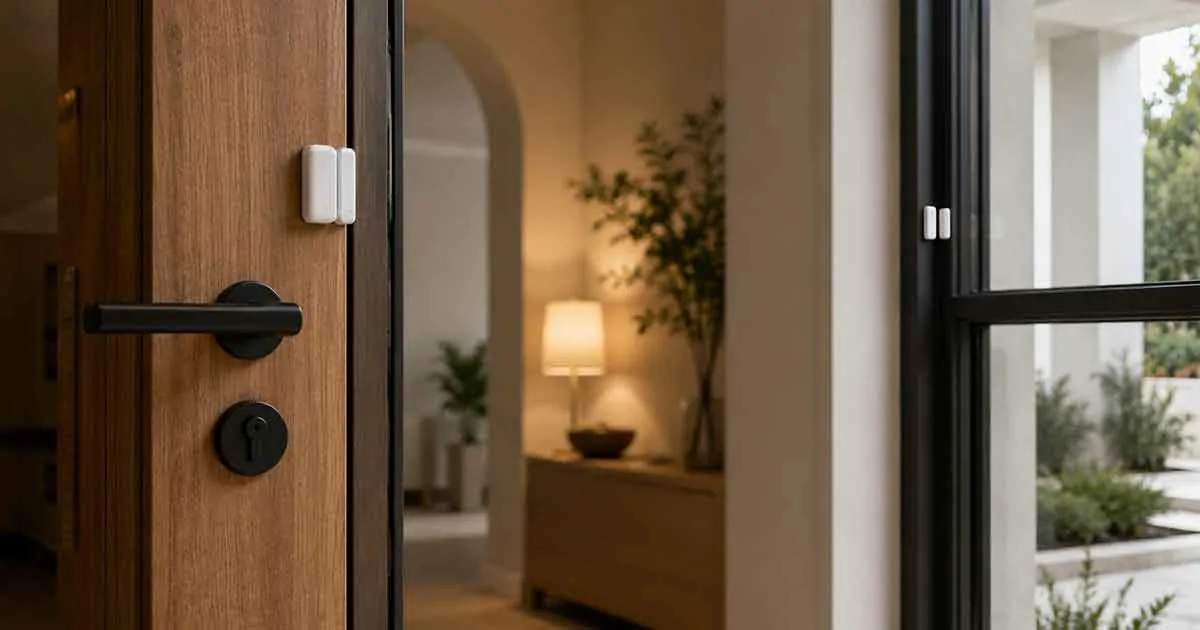
Smart home door and window sensors are simple devices that can provide useful security alerts and automation without requiring complicated installation. By detecting whether a door or window is open or closed, these sensors can help homeowners monitor entry points and create automated routines.
They can also work with other smart home devices. For example, opening a front door can trigger an entry light, while opening a window can send an alert or pause a compatible heating or cooling routine.
Because most door and window sensors are compact and battery powered, they are also suitable for apartments and rental properties when installation is permitted.
The challenge is choosing sensors that fit your doors and windows, work with your smart home platform, and provide the features you actually need.
This guide explains how smart door and window sensors work, what to look for, where to install them, and how to use them for security, automation, and energy management.
Table of Contents
What Are Smart Door and Window Sensors?
A smart door or window sensor is a connected device that detects whether an opening is open or closed.
Most traditional contact sensors consist of two parts:
- A sensor
- A magnet
When the two parts are close together, the system generally considers the door or window closed.
When they separate, the sensor reports an open state.
The smart system can then use this information to:
- Send a notification
- Trigger an alarm
- Turn on a light
- Start a camera recording
- Change a thermostat setting
- Trigger another automation
This simple open-and-close detection makes contact sensors one of the most practical smart home devices.
Why Use Smart Door and Window Sensors?
Smart contact sensors can provide several benefits.
Security Monitoring
A sensor can alert you when an entry point opens unexpectedly.
Home Automation
Opening a door can trigger lights, scenes, or other compatible devices.
Energy Management
A window opening can be used as an automation trigger for compatible heating or cooling systems.
Convenience
Sensors can automate actions that would otherwise require manual control.
Easy Installation
Many models use wireless communication and batteries, making installation relatively simple.
How Smart Door and Window Sensors Work
Most contact sensors use a simple two-piece design.
One part is attached to the door or window, while the other is attached to the frame.
When the door or window moves, the two components separate.
The sensor then communicates its status to a smart home platform.
A basic automation could be:
Front door opens → entry light turns on.
A security automation could be:
Window opens while Away mode is active → smartphone alert.
The sensor does not need to record video or audio to provide this information.
Types of Smart Door and Window Sensors
Standard Contact Sensors
These are the most common type.
They generally detect whether the two components are together or separated.
They are suitable for:
- Doors
- Windows
- Cabinets
- Drawers
Recessed Sensors
Recessed contact sensors are installed inside the door and frame rather than mounted visibly on the surface.
They can provide a cleaner appearance but usually require drilling or other permanent modification.
They are therefore more appropriate for homeowners than renters.
Slim Contact Sensors
Slim models are designed to take up less visible space.
They can be useful when standard sensors are too large for the available area.
Multi-Function Sensors
Some products combine contact detection with additional sensing capabilities.
Depending on the model, these may include:
- Temperature
- Humidity
- Vibration
- Tamper detection
Additional functionality can reduce the number of separate devices needed.
Best Smart Home Door and Window Sensor Technologies
Smart sensors can use several communication technologies.
Wi-Fi
Wi-Fi sensors can connect directly to a home network in some configurations.
Advantages can include:
- Direct network connectivity
- App-based control
- No dedicated hub for certain products
However, Wi-Fi can use more battery power than some low-power alternatives.
Zigbee
Zigbee is a low-power wireless protocol commonly used in smart home sensors.
It typically requires a compatible hub or coordinator.
Its low-power characteristics can make it suitable for battery-operated contact sensors.
Z-Wave
Z-Wave is another low-power smart home protocol.
It is used by various security and automation devices and typically operates through a compatible controller.
Thread
Thread is a low-power mesh networking technology designed for smart home devices.
It can provide reliable communication across compatible devices, but the required controller and border router depend on the system.
Matter
Matter is an interoperability standard designed to make supported smart home devices work more consistently across compatible ecosystems.
A Matter-compatible contact sensor may be useful if you want flexibility between supported smart home platforms.
Always verify the specific device’s requirements before buying.
What to Look for in a Smart Door and Window Sensor
Smart Home Compatibility
The first consideration should be compatibility.
Check whether the sensor works with the smart home platform and controller you already use.
Battery Life
Because many contact sensors are battery powered, longer battery life can reduce maintenance.
Actual battery life depends on:
- Communication protocol
- Usage
- Signal strength
- Battery quality
- Device configuration
Size
A compact sensor may be easier to install and less noticeable.
Detection Reliability
The sensor should reliably recognize open and closed states.
Tamper Detection
Some models can detect attempts to remove or interfere with the sensor.
Temperature Monitoring
A sensor with temperature measurement can provide additional information for automation.
Local vs. Cloud Operation
Some sensors can operate locally through a compatible hub, while others rely more heavily on cloud services.
Local control can provide advantages for responsiveness, reliability, and privacy.
Notification Support
Check whether the sensor can provide the alerts you need and whether those alerts require a subscription.
Smart Door Sensors for Front Entrances
The front door is one of the most useful locations for a contact sensor.
It can be used to:
- Monitor whether the door is open
- Trigger entry lighting
- Send security alerts
- Activate an automation
- Track door activity
For example:
Front door opens → entry light turns on.
Another routine could be:
Front door opens after sunset → selected hallway lights turn on.
Smart Window Sensors for Home Security
Windows are common entry points that can benefit from monitoring.
A sensor can alert you when a window opens unexpectedly.
For example:
Window opens while Away mode is active → security notification.
If you have many windows, prioritize accessible ground-floor windows or other locations where monitoring provides the greatest benefit.
Smart Sensors for Sliding Doors
Sliding glass doors can require special attention because their frame and movement differ from standard hinged doors.
Before purchasing a sensor, check:
- Available mounting space
- Sensor dimensions
- Alignment requirements
- Maximum gap between sensor components
- Manufacturer compatibility guidance
A slim sensor may be easier to install on some sliding door frames.
Smart Sensors for Cabinets and Drawers
Contact sensors are not limited to exterior doors and windows.
They can also monitor:
- Cabinets
- Drawers
- Storage areas
- Medicine cabinets
- Equipment cabinets
For example, opening a cabinet could trigger a small light.
They can also be used to monitor specific storage areas as part of a home automation system.
Smart Door and Window Sensors for Security
Contact sensors are useful as one layer of a broader security system.
A simple security routine could be:
Door opens while Away mode is active → notification sent to your phone.
A more advanced setup could:
- Trigger a compatible siren
- Turn on lights
- Start a camera
- Send notifications
- Activate another security routine
However, contact sensors should not be treated as a complete security system by themselves.
Overall home security also depends on doors, locks, windows, lighting, cameras, and other physical and electronic protections.
Smart Sensors for Nighttime Security
Door and window sensors can also support nighttime routines.
For example:
Window opens at night → notification.
Or:
Back door opens after bedtime → hallway light turns on.
These routines can provide additional awareness without requiring cameras in every area.
Smart Door and Window Sensors for Energy Savings
Contact sensors can also contribute to energy management.
For example:
Window opens → compatible heating or cooling automation changes state.
This can help prevent conditioned air from being wasted while a window is open.
However, the exact behavior depends on your thermostat, smart home platform, and automation system.
A contact sensor does not measure energy consumption itself.
If you want to measure appliance electricity use, an energy-monitoring device is more appropriate.
Smart Sensors for Rental Properties
Contact sensors are often a good choice for renters because they can be:
- Wireless
- Battery powered
- Compact
- Easy to relocate
Surface-mounted models can be less intrusive than recessed sensors.
Renters should still check the lease and consider whether the mounting method could damage paint or other surfaces.
Best Placement for Door Sensors
A door sensor should be installed where the two components remain aligned when the door is closed.
Common locations include:
- Front door
- Back door
- Garage entry
- Patio door
- Interior doors
Avoid placing the sensor where normal door movement could cause it to separate incorrectly.
Always follow the manufacturer’s recommended gap and installation position.
Best Placement for Window Sensors
Window sensors can be installed on:
- Sliding windows
- Casement windows
- Double-hung windows
- Balcony doors
- Basement windows
The best position depends on the window design.
The sensor and magnet should remain within the manufacturer’s specified distance when the window is closed.
Common Installation Problems
Sensor Parts Are Misaligned
If the two parts are too far apart, the system may incorrectly report the door or window as open.
The Sensor Is Mounted on a Moving Surface
Both components need to be positioned according to the sensor’s design.
The Mounting Surface Is Uneven
Uneven surfaces can prevent proper alignment.
The Door or Window Moves Too Much
Excessive movement can affect sensor reliability.
Weak Wireless Signal
A sensor far from its hub or router may experience communication problems.
Battery Life and Maintenance
Most wireless contact sensors use small batteries.
To maximize reliability:
- Check battery alerts
- Replace batteries promptly
- Keep the sensor clean
- Check mounting alignment
- Test important sensors periodically
Do not wait for a low-battery warning if the sensor protects an important entry point.
Smart Door and Window Sensors Without a Subscription
Many contact sensors can provide basic detection and automation without a monthly subscription.
However, subscription requirements vary.
Some ecosystems may charge for:
- Cloud storage
- Advanced security monitoring
- Extended activity history
- Additional cloud features
If avoiding recurring costs is important, check exactly which features remain available without a subscription.
Smart Door and Window Sensors Without a Hub
Some sensors connect directly to a network or compatible platform without a traditional hub.
This can make a small setup easier to manage.
However, hub-based sensors can offer advantages such as:
- Lower power consumption
- Local automation
- Mesh networking
- Support for multiple protocols
- More advanced automation
The best option depends on the rest of your smart home.
Smart Door and Window Sensors With Matter
Matter can make device compatibility easier across supported smart home ecosystems.
A Matter-compatible contact sensor may be useful if you want to avoid being locked into a single platform.
Before purchasing, verify:
- Required Matter controller
- Supported ecosystem
- Connectivity method
- Available automation features
- Local control capabilities
Matter compatibility does not mean that every feature will work identically across all platforms.
Smart Sensors and Privacy
Door and window sensors generally collect less sensitive information than cameras because they do not need to capture video.
However, their activity history can still reveal household routines.
For example, repeated door-opening events can provide information about when people enter and leave.
Review:
- Data storage
- Cloud services
- Account security
- Activity history
- User permissions
- Privacy settings
If privacy is a priority, consider systems that provide local processing or local storage where practical.
Smart Home Automation Ideas
Automatic Entry Lighting
Front door opens → entry light turns on.
Security Alert
Window opens while Away → smartphone notification.
Night Routine
Back door opens after bedtime → hallway light turns on.
Energy Automation
Window opens → compatible HVAC routine changes.
Welcome Routine
Front door opens → selected lights turn on and another compatible device activates.
These routines can make a home more convenient without requiring complicated controls.
Door Sensors vs. Motion Sensors
Door and window sensors and motion sensors serve different purposes.
A contact sensor tells you whether a specific opening has changed state.
A motion sensor detects movement within an area.
For example:
Door sensor: Front door opened.
Motion sensor: Movement detected in the hallway.
Using both can provide more information.
A door sensor can identify an entry event, while a motion sensor can detect activity after entry.
How Many Door and Window Sensors Do You Need?
There is no universal number.
Start with the openings that matter most.
Prioritize:
- Main entrance
- Back entrance
- Accessible ground-floor windows
- Patio or balcony doors
- Other vulnerable openings
After using the system, add sensors only where they provide a meaningful benefit.
Installing a sensor on every opening may increase cost and maintenance without significantly improving your daily experience.
Best Smart Door and Window Sensors for Small Homes
Small homes may require only a few sensors.
A simple setup could include:
- One front-door sensor
- One back-door sensor
- Sensors on important accessible windows
- One motion sensor for the main living area
This can provide useful security and automation without unnecessary hardware.
Best Smart Door and Window Sensors for Apartments
Apartment residents should consider:
- Building rules
- Lease requirements
- Door and window configuration
- Wireless range
- Mounting method
- Shared entrances
Surface-mounted battery sensors are often easier to use than recessed models because they do not require drilling.
However, always confirm that the installation method is appropriate for the property.
Common Mistakes to Avoid
Buying Without Checking Compatibility
A sensor may not work with your existing smart home system.
Ignoring the Required Hub
Some products require a specific controller or bridge.
Installing Without Checking the Sensor Gap
Incorrect spacing can cause unreliable open/closed detection.
Putting Sensors in the Wrong Location
Poor placement can lead to false states or missed events.
Assuming a Sensor Is a Complete Security System
Contact sensors are one component of home security.
Ignoring Subscription Requirements
Check whether important features require a recurring payment.
How to Choose the Best Smart Home Door and Window Sensors
Before buying, consider:
- Which doors and windows need monitoring?
- What smart home platform do you use?
- Does the sensor require a hub?
- What communication protocol does it use?
- How long should the battery last?
- Is the sensor compact enough for your installation?
- Does it support the automations you want?
- Does it provide useful notifications?
- Does it require a subscription?
- Can it be installed without permanent modifications?
Answering these questions can help you choose a sensor that fits your home rather than simply buying the most feature-heavy option.
Are Smart Door and Window Sensors Worth It?
Smart door and window sensors are among the simplest ways to add useful automation and security awareness to a smart home.
They require little space, can often be installed without electrical work, and can trigger many useful routines.
Their value becomes even greater when combined with smart lighting, security cameras, locks, thermostats, and other compatible devices.
For most homes, starting with the main entrance and the most important accessible windows is a practical approach.
Final Thoughts
The best smart home door and window sensors provide reliable open-and-close detection, good battery life, strong compatibility, and useful automation options.
Standard contact sensors are suitable for most basic applications, while recessed and multi-function models can provide additional options for specific installations.
Before buying, check compatibility, communication protocol, installation requirements, battery life, subscription policies, and privacy features.
A small number of strategically placed sensors can provide useful security alerts, automate lighting, and support energy-management routines without adding significant clutter to your home.