
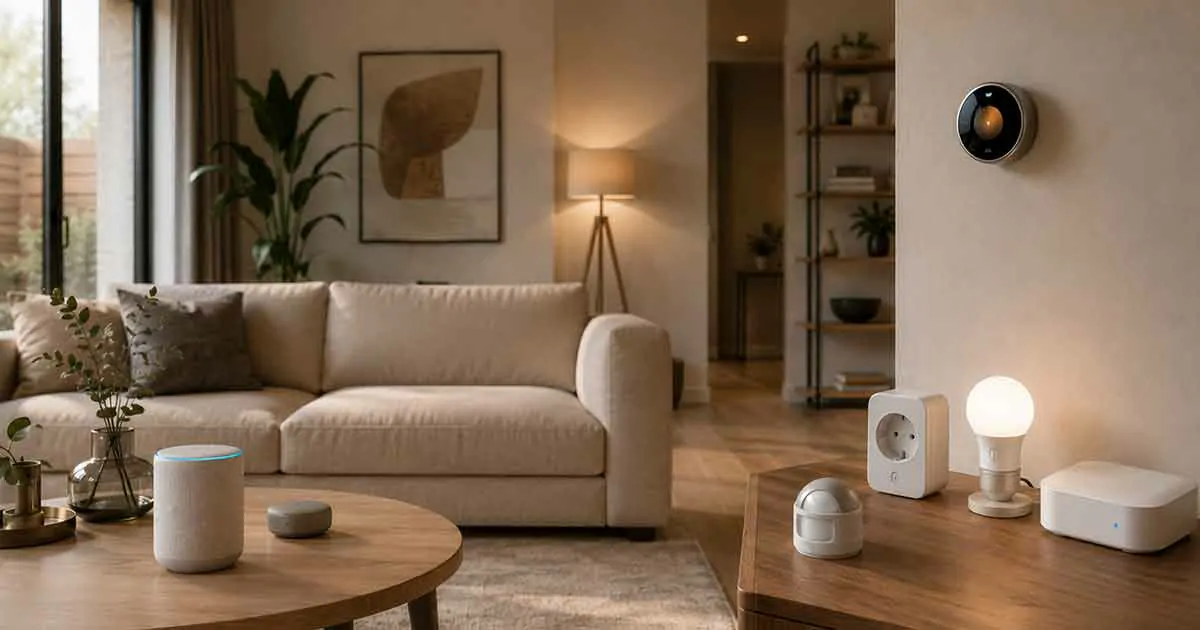
Smart home technology has become more accessible than ever, but many homeowners are hesitant to adopt smart devices because of ongoing subscription fees. Fortunately, you do not need to pay a monthly or annual fee to enjoy many of the most useful smart home features.
The best smart home devices without a subscription can provide automation, remote control, scheduling, monitoring, and convenient integrations without requiring a recurring payment. From smart plugs and lights to thermostats, speakers, and security devices, there are plenty of options for building a connected home while keeping long-term costs under control.
In this guide, we explain what to look for in subscription-free smart home devices, which types of devices are available, and how to build a practical smart home without committing to monthly service fees.
Table of Contents
Why Choose Smart Home Devices Without a Subscription?
Subscription-free smart home devices can be a practical choice for homeowners who want predictable costs and greater control over their technology.
Some smart products offer basic functionality without a subscription but place advanced features behind a monthly plan. Others provide most of their important features locally or through a manufacturer’s free app.
Choosing carefully can help you avoid paying recurring fees for features you may never use.
Lower Long-Term Costs
A device that costs slightly more upfront may be cheaper over several years if it does not require a monthly subscription.
For example, a $5 monthly service costs $60 per year. Over five years, that becomes $300 in recurring expenses in addition to the original cost of the device.
Subscription-free devices can make it easier to calculate the total cost of your smart home before purchasing.
More Predictable Expenses
Without recurring fees, your smart home budget is easier to manage.
You pay for the hardware once and can continue using its core features without worrying about another monthly charge.
This can be particularly useful when installing several smart devices throughout a home.
More Control Over Your Smart Home
Some subscription-free products allow important functions such as schedules, automations, and device control to work without an ongoing service plan.
Depending on the product, some functions may even work locally within your home network rather than relying entirely on a cloud service.
However, this varies significantly between manufacturers and device categories, so checking the specifications before buying is important.
What Does “No Subscription” Actually Mean?
The phrase “no subscription” can mean different things depending on the product.
A smart device may not require a subscription for its basic functions while offering optional paid services for additional features.
For example, a smart camera might allow live viewing and basic notifications for free but charge for cloud video storage.
Similarly, a smart thermostat may provide scheduling and remote control without a subscription while offering optional professional monitoring or energy-management services.
Therefore, when looking for smart home devices without a subscription, distinguish between:
- No subscription required for basic operation
- No subscription required for remote control
- No subscription required for automation
- No subscription required for cloud storage
- No subscription required for advanced features
- Optional subscription services
The most important question is not simply whether a product has a subscription. It is which features continue working without one.
Best Types of Smart Home Devices Without a Subscription
You can build a surprisingly capable smart home without paying monthly fees. Some device categories are particularly well suited to this approach.
1. Smart Plugs
Smart plugs are among the simplest ways to introduce automation into an existing home.
A smart plug connects between an electrical outlet and a compatible appliance. Depending on the model, you can use an app or smart home platform to turn the connected appliance on or off, create schedules, and build automations.
Common uses include:
- Lamps
- Fans
- Coffee makers
- Decorative lighting
- Small appliances
- Seasonal decorations
Many smart plugs do not require a subscription for basic scheduling and remote control.
They are also relatively inexpensive, making them a good starting point for homeowners who want to experiment with smart home automation.
2. Smart Light Bulbs
Smart bulbs can provide lighting control without requiring a recurring payment.
Depending on the ecosystem, you may be able to control brightness, color, schedules, scenes, and automations through a free app or compatible smart home platform.
You can use smart lighting to:
- Turn lights on automatically
- Turn lights off at bedtime
- Create morning lighting routines
- Control lights remotely
- Adjust brightness
- Create different lighting scenes
For homeowners who want visible benefits from smart home technology without paying monthly fees, smart lighting is one of the easiest places to start.
3. Smart Switches
Smart switches are another useful option for subscription-free automation.
Unlike smart bulbs, smart switches control the electrical circuit itself. This means the connected light can often continue to be operated from the wall switch while also being controlled through a smart home system.
Smart switches can be especially useful for:
- Ceiling lights
- Hallway lighting
- Outdoor lights
- Bedroom lights
- Frequently used fixtures
Before installation, check whether the switch requires a neutral wire and whether it is compatible with your home’s electrical system.
If you are not comfortable working with household electrical wiring, professional installation may be appropriate.
4. Smart Thermostats
Smart thermostats can help automate heating and cooling while providing more convenient temperature control.
Many models offer features such as:
- Temperature scheduling
- Remote control
- Automatic adjustments
- Energy monitoring
- Home and away settings
- Smart home integrations
Some smart thermostats provide these core functions without requiring a monthly subscription.
However, homeowners should check compatibility before purchasing. A thermostat that works with one HVAC configuration may not work with another.
For a deeper understanding of energy-related improvements around the home, homeowners may also want to consider how insulation and windows affect heating and cooling efficiency.
5. Smart Speakers
Smart speakers can serve as voice-control interfaces for a connected home.
Depending on the platform and compatible devices, you can use voice commands to control lights, plugs, thermostats, and other smart devices.
They can also provide:
- Timers
- Alarms
- Reminders
- Weather information
- Music playback
- Voice-based home control
Basic smart speaker functionality generally does not require a monthly subscription, although some music and premium services may have their own separate fees.
6. Smart Displays
Smart displays combine voice assistance with a screen.
They can be useful for controlling compatible devices, viewing information, managing routines, and interacting with connected home systems.
For example, a smart display can provide a central interface for:
- Lighting
- Thermostats
- Smart plugs
- Cameras
- Doorbells
- Household routines
The important distinction is between the device itself and optional services connected to it. Some features may depend on third-party subscriptions.
7. Smart Sensors
Smart sensors can make home automation more responsive.
Common examples include:
- Motion sensors
- Door sensors
- Window sensors
- Temperature sensors
- Humidity sensors
- Water leak sensors
For example, a motion sensor can trigger a hallway light when someone enters an area. A door sensor can trigger an automation when a door opens.
Many sensors can be used as part of an automation system without requiring a monthly subscription.
8. Smart Locks
Smart locks can provide keyless entry and remote access while eliminating the need to carry a traditional key in some situations.
Depending on the model, features may include:
- Smartphone control
- Keypad entry
- Temporary access codes
- Automatic locking
- Activity notifications
- Integration with other smart home devices
Some smart locks provide these features without a subscription, while others may charge for advanced remote-access services.
Always check the exact feature list before purchasing.
9. Smart Home Hubs
A smart home hub can bring compatible devices from different categories together.
Depending on the platform, a hub can allow you to create automations that involve multiple devices.
For example:
Motion detected → hallway lights turn on → thermostat adjusts → lights turn off after several minutes.
The availability of these features depends on the ecosystem and the devices being used.
Some smart home hubs operate without a monthly subscription, making them useful for homeowners who want a centralized automation system without recurring costs.
10. Smart Energy Monitoring Devices
Energy monitoring devices can help homeowners understand how electricity is being used.
Depending on the product, you may be able to monitor:
- Electricity consumption
- Individual circuits
- Appliance usage
- Daily energy patterns
- Estimated energy costs
Some energy monitoring systems provide their primary data through a free application, although advanced analytics or professional services may require additional fees.
Understanding energy consumption can also complement broader energy-saving improvements throughout the home.
What to Look For in a Subscription-Free Smart Home Device
Not all products marketed as subscription-free offer the same experience.
Before purchasing, consider the following factors.
Core Features Without a Paid Plan
Start by identifying which features work without a subscription.
Do not assume that “no subscription required” means every feature is free.
Look specifically for information about:
- Remote control
- Scheduling
- Automation
- Notifications
- Local control
- Data storage
- Integrations
Local Processing
Devices that can process some functions locally may be less dependent on cloud services.
Local processing can potentially improve responsiveness and reduce reliance on an internet connection for certain operations.
However, local functionality varies widely, so check the manufacturer’s specifications.
Smart Home Compatibility
Compatibility is important when building a larger smart home.
Before buying, check whether the device works with the ecosystem you already use.
Common platforms and standards include:
- Amazon Alexa
- Google Home
- Apple Home
- Matter
- Other manufacturer-specific ecosystems
Choosing compatible products from the beginning can make future expansion easier.
App Requirements
A product may not require a subscription but may still require an account and a manufacturer’s mobile application.
Check whether the app provides the controls you need without requiring a premium plan.
Cloud Storage
Cloud storage is particularly important for smart cameras and video doorbells.
A device may work without a subscription while limiting how long recordings are stored.
If you are specifically looking for subscription-free security devices, check whether recordings can be stored locally using options such as a microSD card, local hub, network storage, or another supported method.
Smart Security Devices Without Monthly Fees
Home security is one area where subscription costs can become significant.
Security cameras, video doorbells, alarms, and monitoring systems may offer optional paid services.
However, there are products designed to provide useful security features without requiring professional monitoring subscriptions.
Depending on the device, subscription-free security features may include:
- Local video recording
- Motion detection
- Smartphone notifications
- Live video
- Door and window alerts
- Local sirens
- Device-to-device automations
If security is your priority, focus on the recording and notification system rather than simply looking for a product labeled “subscription-free.”
A camera that offers free live viewing but requires a subscription for recorded video may not meet your needs.
How to Build a Smart Home Without Subscriptions
You do not need to replace every appliance in your home to create a useful smart home.
A gradual approach is often more practical.
Start With Simple Devices
Begin with devices such as smart plugs, bulbs, and sensors.
These products can introduce automation without requiring complicated installation.
For example, you could create a simple evening routine that turns on selected lights at sunset and turns them off at bedtime.
Choose One Main Ecosystem
Using compatible devices within one ecosystem can reduce compatibility problems.
Before purchasing multiple products, decide which platform best fits your existing devices and preferences.
Prioritize Local or Subscription-Free Features
When comparing products, pay attention to what happens if you never activate a paid plan.
If essential features disappear without the subscription, the product may not be the best choice for a long-term subscription-free setup.
Expand Automation Gradually
Once the basic devices are working reliably, add sensors and more advanced automations.
For example:
Door opens → entry light turns on → light switches off after a set period.
Or:
Temperature reaches a specific level → thermostat adjusts automatically.
The goal is not to install as many smart devices as possible. The goal is to create useful automation that makes everyday life easier.
Subscription-Free vs. Subscription-Based Smart Home Devices
Both approaches can make sense depending on your needs.
| Feature | Subscription-Free Devices | Subscription-Based Devices |
|---|---|---|
| Upfront cost | Usually the main cost | May be lower or similar |
| Recurring fees | Usually none | Monthly or annual fees may apply |
| Basic automation | Often available | Usually available |
| Cloud services | May be limited | Often more extensive |
| Cloud video storage | Often limited or local | Commonly included with a plan |
| Long-term cost | More predictable | Can increase over time |
| Advanced services | May be limited | Often available through paid plans |
Subscription-based products are not necessarily bad. Some paid services provide valuable features such as extended video history, professional monitoring, advanced analytics, or expanded cloud storage.
The important point is to understand what you are paying for.
Are Subscription-Free Smart Home Devices Worth It?
For many homeowners, yes.
Subscription-free devices can provide a strong combination of convenience and predictable costs.
They are particularly attractive if you want:
- Basic home automation
- Smart lighting
- Remote device control
- Scheduling
- Simple security alerts
- Energy monitoring
- Voice control
- Local control options
However, subscription-free does not automatically mean better.
A subscription may be worthwhile when it provides a service that would otherwise be difficult or expensive to replicate, such as professional security monitoring or extensive cloud video storage.
The right choice depends on the features you actually need.
Common Mistakes When Buying Smart Home Devices
Avoiding subscriptions is useful, but it should not be the only purchasing criterion.
Buying the Cheapest Device
A low purchase price does not always mean lower ownership costs.
An inexpensive device may have poor software support, limited compatibility, or important features locked behind a subscription.
Ignoring Compatibility
A device can be excellent on its own but frustrating if it does not work with your existing smart home ecosystem.
Always verify compatibility before buying.
Assuming Every Feature Is Free
Read the manufacturer’s feature and service information carefully.
Pay particular attention to cloud storage, advanced automation, remote access, and premium integrations.
Building Around Too Many Ecosystems
Using products from many unrelated ecosystems can make automation unnecessarily complicated.
Whenever possible, choose devices that can communicate through a compatible platform or supported standard.
Over-Automating the Home
More automation is not always better.
A smart home should reduce friction rather than create more things to configure and maintain.
Start with a few practical routines and expand only when the additional automation provides a real benefit.
How Much Can You Save Without Smart Home Subscriptions?
The potential savings depend on the number of devices and the services involved.
Suppose a household uses three subscription-based services costing $5 per month each.
That would equal:
$15 per month
or:
$180 per year
Over five years, the recurring cost would reach:
$900
A subscription-free setup can eliminate some or all of those recurring charges, although the initial hardware cost may be higher.
This is why comparing the total cost of ownership is more useful than comparing the initial purchase price alone.
Best Approach for a Subscription-Free Smart Home
The most practical strategy is to combine simple devices with a compatible automation platform.
A basic setup could include:
- Smart bulbs for lighting
- Smart plugs for existing appliances
- Smart sensors for automation
- A compatible smart speaker or hub
- A smart thermostat if compatible with your HVAC system
- Local storage for security cameras when available
This approach allows you to build the system gradually while avoiding unnecessary recurring expenses.
Final Thoughts
The best smart home devices without a subscription are not necessarily the products with the lowest upfront price. They are the devices that provide the features you actually need without forcing you into recurring payments for basic functionality.
Smart plugs, smart lights, sensors, thermostats, speakers, hubs, and selected security devices can all play a role in a subscription-free smart home.
Before purchasing, look beyond the product’s marketing claims. Check which features work without a paid plan, whether local control is available, how cloud services are handled, and whether the device works with your existing smart home ecosystem.
By choosing compatible devices carefully and adding automation gradually, you can create a connected home that is convenient, flexible, and easier to manage over the long term—without building your entire smart home around monthly subscriptions.